Template details
Loading Ads with the Script Component
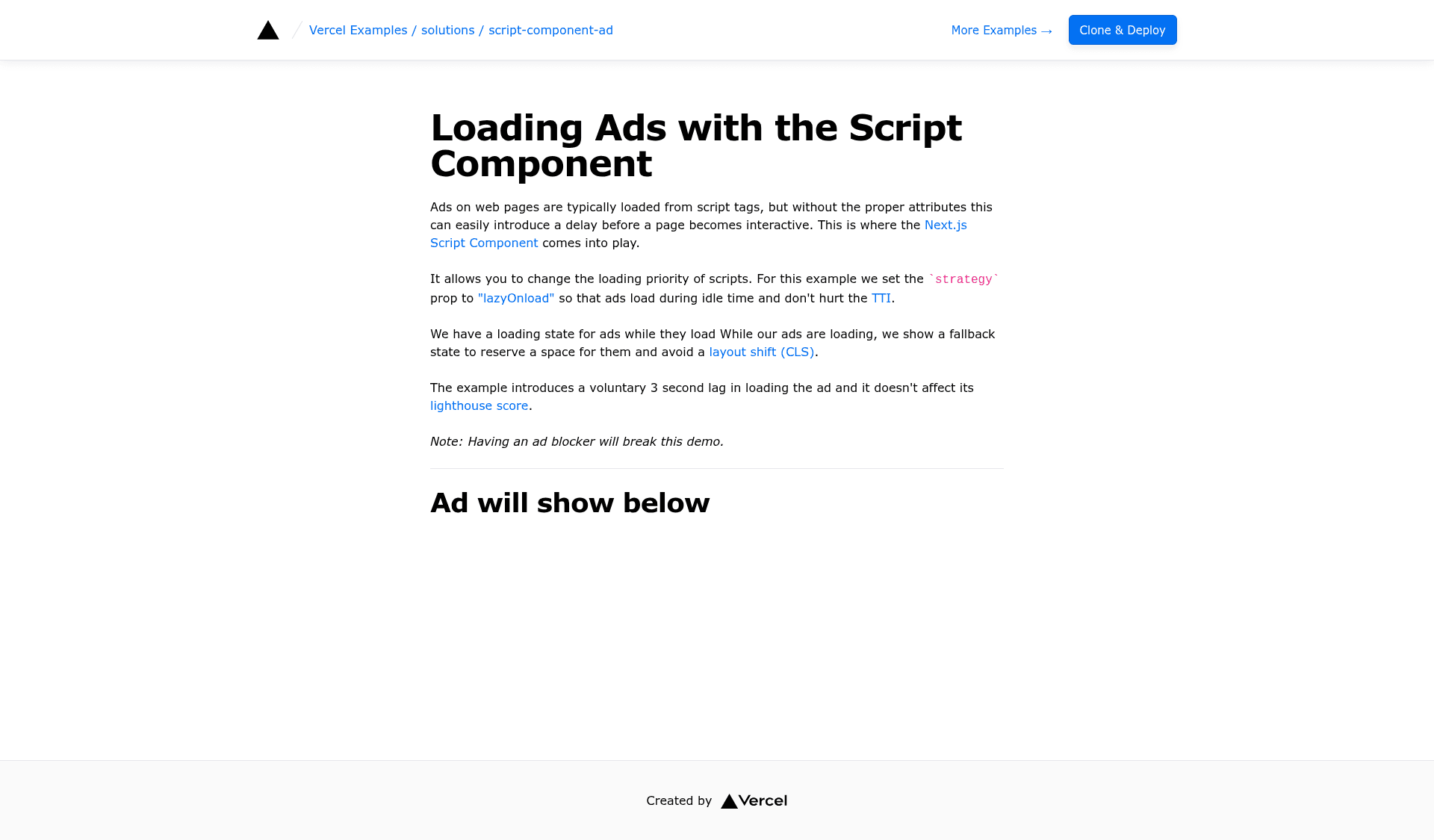
Next.js example showing how to lazy load ads using the built-in Script Component.
About this template
Loading Ads with the Script Component is a Next.js solution example that shows how to lazy-load advertising and other third-party scripts through the framework's built-in Script Component.
What is Loading Ads with the Script Component?
Loading Ads with the Script Component is a documentation-style Next.js example, published inside the vercel/examples repository under the solutions/script-component-ad folder, that demonstrates lazy-loading ad scripts with next/script instead of a plain HTML script tag. You provide an ad network's script source, and the Script Component controls when that third-party code is fetched and executed so it does not block the page's first render. The example runs as a standard Next.js app, is styled with Tailwind CSS, and can be deployed to Vercel in one click or bootstrapped locally with create-next-app. A hosted live copy is available at the demo URL linked from the README.
Key Features
- Next.js Script Component — the core of the example:
next/scriptis used to load a third-party ad script with a controlled loading strategy rather than a render-blocking script tag. - Lazy ad loading — the template's stated purpose is deferring ad script fetch and execution, so advertising code loads after the page rather than holding up the main content.
- Framework: Next.js — the example is a Next.js application, matching the README's
framework: Next.jsmetadata. - Styling: Tailwind CSS — the example ships with Tailwind CSS for its page styling, per the
css: Tailwindmetadata. - One-click deploy to Vercel — the README includes a Vercel deploy button that clones the repository into a new Vercel project named
script-component-ad. - Clone-and-bootstrap path — a second setup method runs
pnpm create next-app --exampleagainst the example's GitHub URL to scaffold a local copy. - pnpm development workflow — once cloned, the example is started locally with
pnpm devand deployed with Vercel. - Live demo — a deployed reference at
solutions-script-component-ad.vercel.appshows the lazy-loaded ads working before you build anything.
Who is it for?
- Next.js developers adding ad units — anyone who needs to drop an ad network's script into a Next.js site without blocking first paint uses this example as the reference pattern.
- Performance-focused front-end engineers — developers auditing third-party script impact can study how the Script Component's loading strategy changes when ad code executes.
- Teams following Vercel's examples — engineers browsing the vercel/examples collection for a copy-paste solution to third-party script loading start from this repository.
- Developers evaluating ad tech integration — anyone comparing how ad scripts behave under Next.js's script APIs versus manual tag insertion can deploy the demo and test it directly.
How does it work?
You either deploy the example through the Vercel one-click button or scaffold it locally with pnpm create next-app --example pointing at the repository URL. After installing, pnpm dev starts the Next.js development server, where the Script Component handles the lazy loading of the ad script; the same app is then deployed to Vercel with the standard Next.js deployment flow.
What can you do with Loading Ads with the Script Component?
- Ad-supported publishers: copy the
next/scriptpattern into a production Next.js site to serve ad units without letting third-party code delay page rendering. - Performance experiments: fork the example, swap in a different ad network's script URL, and measure how loading strategy affects when ads appear.
- Template starting point: use the repository as the base for a new Next.js project that needs third-party scripts, then strip the ad-specific code you do not need.
FAQ
What does Loading Ads with the Script Component do?
It is a Next.js example that lazy-loads a third-party ad script using the framework's Script Component, so the ad code loads without blocking the page's initial render. It ships as a deployable repository with a live Vercel demo.
Is it free to use?
Yes. It is published in the vercel/examples repository as open example code, and both the one-click Vercel deploy and the pnpm create next-app clone workflow are available without a paid license.
Which framework and styling does it use?
The example is built on Next.js and styled with Tailwind CSS, as stated in its repository metadata. It deploys to Vercel and uses pnpm for local development.
How do I run it locally?
Run pnpm create next-app --example with the example's GitHub URL to bootstrap a copy, then run pnpm dev inside the project to start the Next.js development server.