Template details
Material Admin
Free Material Design admin dashboard template from Bootstrapdash with UI components, sample pages, and Gulp build workflow.
About this template
Material Admin is a free, MIT-licensed admin dashboard template from Bootstrapdash that builds on Google Material Design to provide a ready-made set of UI components and sample pages for web applications.
What is Material Admin?
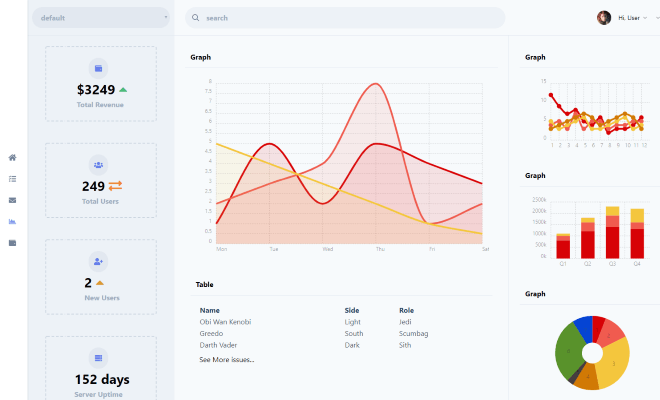
Material Admin is a free admin dashboard template from Bootstrapdash, built on Google's Material Design framework. It provides a collection of Material Design components, UI elements, and sample pages so developers can start building an admin interface without designing from scratch. The template runs as static HTML with jQuery and is distributed as a GitHub repository under the MIT license.
Key Features
- Material Design foundation — follows Google's Material Design spec with Material Design Icons included.
- Built-in sample pages — includes a set of pre-built pages to kick-start projects.
- Chart.js integration — comes with Chart.js for adding charts and data visualizations.
- Gulp workflow — uses Gulp for task automation, including a
gulp servecommand for local development. - Cross-browser support — supports the latest Chrome, Firefox, Safari, Opera, and IE10+.
- Customizable — the design can be altered to suit needs and is documented to help developers get started.
- Free and open source — released under the MIT license, free to download, use, share, and modify.
Who is it for?
- Web developers who need a starting point for admin panels or dashboards and want a Material Design look.
- Frontend beginners who want to learn how to structure an admin theme with HTML, jQuery, and Gulp.
- Startup teams that need a free, ready-to-use admin UI to prototype internal tools quickly.
What can you do with Material Admin?
- Developers: clone the GitHub repository and run
npm installto get all dependencies, then editindex.htmlto build a custom dashboard. - Contributors: fork the repo, run
gulp serveto preview changes, and submit pull requests. - Designers: modify the Material Design components and sample pages to create a unique admin interface without licensing fees.
How does Material Admin work?
- Download the ZIP from GitHub or clone
https://github.com/BootstrapDash/Material-Admin.git. - Run
npm installto install dependencies from the node_modules folder. - Open
index.htmlin a text editor and edit the components you need. - For local development, run
gulp serveto open the template in your browser.
FAQ
Is Material Admin free?
Yes, Material Admin is released under the MIT license, so it is free to download, use, share, and modify. It is developed by BootstrapDash and hosted on GitHub.
Which browsers does Material Admin support?
The template is designed to work with the latest versions of Chrome, Firefox, Safari, Opera, and Internet Explorer 10 and above.
What dependencies does Material Admin use?
The template includes Google Material Design Framework, Material Design Icons, jQuery, Gulp, and Chart.js. It uses Gulp for task automation and npm for dependency management.
How do I run Material Admin locally?
After cloning or downloading the repository, run npm install to install dependencies, then use gulp serve to open the template in your default browser for local development.