Template details
MaterialM Free Angular Material Template
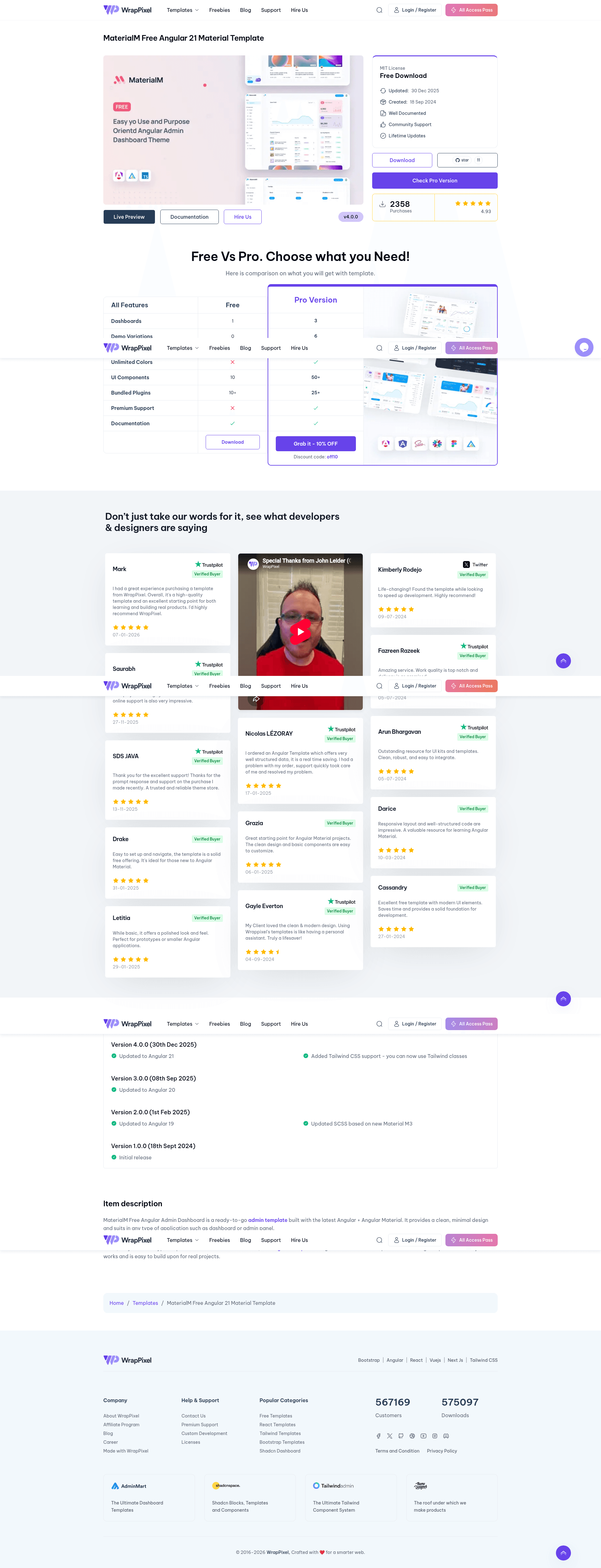
Free open-source Angular admin dashboard built with Angular Material and ApexCharts, offering a responsive Material Design 3 layout.
About this template
MaterialM Free Angular Material Template is an open-source, free Angular admin dashboard template from Wrappixel that provides a production-ready foundation for admin panels, SaaS dashboards, and internal tools using Angular Material and ApexCharts.
What is MaterialM Free Angular Material Template?
MaterialM Free Angular Material Template is a responsive admin dashboard built on the Angular framework with Angular Material components and ApexCharts for data visualization. It takes an Angular project scaffold and adds pre-designed dashboard pages, widgets, and example charts, giving developers a coherent starting point that runs with the Angular CLI. The template is created and maintained by Wrappixel (wrappixel.com) and distributed through the public GitHub repository wrappixel/materialm-angular-free, with a live demo hosted at materialm-angular-free.netlify.app/dashboard. According to repository topics, it targets Angular 20.
Key Features
- Responsive Design — Uses Angular Material's responsive layout system to deliver a consistent interface across mobile, tablet, and desktop screens.
- Angular Material Components — Built entirely on Angular Material, providing pre-styled and accessible Material Design 3 components such as forms, tables, menus, and dialogs.
- ApexCharts Integration — Includes interactive and customizable ApexCharts graphs for analytics and dashboard visualization.
- TypeScript Support — The codebase is fully typed with TypeScript, enabling better editor tooling, compile-time checks, and maintainability.
- Developer-Friendly Structure — Modular folder organization and clean code make the template easy to customize, extend, and scale.
- Open Source and Free — The complete source code is freely available on GitHub; setup requires only cloning the repo, running
npm install, and starting the server withng serve -o.
Who is it for?
- Angular developers who need a ready-made admin layout so they can focus on application-specific features and logic.
- SaaS product teams that want to quickly stand up a dashboard for user metrics, billing, or operational monitoring.
- Internal tool builders who need a clean, responsive interface with tables and charts to display company data.
What can you do with it?
- Create an analytics dashboard — Use the ApexCharts integration to display interactive sales, traffic, or performance graphs.
- Build a SaaS admin panel — Adapt the pre-designed pages and components to manage users, subscriptions, or invoices.
- Prototype an internal tool — Assemble forms, data tables, and navigation quickly with Angular Material's UI components.
How does MaterialM Free work?
Installation follows three steps: clone the repo with git clone https://github.com/wrappixel/materialm-angular-free.git, install dependencies with npm install, and start the development server with ng serve -o. After that, developers edit the Angular components, add routes, and replace the sample data and charts with their own content.
Free vs Pro
The Free version includes responsive design, basic pre-designed pages, basic widgets, the default theme, community support, and basic charts. The Pro version adds multiple themes and custom color skins with dark modes, advanced widgets (weather, charts, maps), priority support, additional UI components, advanced data visualizations, multi-language support, user roles and permissions, real-time notifications, and advanced analytics with custom reports and filters.
FAQ
Is MaterialM Free Angular Material Template free?
Yes, the template is free and open source. The repository is public on GitHub and the live demo is accessible without any payment.
What is the tech stack?
The template uses Angular, Angular Material, ApexCharts, and TypeScript.
How do I install MaterialM Free?
Run git clone https://github.com/wrappixel/materialm-angular-free.git, then npm install, then ng serve -o to start the development server.
What is the difference between Free and Pro?
The Pro version offers multiple themes, dark modes, advanced widgets, priority support, multi-language support, user permissions and roles, real-time notifications, and advanced analytics, none of which are in the free version.
Does the free version support multi-language?
No, multi-language support is not available in the free version; it is a Pro feature.