Template details
MCServer-Web-Template
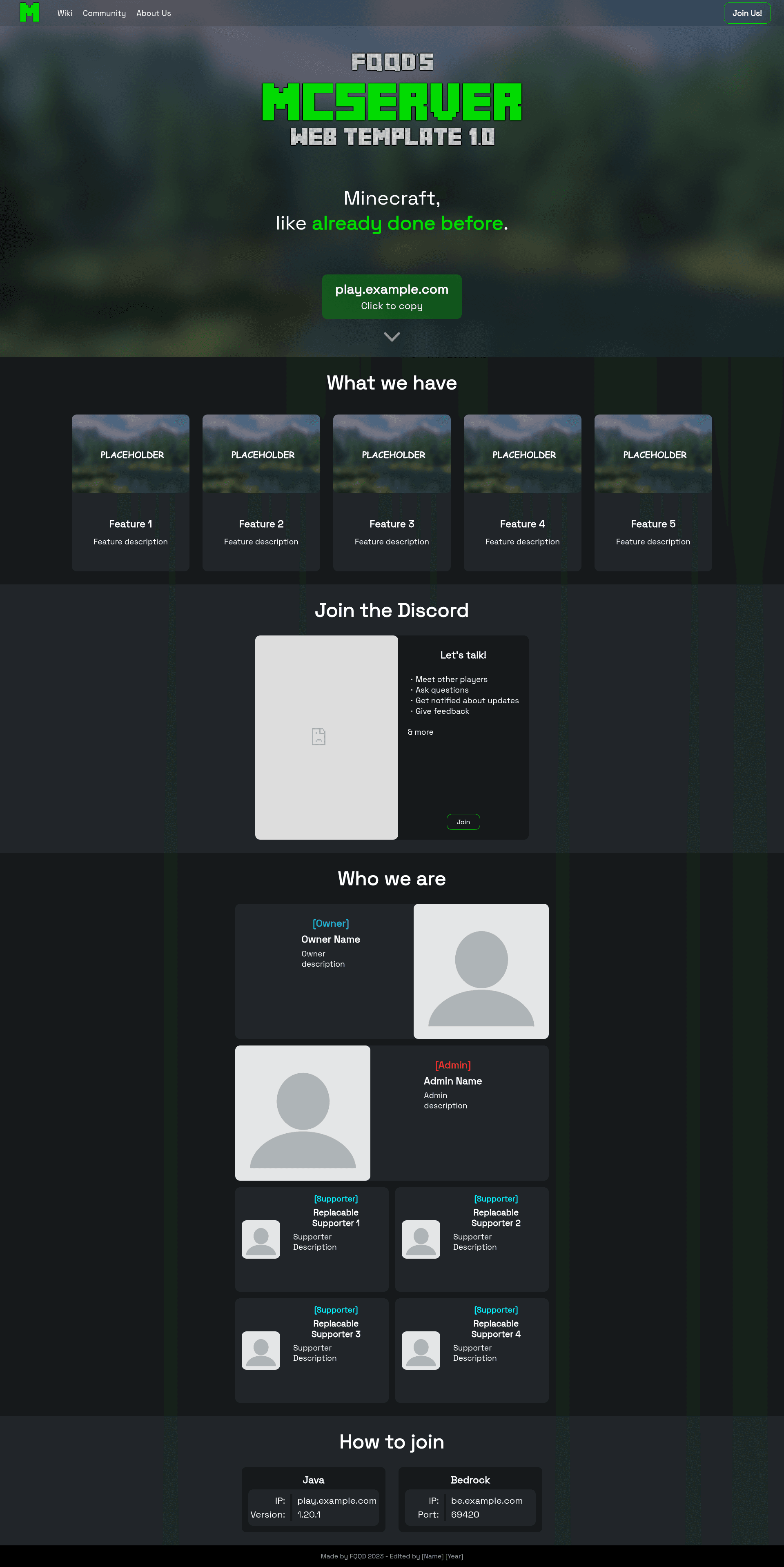
A modern HTML/CSS website template for promoting your Minecraft server with server IP cards, Discord embed, and team member profiles.
About this template
MCServer-Web-Template is a free, open-source HTML/CSS website template built to promote a Minecraft server with a modern, single-page layout.
What is MCServer-Web-Template?
MCServer-Web-Template is a static website template created by FQQD and originally made for GitHub user @HerrFisch. It takes the source files (index.html and a stylesheet in the media folder) and produces a complete promotional one-page site for a Minecraft server. The template is written in plain HTML with a large custom CSS file and minimal JavaScript. It includes a navbar, server IP cards for both Bedrock and Java editions, a Discord server widget embed, team member cards, hover animations, and mobile support. A live demo is available at https://fqqd.github.io/MCServer-Web-Template/index.html, and it can be hosted on any static host, including GitHub Pages or Neocities.
Key Features
- Server address copy button — a one-click button that copies the server IP to the clipboard, with separate cards for Bedrock and Java addresses.
- Modern design — the layout uses custom CSS with hover animations, a fixed navbar, and responsive behavior for mobile screens.
- Discord server embed — a section that displays your Discord server widget; you replace the placeholder link with your widget URL from Discord Server Settings.
- Team member cards — a grid of cards to introduce your staff and moderators.
- Simple configuration — all content is edited directly in index.html and style.css in the media folder; there is no build step or package manager.
- Mobile support — the design adjusts to small screens so players can browse on phones.
- Hover animations — interactive hover effects on buttons, cards, and menu items.
Who is it for?
- Minecraft server owners who need a quick, professional landing page to attract players and show server addresses.
- Server admins who want to present their team members and promote their Discord community.
- Beginner web developers who want a small, readable HTML/CSS project to learn from and customize.
What can you do with MCServer-Web-Template?
- Promote your server: publish a one-page site with IP copy buttons and screenshots to make joining easier.
- Build a community hub: embed your Discord server, list team members, and add links to your social channels.
- Create a custom static portfolio: use the template as a starting point for any simple one-page website by editing the existing sections.
How does it work?
Fork the repository, edit index.html and the style.css in the media folder, replace the placeholder text and links with your own server info, then host the files on any static web server. To enable the Discord embed, go to Discord Server Settings, enable the Server Widget, copy the widget URL, and paste it into the Discord section of the HTML.
Pros and cons
- Pros: no dependencies, lightweight, fast to deploy, free to use, and easy to customize.
- Cons: changes require manual HTML/CSS editing, and the footer credit "Made by FQQD 2023" must remain unchanged.
Pricing
The template is free to use and edit. The only condition is keeping the original credit line ("Made by FQQD 2023") intact in the footer.
FAQ
Is the template free to use?
Yes, it is free. You can use and edit the website as much as you want, as long as the "Made by FQQD 2023" credit remains unchanged at the bottom of the site.
How do I personalize this website?
Fork the repository and edit the index.html and style.css files in the media folder. Reading through the code should be enough to understand what you can edit; there is no separate config file.
How do I make the Discord embed work?
In Discord Server Settings, enable the Server Widget under the Widget tab, select an invite channel (e.g., the main chat), manually copy the widget link (format: https://discord.com/widget?id=[SERVER-ID]&theme=dark), and replace the placeholder imgur link in the Discord section.
Where can I host this website?
The author recommends hosting on your own Linux VServer with Caddy Server, or using free hosting services like Neocities or GitHub Pages. Because it's static, any web server works.
Why would I need such a website?
A dedicated website provides additional information about your Minecraft server and gives players a place to find server addresses, staff, and a Discord link, which can help get people to join.