Template details
MDB UI Kit
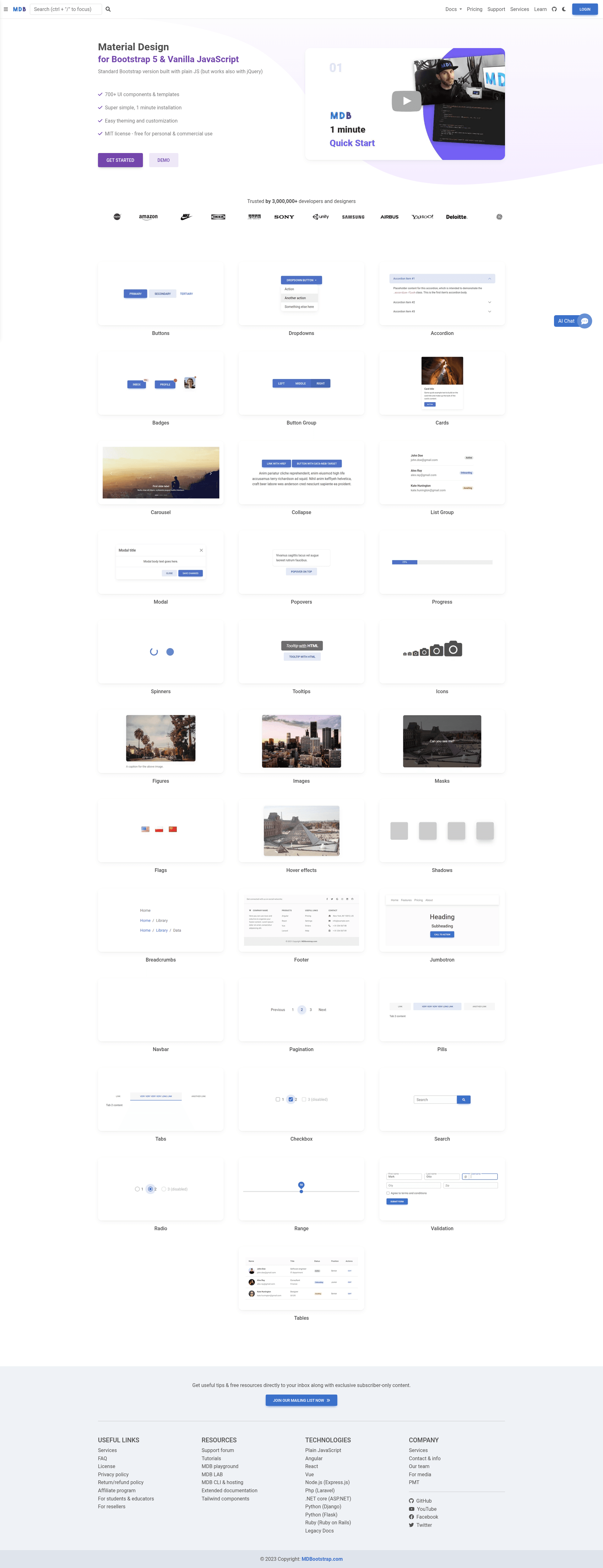
Bootstrap 5 & Material Design UI KIT — 700+ components, plain JavaScript, MIT license.
About this template
MDB UI Kit is a free, MIT-licensed Bootstrap 5 component library and template collection that gives developers 700+ Material Design components in plain JavaScript.
What is MDB UI Kit?
MDB UI Kit (also known as Material Design for Bootstrap 5) is a UI component library built on top of Bootstrap 5, created by the MDBootstrap team. It takes Bootstrap's core grid and utilities and adds Material Design styling plus over 700 ready-to-use components such as carousels, buttons, spinners, cards, forms, modals, footers, tabs, notes, scrollspy, and hover effects. The library outputs production-ready HTML, CSS, and JavaScript that you can drop into any web project, and it includes a set of free page templates (ecommerce, portfolio, pricing, blog, landing, admin, login, coming soon, magazine, checkout, product, category, and column layouts) built with those components.
Key Features
- 700+ UI components — A component library covering carousels, buttons, spinners, cards, forms, modals, footers, tabs, scrollspy, hover effects, validation, and many more, all styled with Material Design guidelines.
- Plain JavaScript — The components run with vanilla JavaScript; jQuery is optional and still supported, so no framework is required.
- MIT license — Free for personal and commercial use, with no attribution required.
- Simple installation — You can install via .zip download, npm, or cdnjs, with a stated setup time of about one minute; Webpack integration is also documented.
- Free page templates — A set of Bootstrap 5 templates covering ecommerce, portfolio, pricing, blog, landing pages, admin dashboards, login, checkout, magazine, product, category, coming soon, and multi-column layouts.
- Extended documentation — Detailed docs with practical examples plus a large list of extended component guides (address forms, avatars, chat, comment sections, mega menus, timelines, dark mode, and dozens more).
- MDBGO hosting integration — Optional one-click deployment through MDBGO, which provides free hosting, WordPress support, custom domains, SSL, and a free database.
- Large community — The vendor reports over 3,000,000 developers and designers using the product, with logos from NASA, Nike, Amazon, Sony, Samsung, Airbus, Yahoo, Deloitte, GE, KPMG, Unity, IKEA, and Aegon shown on the page.
Who is it for?
- Web developers and frontend designers — Build responsive, Material Design–styled interfaces quickly by copying pre-built components instead of writing CSS and JavaScript from scratch.
- Rapid prototypers — Assemble a working landing page, admin panel, or ecommerce layout in minutes using the included free templates and component snippets.
- Agencies and freelance web designers — Use the MIT license to ship client sites commercially without royalty or licensing fees, and take advantage of the consistent Material Design look across projects.
- Developers who need Bootstrap without jQuery — The plain JavaScript implementation lets you use modern JS workflows while keeping Bootstrap's familiar class names and layout system.
What can you do with MDB UI Kit?
- Launch a marketing site — Start from the Landing Page, Full Cover, or Jumbotron templates and customize the components to produce a polished one-page site.
- Build an ecommerce storefront — Use the ecommerce, product, category, shopping-cart, checkout, and payment-form components to assemble a complete online store UI.
- Create an admin or dashboard — Use the admin template, tables, side navbars, and modal components to set up a management interface.
- Add interactive sections — Add carousels, testimonial sliders, modal dialogs, hover effects, and status/validation feedback to existing Bootstrap sites without adding a framework.
How does MDB UI Kit work?
Installation is offered in three primary ways: download the .zip and include the files directly, install via npm as the mdbootstrap package, or load from cdnjs. For more advanced setups, the documentation covers Webpack configuration enabling bundling, unit testing, linting, and Sass support. The MDBGO service adds one-click deployment with free hosting and WordPress integration.
FAQ
Is MDB UI Kit free?
Yes, MDB UI Kit is released under the MIT license, which permits both personal and commercial use. The page states it is free for personal and commercial use, and the GitHub repository shows an MIT license.
Does MDB UI Kit require jQuery?
No. The Bootstrap 5 & vanilla JavaScript version of MDB works with plain JavaScript. jQuery is not required, though the page notes it “works also with jQuery,” so existing jQuery projects can still use it.
How many components does MDB UI Kit include?
The product page states 700+ UI components. These range from buttons, cards, and spinners to modals, carousels, tabs, scrollspy, validation, and hover effects.
How do I install MDB UI Kit?
You can install via .zip download, npm, or cdnjs. The page says setup takes about one minute. For development workflows, Webpack installation is documented, and MDBGO provides hosting and WordPress integration.
What templates are included?
The free template collection includes ecommerce, full and half carousel/cover, image cover, video cover, portfolio, post, pricing, login, magazine, checkout, blog, product, category, landing page, admin, coming soon, classic jumbotron, one-column, two-columns, and three-columns page layouts.