Template details
Midnight
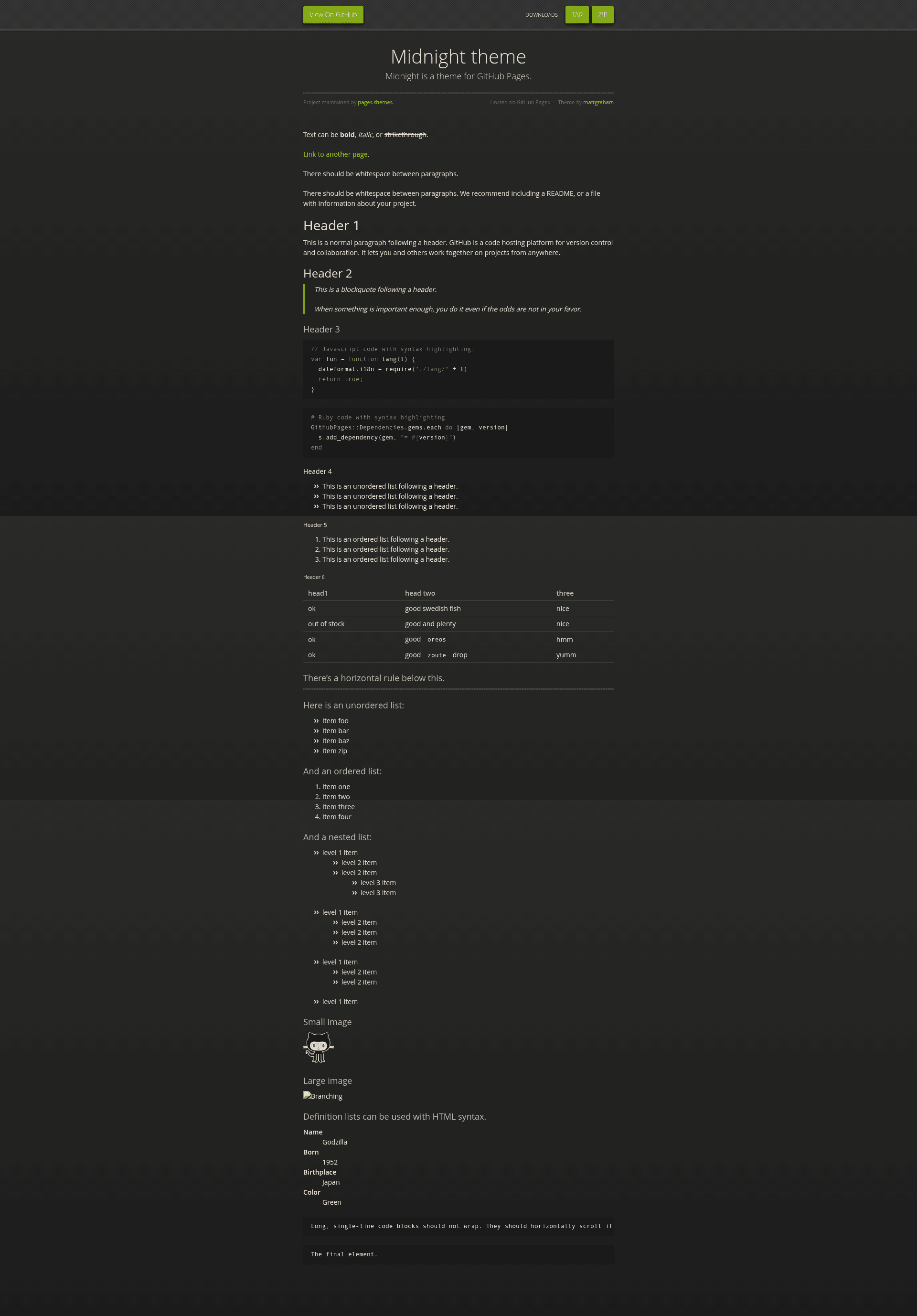
Midnight is a Jekyll theme for GitHub Pages
About this template
Midnight is an open-source Jekyll theme from GitHub's pages-themes organization that turns a GitHub Pages repository into a website through a single remote_theme setting in _config.yml.
What is Midnight?
Midnight is a Jekyll theme built for GitHub Pages, maintained by the pages-themes organization and distributed as the jekyll-theme-midnight Ruby gem. It takes a GitHub Pages site's configuration and Markdown content and renders them as a static website, installed by adding remote_theme: pages-themes/midnight@v0.2.0 to the site's _config.yml together with the jekyll-remote-theme plugin. The repository's minimal test suite verifies that a site using the theme builds successfully, and the project tracks proposed features and known issues in its GitHub Issues.
Key Features
- One-line installation — Add
remote_theme: pages-themes/midnight@v0.2.0to your_config.ymland include thejekyll-remote-themeplugin to publish the theme without forking the repository or copying theme files. - Configurable site variables — Respects
title,tagline, anddescriptionfrom_config.yml, plus optionalshow_downloadsandgoogle_analyticssettings. - Custom stylesheet support — Create
/assets/css/style.scssin your site with an@importline that loads the theme, then append your own CSS or Sass; theme Sass variables can be overridden before that import. - Overridable layouts — Copy the default layout from the repository's
_layouts/default.htmlinto your own/_layouts/default.htmlfor full HTML control, or add files to a local_includesfolder for smaller changes such as a custom favicon. - Google Analytics integration — Insert the latest Google Analytics tracking code into
_includes/head-custom-google-analytics.htmlin your Jekyll site. - GitHub URL overrides — Replace GitHub-generated URLs such as
site.github.zip_urlby setting custom values under agithub:key in_config.yml, with each variable name indented two spaces. - Local preview and tests — Clone the repository, run
script/bootstrapto install dependencies, thenbundle exec jekyll serveto preview atlocalhost:4000; runscript/cibuildto execute the test suite.
Who is it for?
- GitHub Pages beginners — Publish a first website by adding one line to
_config.yml, with no need to learn HTML or CSS layout details. - Open-source project maintainers — Create a project landing page that automatically uses repository and download URLs from GitHub, with the option to override them in
_config.yml. - Developers building a custom theme — Clone the theme's repository or copy its default layout and stylesheet as a starting point, then modify the HTML and Sass directly.
- Students and educators — Host free personal or course sites on GitHub Pages with a theme that includes a test suite for reliable builds.
What can you do with Midnight?
- Create a personal homepage: Set
title,tagline, anddescriptionin_config.ymland publish a clean profile page on GitHub Pages in minutes. - Build a project landing page: Use the theme's download-link and repository-URL variables to direct visitors to your project's releases and source code.
- Prototype a branded site: Add custom CSS or Sass through
assets/css/style.scssto change the look while keeping the default layout.
How does Midnight work?
- Add
remote_theme: pages-themes/midnight@v0.2.0to your site's_config.ymland ensure thejekyll-remote-themeplugin is listed. - Optionally add
gem "github-pages", group: :jekyll_pluginsto yourGemfileto preview locally. - Run
bundle exec jekyll serveto preview atlocalhost:4000, or push to GitHub to build the site.
FAQ
Is Midnight free?
Yes. Midnight is an open-source project maintained by the pages-themes organization, so it can be used on GitHub Pages at no cost.
What does Midnight do?
Midnight is a Jekyll theme that renders a GitHub Pages site as a static website. You install it through the remote_theme mechanism, which keeps theme files out of your own repository.
How do I customize Midnight's colors?
Create a file at assets/css/style.scss in your site, add the @import statement that loads the theme, and set new Sass variable values before the import line. Custom CSS or Sass added after the import will override the theme's defaults.
Can I change Midnight's layout?
Yes. For small changes such as a custom favicon, add files to your local _includes folder. For extensive changes, copy the default layout from _layouts/default.html in the theme's repository into your own _layouts/default.html and edit it.
Does Midnight have tests?
The theme repository includes a minimal test suite that confirms a site using the theme builds successfully. Run script/bootstrap once, then script/cibuild to run the tests.