Template details
MiloDocs
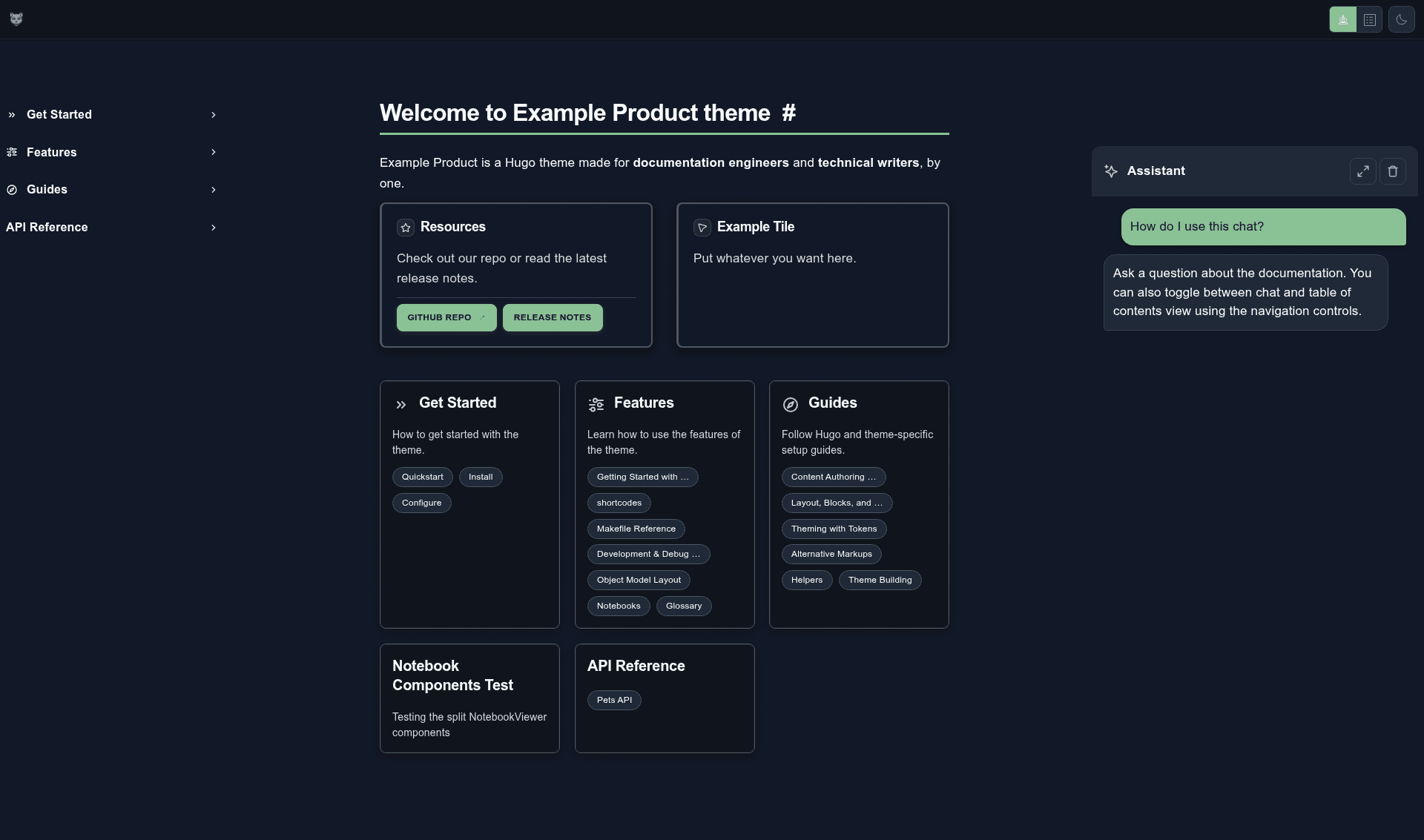
A Hugo documentation theme with native ChatGPT-style and Algolia search UIs for docs-as-code sites.
About this template
MiloDocs is a Hugo documentation theme that ships a native ChatGPT-style search interface and a native Algolia search UI for docs-as-code sites.
What is MiloDocs?
MiloDocs is an open-source Hugo theme built for documentation sites and technical writing workflows. It takes Markdown content organized in content directories — each section has an _index.md file with title, description, and weight frontmatter — and produces a static documentation website. The theme is maintained on GitHub by user lbliii and is installed either as a git submodule or via gh repo clone lbliii/milodocs into a Hugo site's themes directory. Its repository metadata describes its audience as "Docs Eng & Tech Writers" and lists topics including docs-as-code, RAG embeddings, and Jamstack.
Key Features
- Native ChatGPT UI — embeds a ChatGPT-style chat interface into the docs site, aimed at conversational search over documentation content; the repo topics mention RAG embeddings, suggesting retrieval-augmented interaction.
- Native Algolia UI — includes an Algolia-powered search interface out of the box, giving docs typo-tolerant, instant search without a separate search plugin.
- Docs-as-code structure — content is plain Markdown under
content/, with_index.mdper section carrying title, description, and weight for ordering. - Hugo-based static generation — built on Hugo, so builds are fast and deployment works on any static host; the quickstart runs a local server on port 1313.
- Tailwind CSS styling — the theme uses Tailwind CSS (listed among repo topics) for utility-first styling.
- Vanilla JavaScript — client-side behavior is implemented in vanilla JavaScript, avoiding a heavy front-end framework.
- Config-driven setup — default configs are copied from
themes/milodocs/exampleSite/config/, letting users tweak settings in YAML files. - macOS quickstart — a one-command install script installs Hugo via Homebrew, creates a new site, adds the theme as a submodule, copies configs, and starts a server.
Who is it for?
- Technical writers — create and maintain documentation content in Markdown with structured frontmatter for ordering and titles.
- Documentation engineers — set up a docs site quickly via git submodule or repo clone, then customize configuration files.
- Developer advocates and API teams — publish API docs, getting-started guides, and reference material with built-in search and a chat-style interface.
- Teams adopting docs-as-code — store docs alongside code in git, use Hugo's build pipeline, and deploy to static hosting.
What can you do with MiloDocs?
- Launch a docs site in about five minutes — the macOS quickstart script creates a new Hugo site, installs the theme, copies default configs, and starts a local server.
- Add conversational search to documentation — the ChatGPT-style UI gives readers a chat interface for finding information in your docs, with RAG embeddings listed as a repo topic.
- Provide Algolia-powered search — readers get typo-tolerant, instant search results via the bundled Algolia UI.
- Organize content by sections — use
_index.mdfrontmatter with title, description, and weight to control navigation order.
How does MiloDocs work?
The quickstart installs Hugo with Homebrew, creates a new site with hugo new site, and clones MiloDocs into the themes/ directory via gh repo clone lbliii/milodocs or adds it as a git submodule. Default configuration files from the theme's exampleSite are copied into the site's config/ folder. Content lives as Markdown in content/, and a local server runs with hugo server (typically on localhost:1313).
FAQ
Is MiloDocs free?
Yes, MiloDocs is an open-source Hugo theme available on GitHub. The repository shows no paid licensing or pricing model; you install it with standard git or GitHub CLI commands and use it freely.
Does MiloDocs require an Algolia account?
The theme includes a native Algolia UI, so serving live search results requires wiring it to an Algolia index, which needs an Algolia account. The theme provides the interface; the backend index is set up through your own Algolia configuration.
Can I use MiloDocs without ChatGPT?
The theme lists a native ChatGPT UI as a feature, and the repository topics include RAG embeddings. There is no documented option to turn it off, so removing it would require editing theme templates.
What static site generator does MiloDocs use?
MiloDocs is built for Hugo. Installation starts with brew install hugo, and site generation is done with hugo server for local development or hugo for building static output.