Template details
Newt Starter Next.js Landing Page
Next.js landing page starter using the Newt headless CMS, with App Router, pre-built content models, and Vercel deployment.
About this template
Newt Starter Next.js Landing Page is a boilerplate for building a marketing landing page with the Next.js App Router and the Newt headless CMS, pairing pre-defined content models with a Vercel-ready deployment flow.
What is Newt Starter Next.js Landing Page?
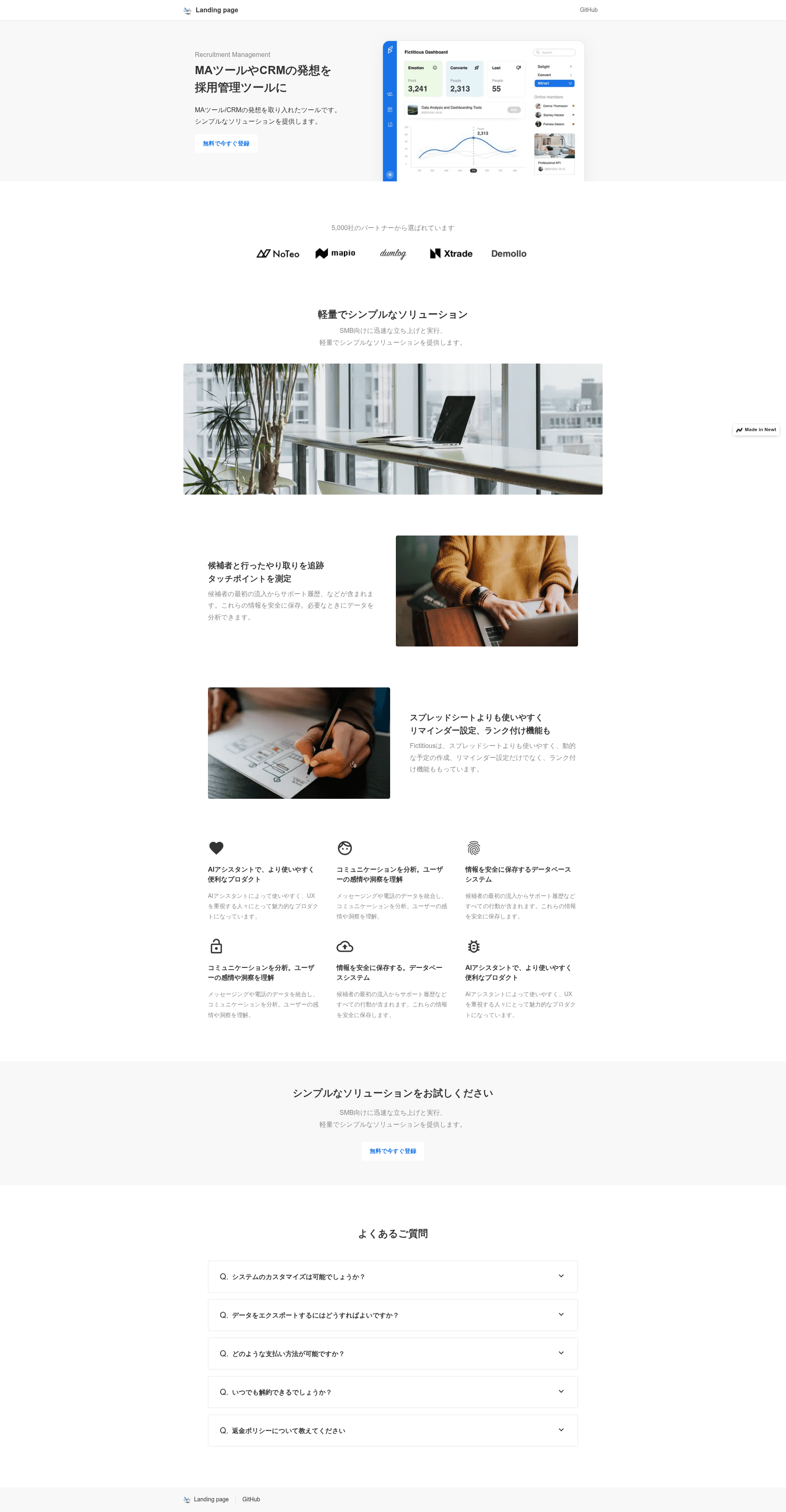
Newt Starter Next.js Landing Page is a starter template created by Newt Inc. that connects the Newt headless CMS to a Next.js site. It takes content managed in Newt landing page apps — pages with a slug and composed sections — and renders those as a top page that redirects to a detail page, plus dynamic detail routes at /pages/[slug]. The project runs on Next.js App Router, is written in TypeScript, and includes a full setup guide for creating a Newt space, app, and CDN API token.
Key Features
- Next.js App Router — The template uses the App Router with a top page at
/that redirects to a detail page, and a dynamic route at/pages/[slug]; source files areapp/page.tsandapp/pages/[slug]/page.tsx. - Newt CMS integration — Content is fetched from the Newt CDN API using environment variables:
NEXT_PUBLIC_NEWT_SPACE_UID,NEXT_PUBLIC_NEWT_APP_UID,NEXT_PUBLIC_NEWT_API_TOKEN,NEXT_PUBLIC_NEWT_API_TYPE, andNEXT_PUBLIC_NEWT_PAGE_MODEL_UID. - Predefined content models — The landing page app defines a Page model (UID
landing-page) with a requiredpageName, uniqueslug, Meta information, and a multi-type sections field. - Reusable section types — Available sections include hero, logo, feature areas (full image, image right, image left, 3 columns), CTA, and FAQ, each with its own required fields for copy, images, and links.
- Custom field types — Includes Meta (title, description, OG image), Link (label, URL, new tab), Q&A (question, answer), and FeatureIcon (icon image, title, text) field definitions.
- One-click Vercel deployment — The README includes a Deploy with Vercel button that clones the repository and prepares the project for deployment.
- MIT License — The starter is released under the MIT License, so it can be reused and modified freely.
Who is it for?
- Developers getting started with Next.js App Router and headless CMS architectures — they can use the template as a reference for fetching CMS content and rendering structured landing page sections.
- Marketing teams that want a content-managed landing page without editing code — the Newt editor lets non-technical users update section content, images, and CTA buttons.
- Newt users looking for an official starter — this repository is provided by Newt Inc. and demonstrates the recommended way to build a landing page on the platform.
What can you do with it?
- Build a multi-page landing site: Create pages in Newt with a slug field and render each one at
/pages/[slug], with the top page redirecting to a primary detail page. - Compose sections from a fixed catalog: In the Newt editor, add hero, logo, feature variants, CTA, and FAQ sections, each with specific fields like
titleCopy,text,image, andctaButton. - Deploy a live site quickly: Click the Deploy with Vercel button, provide the three required Newt credentials, and get a production URL without leaving the browser.
How does it work?
Setup follows three steps documented in the README. First, create a Newt space, add a landing page app from the template gallery, and generate a CDN API token. Second, copy .env.local.example to .env.local and fill in the space UID, app UID, and API token, plus the other NEXT_PUBLIC_ variables. Third, install dependencies with yarn install or npm install and start the dev server on localhost:3000.
FAQ
Is the Newt CMS still available?
No. Newt Inc. has announced that the Newt headless CMS will be retired on 2026-11-24. After that date, the admin console and API will no longer work, so this starter will not function unless the CMS backend is replaced before then.
What environment variables are required?
You need NEXT_PUBLIC_NEWT_SPACE_UID, NEXT_PUBLIC_NEWT_APP_UID, NEXT_PUBLIC_NEWT_API_TOKEN, NEXT_PUBLIC_NEWT_API_TYPE, and NEXT_PUBLIC_NEWT_PAGE_MODEL_UID. Instructions reference the .env.local.example file in the repository.
What landing page sections are available?
The sections field accepts a multi-type list. The available section types are hero area, logo area, feature area (full image), feature area (image right), feature area (image left), feature area (3 columns), CTA area, and FAQ area.
Does the template include styling?
The README does not mention any CSS framework or styling system. The template is focused on structure and content delivery; styling would need to be added or customized by the developer.