Template details
Nuxt Ionic Capacitor Template
Nuxt 2, Capacitor 3, and Ionic 5 template for starting cross-platform app development.
About this template
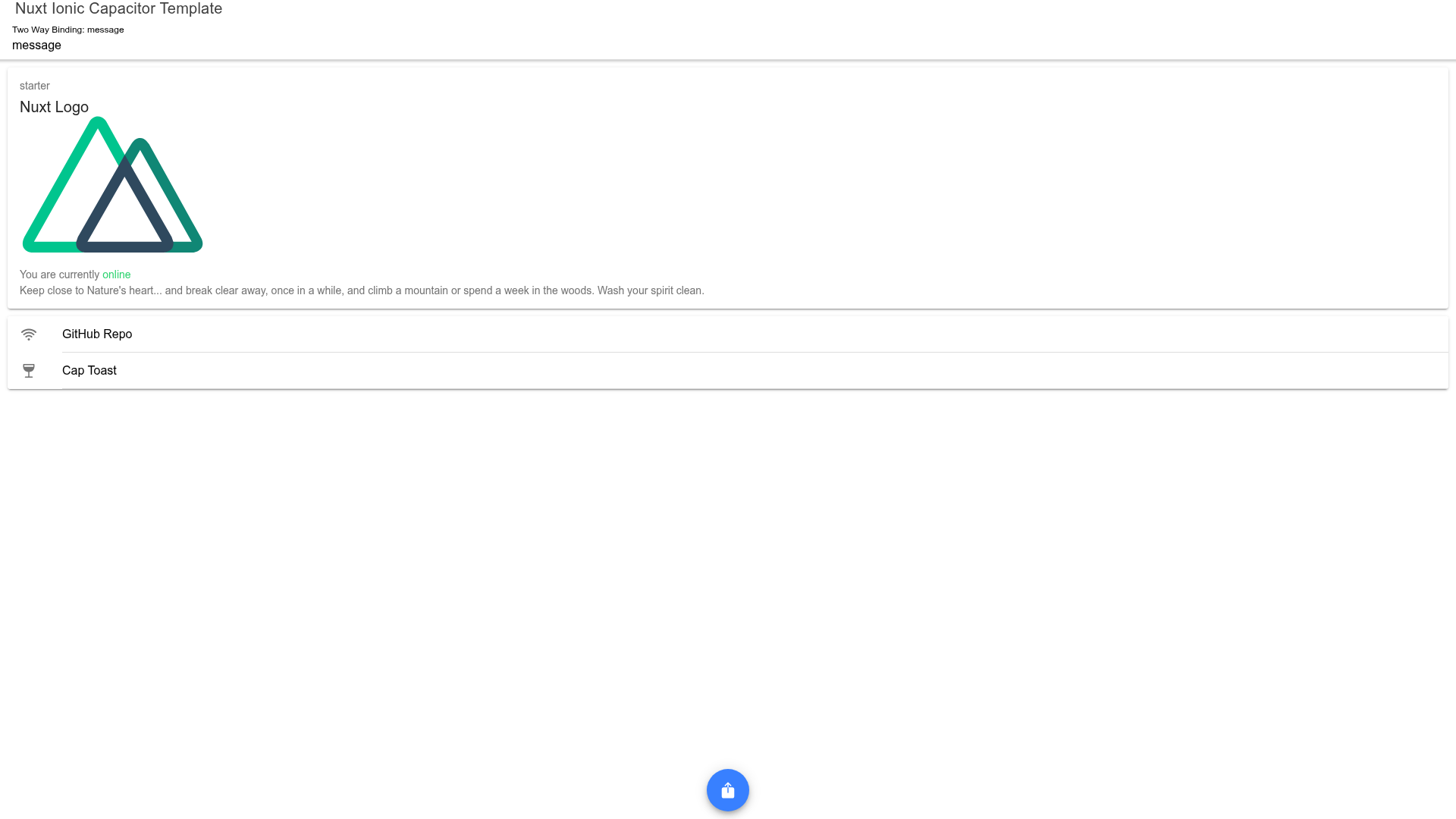
The Nuxt Ionic Capacitor Template is a GitHub boilerplate that combines Nuxt.js 2, Capacitor 3, and Ionic 5 so you can develop one app and build it for the web, Android, PWA, and Electron desktop.
What is the Nuxt Ionic Capacitor Template?
This template is a starting point for cross-platform app development, using Nuxt.js on the front end, Ionic 5 for mobile-ready UI components, and Capacitor 3 to wrap the web app into deployable native projects. The repository is maintained by Mexson Fernandes and is published on GitHub under the "nuxt-capacitor-app" name. It takes your Nuxt.js source code and generates web builds, Android artifacts, PWA assets, and Electron packages, with a custom app installation button and SEO support included out of the box.
Key Features
- Documentation module — A built-in documentation area that demonstrates how to structure pages and can be extended for your own docs.
- App installation button — A custom button that lets users install the app on supported devices, wired into the interface.
- SEO support — Meta-tag configuration integrated with Nuxt for page titles, descriptions, and social sharing.
- Ionic 5 UI components — The Ionic component library is preconfigured, giving access to mobile-style buttons, modals, tabs, and forms.
- Capacitor plugins — Capacitor 3 plugins are already set up, allowing native features such as camera, storage, or push notifications to be added.
- Cordova resources generator — A
yarn resourcescommand creates icon and splash assets from a 1024x1024 pixel icon and a 2732x2732 pixel splash image in the project. - Electron packaging —
yarn package:linuxandyarn package:windowsproduce desktop builds under thepackage/folder, andnpm run deb64creates a Debian installer viaelectron-installer-debian. - One-click cloud deployment — Deploy buttons for Vercel, Netlify, and Render are included in the README, pointing at the GitHub repository.
Who is it for?
- Front-end developers who want to reuse a single Vue/Nuxt codebase for browser, Android, PWA, and desktop without maintaining separate implementations.
- Mobile app developers who need a starting project with Capacitor and Ionic already wired, so they can focus on features rather than setup.
- Desktop packagers who want to generate Linux and Windows Electron executables from the same code, then create installers with the provided Debian script.
- Startup teams prototyping cross-platform MVPs who need SEO, an install button, and documentation scaffolding from day one.
What can you do with it?
- Android developers: Run
yarn resourcesafter adding a 1024x1024 pixel icon and a 2732x2732 pixel splash to generate native assets, then build an Android app with Capacitor. - PWA creators: Deploy the Nuxt front end to Vercel, Netlify, or Render using the one-click buttons and ship a PWA whose install button is already in place.
- Electron builders: Use
yarn package:linuxoryarn package:windowsto compile desktop apps intopackage/, then runnpm run deb64to create a Debian installer for distribution.
How does it work?
The template comes with a resource workflow and Electron packaging commands. To prepare app icons, add a 1024x1024 pixel icon file and a 2732x2732 pixel splash file, then execute yarn resources to generate the Cordova-compatible assets. For desktop output, run yarn package:<platform> with a platform name such as linux or windows; the resulting build lands in the package/ directory. To make a Debian installer, install electron-installer-debian globally and run npm run deb64 (or yarn deb64).
FAQ
What versions of Nuxt, Capacitor, and Ionic does this template use?
The repository metadata states Nuxt 2, Capacitor 3, and Ionic 5. These versions are fixed in the template's dependencies and are the basis for its build configuration.
Which platforms are supported?
The README lists support for web browsers (tested on Chrome, Firefox, Brave, and Edge), Android, and PWA (tested on Chrome, Brave, and Edge). Electron support is included as well, with commands that generate Linux and Windows packages.
How do I generate icons and splash screens?
Place an icon sized 1024x1024 pixels and a splash sized 2732x2732 pixels in the project, then run yarn resources. The script outputs the required icon and splash assets for Capacitor and Cordova.
Can I deploy the web version to cloud hosting?
Yes. The README includes deploy buttons for Vercel, Netlify, and Render. Clicking any of these buttons connects the GitHub repository to the respective hosting platform and starts a deployment of the Nuxt web app.