Template details
ollama-ui
Simple HTML UI for Ollama
About this template
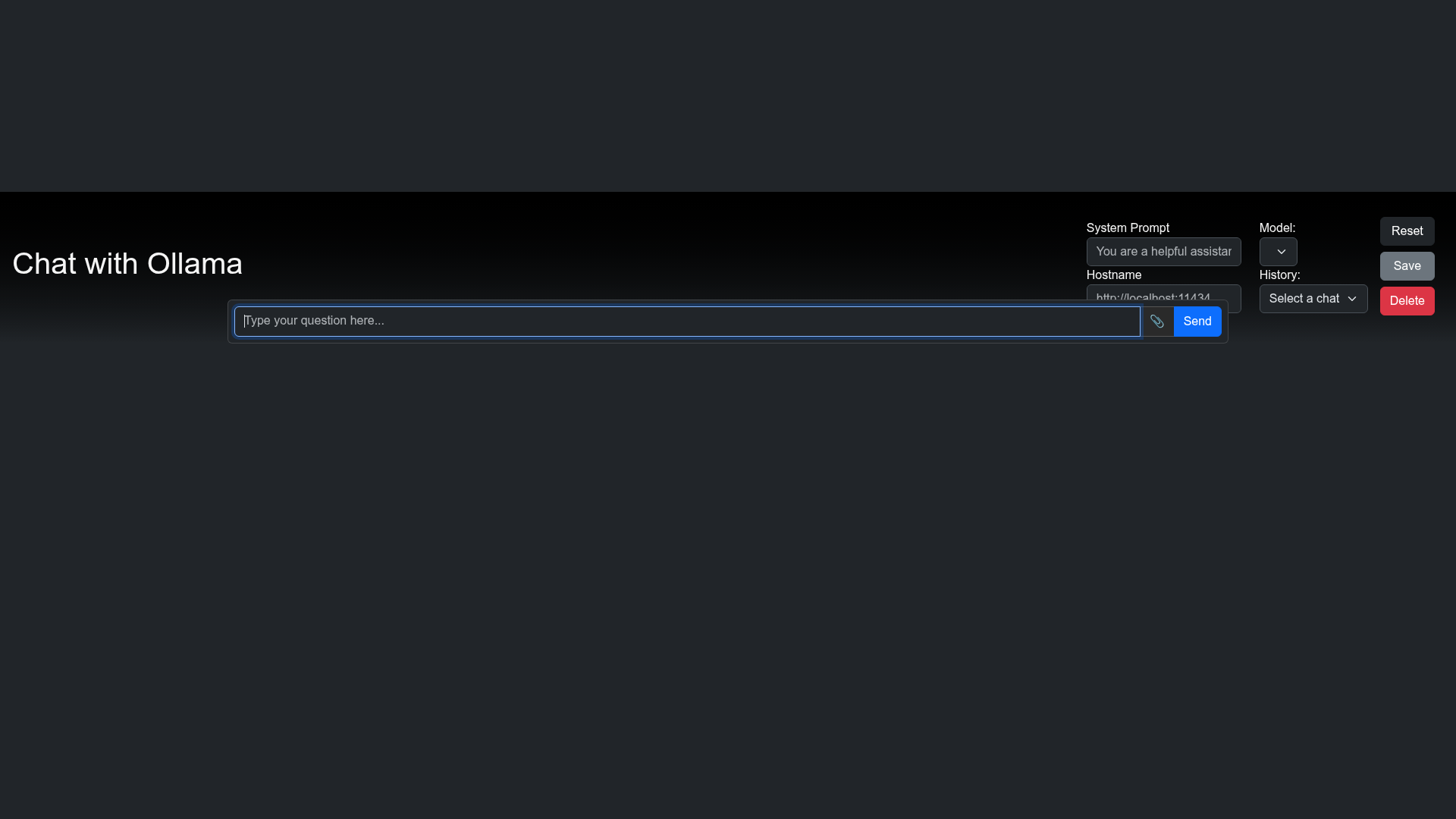
ollama-ui is a minimal HTML web interface for chatting with Ollama's locally hosted large language models, now also available as a Chrome extension.
What is ollama-ui?
ollama-ui is an open-source project on GitHub that provides a simple, framework-free HTML user interface for Ollama, a tool for running large language models locally. It takes text prompts from a user in a browser and sends them to the Ollama server running on the same machine, then displays the model's responses in a chat-style layout. The project is maintained under the ollama-ui GitHub organization and has received 1125 stars. It is distributed in two ways: as a local web app served on localhost:8000, and as a Chrome extension published on the Chrome Web Store.
Key Features
- Framework-free HTML — The UI is built with plain HTML, CSS, and JavaScript, so there is no build step, no Node dependencies, and no framework lock-in.
- Local serving via make — Running
makein the cloned repository starts a local server on port 8000, which you open in your browser. - Chrome extension — A packaged version of the UI is available on the Chrome Web Store, giving users a dedicated browser popup for Ollama.
- Open source — The source code is publicly available on GitHub under the ollama-ui repository, allowing inspection, modification, and redistribution.
- Easy setup — Installation is a three-step process: clone the repo, run
make, and open the local URL.
Who is it for?
- Ollama users who prefer a browser-based chat interface over the command-line tool for everyday conversations with local models.
- Developers building on Ollama who want a minimal, readable starting point to customize into their own UI.
- Chrome users who want a quick-launch extension to access Ollama without opening a separate terminal or tab.
What can you do with ollama-ui?
- Chat with local LLMs: Type prompts in the browser and receive responses from any model available through your local Ollama server.
- Create a custom interface: Fork the repository and modify the HTML and JavaScript to add features like system prompts, multi-model selection, or conversation history.
- Use as a browser extension: Install the Chrome Web Store version to get a lightweight popup interface that connects to your running Ollama instance.
How does ollama-ui work?
The usage instructions on the repository describe a straightforward local workflow: clone the repository with git clone https://github.com/ollama-ui/ollama-ui, enter the directory, and run make to start the server. After that, opening http://localhost:8000 in a browser loads the interface. The Chrome extension version can be installed directly from the Chrome Web Store link provided in the repository description.
FAQ
Is ollama-ui free?
Yes, ollama-ui is open source and freely available. The source code is public on GitHub, and the Chrome extension can be installed from the Chrome Web Store at no cost.
Does ollama-ui require Ollama to be installed?
Yes, ollama-ui is a user interface for Ollama, so you need to have Ollama installed and running locally. The UI connects to the local Ollama server to send prompts and receive model responses.
How do I run ollama-ui locally?
Clone the repository, run make in the project directory, and then open http://localhost:8000 in your browser. The make command starts a simple HTTP server on port 8000 that serves the HTML UI.