Template details
Onepage
A minimal single-page Jekyll blog theme for GitHub Pages, configured entirely through _config.yml with accent colors, analytics, and language support.
About this template
Onepage is a single-page Jekyll blog theme that transforms a GitHub repository into a minimal personal blog, configured through _config.yml and deployed via GitHub Pages. This theme is built for writers and developers who want a lightweight blog without JavaScript frameworks or content management systems.
What is Onepage?
Onepage is a static-site blog theme for Jekyll, the Ruby-based static site generator. It accepts Markdown posts placed in the _posts directory and outputs a single-page HTML site with blog content, requiring only Jekyll and a GitHub Pages deployment. The theme is maintained by the author of the demo site at lukas-h.github.io/onepage and is released under the MIT license.
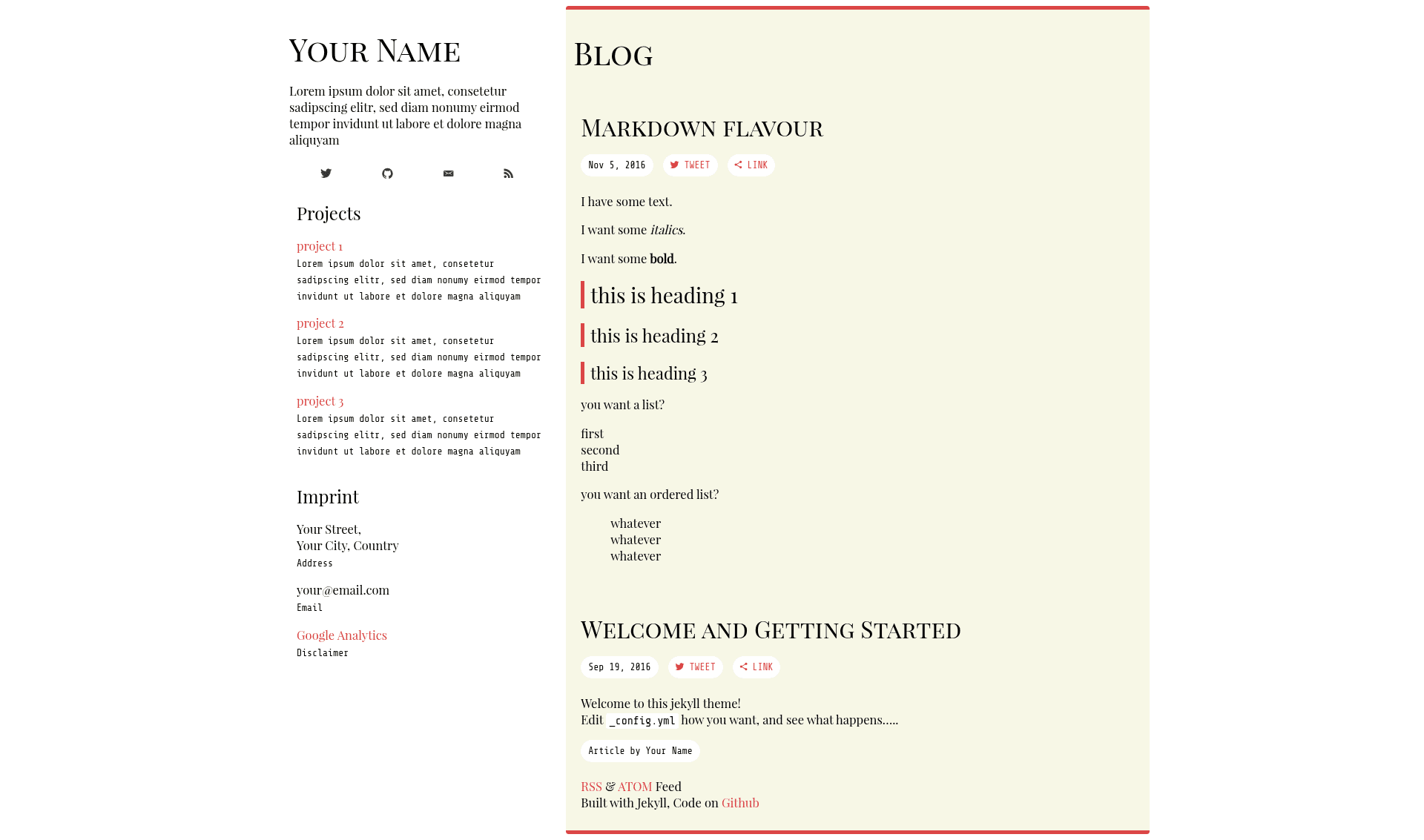
The repository provides a live demo at https://lukas-h.github.io/onepage/ so you can see the single-column layout before installing.
Key Features
- Single-page layout — The theme renders posts in one continuous blog column, with an accent-colored sidebar showing your title, description, and social links.
- Simple configuration — All site settings live in
_config.yml: title, description, URL, base URL, GitHub and Twitter usernames, accent color, address, name, email, and language. - Google Analytics support — Paste your tracking ID into the
g_analyticsvariable to enable analytics without editing templates. - Language setting — Set
isolangto your content language code (default isen) to adjust the HTML lang attribute. - GitHub Pages ready — The official setup copies the repository to a
gh-pagesbranch, so no local builds are required. - Markdown blogging — Write posts in
_postsfollowing Jekyll's post naming convention; the theme picks them up automatically. - MIT licensed — Free to use, modify, and share, with the license badge shown in the repository.
Who is it for?
- Personal bloggers — Publish a single-page journal or essay collection without paying for hosting or managing a database.
- Developers — Use it as a portfolio of technical notes, since the theme integrates with GitHub Pages and existing Jekyll workflows.
- Minimalists — Users who prefer a plain, readable text layout over interactive, JavaScript-heavy blog themes.
What can you do with Onepage?
- Set up a blog in four steps — Fork the repo, create a
gh-pagesbranch, edit_config.yml, and add your first Markdown post to_posts. - Customize the look — Change the accent color, add your GitHub and Twitter profiles, and update the address and email fields directly in the config file.
- Track visitors — Enable Google Analytics by pasting a single tracking ID into the configuration.
- Serve a multilingual site — Adjust the language code with
isolangfor non-English content.
How does Onepage work?
The workflow is repository-based: after forking, you create a gh-pages branch and edit _config.yml with your site's URL, base URL, usernames, accent color, and contact details. Posts go into the _posts folder using Jekyll's standard Markdown naming convention, and GitHub Pages automatically builds and serves the site at the configured URL.
FAQ
Is Onepage free?
Yes, the theme is released under the MIT license, so you can use it for personal or commercial projects free of charge.
How do I deploy Onepage?
Fork the repository on GitHub, rename it, create a branch named gh-pages, and edit _config.yml with your site's URL. GitHub Pages will then serve the built site automatically.
How do I change the accent color?
Open _config.yml and set the accent variable to any color code you like; the blog column uses this value for highlighting.
Can I use Google Analytics with Onepage?
Yes, enter your Google Analytics tracking ID in the g_analytics field in _config.yml, and the theme will include the tracking snippet.
Where do I write posts?
Create Markdown files inside the _posts directory with Jekyll's required filename pattern, such as 2025-01-01-title.md.