Template details
Wall-E
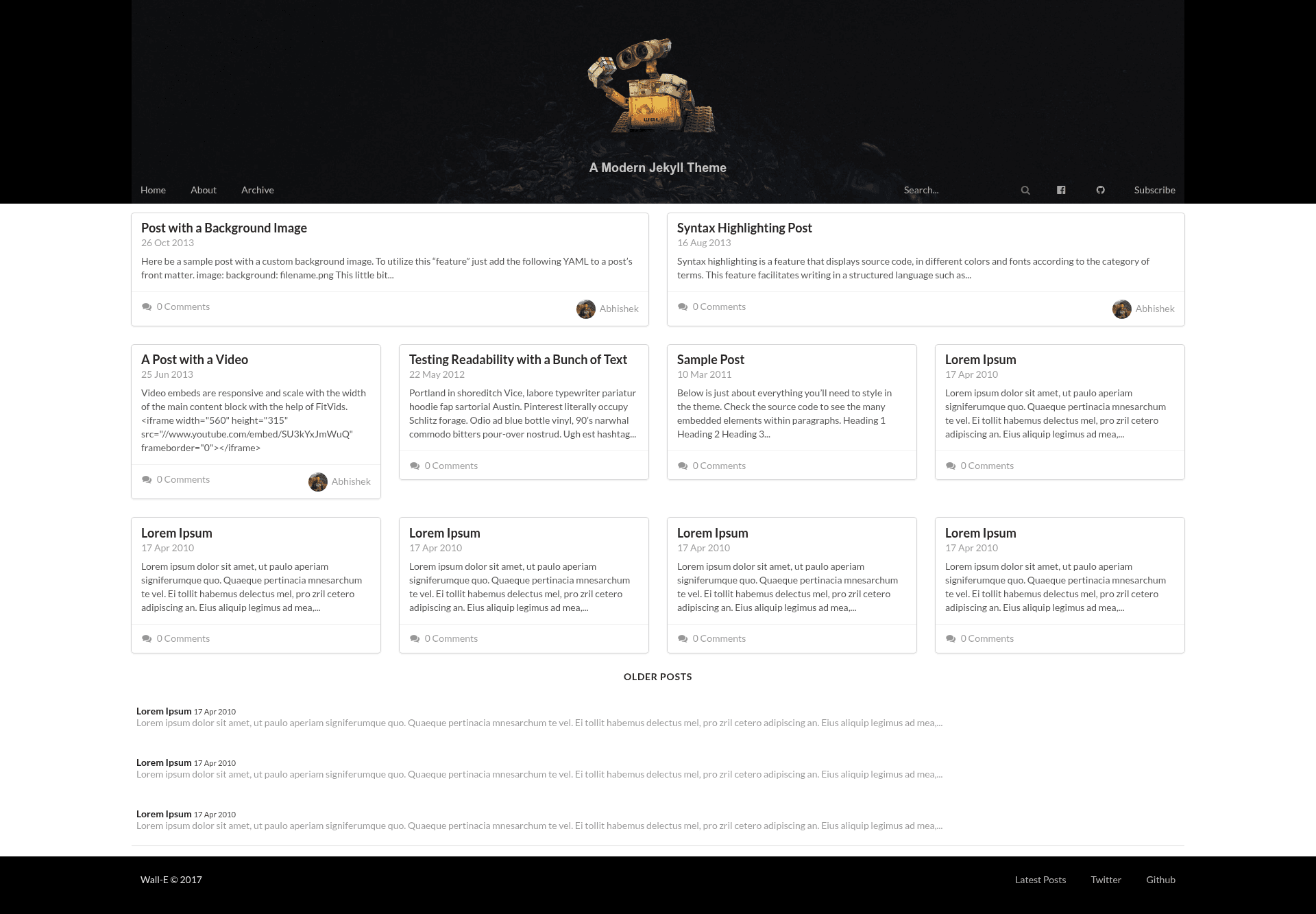
A modern Jekyll theme with a magazine-style grid frontpage, beautiful typography, and integrated Disqus.
About this template
Wall-E is a free, open-source Jekyll theme that creates a magazine-style grid frontpage for personal blogs, with Semantic UI responsiveness, Google search integration, and built-in Disqus comments.
What is Wall-E?
Wall-E is a modern Jekyll theme designed for personal blogs. It takes standard Jekyll Markdown posts and renders them into a magazine-like grid layout on the homepage, with a one-column post template that keeps attention on the content. The theme is built on Semantic UI, uses League Gothic and Open Sans fonts, and is distributed on GitHub under the MIT license. It runs on any Jekyll installation and is commonly deployed to GitHub Pages via the username.github.io workflow.
Key Features
- Semantic UI styling — The theme is built on Semantic UI, so layout components like cards and items come from Semantic's CSS framework and can be customized through documented include files.
- Disqus integration — Disqus commenting is enabled by default; replace the
disqus_shortnamevariable in_includes/disqus.htmland_includes/disqus-count.htmlwith your own username to activate it. - Magazine grid frontpage — The homepage displays posts in a card grid, with optional feature images, excerpt text, categories, tags, and comment counts.
- One-column post layout — Posts use a single-column template that prioritizes typography, with League Gothic headings and Open Sans body text.
- Google search integration — The default search box links to a Google site search, and the behavior can be modified in
assets/js/main.js. - Mobile responsive — The layout adapts between desktop and mobile using a dedicated
assets/css/mobile.css, with screenshots demonstrating portrait and landscape views. - Easy content setup — To start, fork the repository, rename it to
your-username.github.io, delete the sample posts, and edit_config.yml.
Who is it for?
Wall-E is aimed at content creators and developers who want a clean, reading-focused blog without designing from scratch.
- Personal bloggers — Publish text-heavy posts and get a magazine-style archive page that highlights recent articles with feature images.
- Developers — Host a Jekyll blog on GitHub Pages by forking the repo and renaming it; the workflow is entirely Git-based and requires no external services.
- Writers and journalists — Use the grid frontpage to present multiple stories at once, letting readers scan by headline and image before clicking through.
What can you do with Wall-E?
- Launch a GitHub Pages blog — Fork the repository, rename it to
your-username.github.io, and push content to have a live static blog in minutes. - Publish posts with rich metadata — Add feature images, categories, and tags at the top of each post; they automatically populate the homepage cards.
- Manage comments with Disqus — Set your Disqus shortname in two include files to enable threaded comments on every post, with a comment counter on the frontpage cards.
- Customize the look and feel — Edit the author bio, header navigation, footer links, and global CSS through the documented
_includesfiles and asset stylesheets.
How does Wall-E work?
Using Wall-E starts by setting up Jekyll and forking the repository. After cloning your fork, you delete the sample posts in _posts and the tmp directory, then edit _config.yml with your site variables and replace the Disqus shortname in two includes. Running jekyll serve makes the blog live at localhost:4000 for local testing, and pushing to GitHub publishes it to your-username.github.io.
Pricing
Wall-E is free and open source under the MIT license. There are no paid tiers or premium features; you can use, modify, and redistribute it without licensing fees.
FAQ
Is Wall-E free?
Yes, Wall-E is open-sourced under the MIT license, so the theme is completely free to use, modify, and redistribute, even for commercial projects.
Do I need to know Jekyll to use Wall-E?
The theme works out of the box, but you need a basic Jekyll installation to build the site. The README links to Jekyll's official installation guide to get started.
How do I enable Disqus comments?
Replace the value of the disqus_shortname variable in both _includes/disqus.html and _includes/disqus-count.html with your Disqus username, then rebuild the site.
Can I deploy Wall-E to GitHub Pages?
Yes, the recommended workflow is to fork the repository, rename the fork to your-username.github.io, and push your changes. The blog then goes live at that URL automatically.
Is Wall-E mobile responsive?
Yes, the theme is built with Semantic UI and includes a separate mobile CSS file. Screenshots in the README show the homepage and posts in portrait and landscape mobile views.