Template details
Paper Bootstrap Wizard
A free Bootstrap wizard UI template from Creative Tim that splits long forms into multi-step screens and deploys to Genezio in one click.
About this template
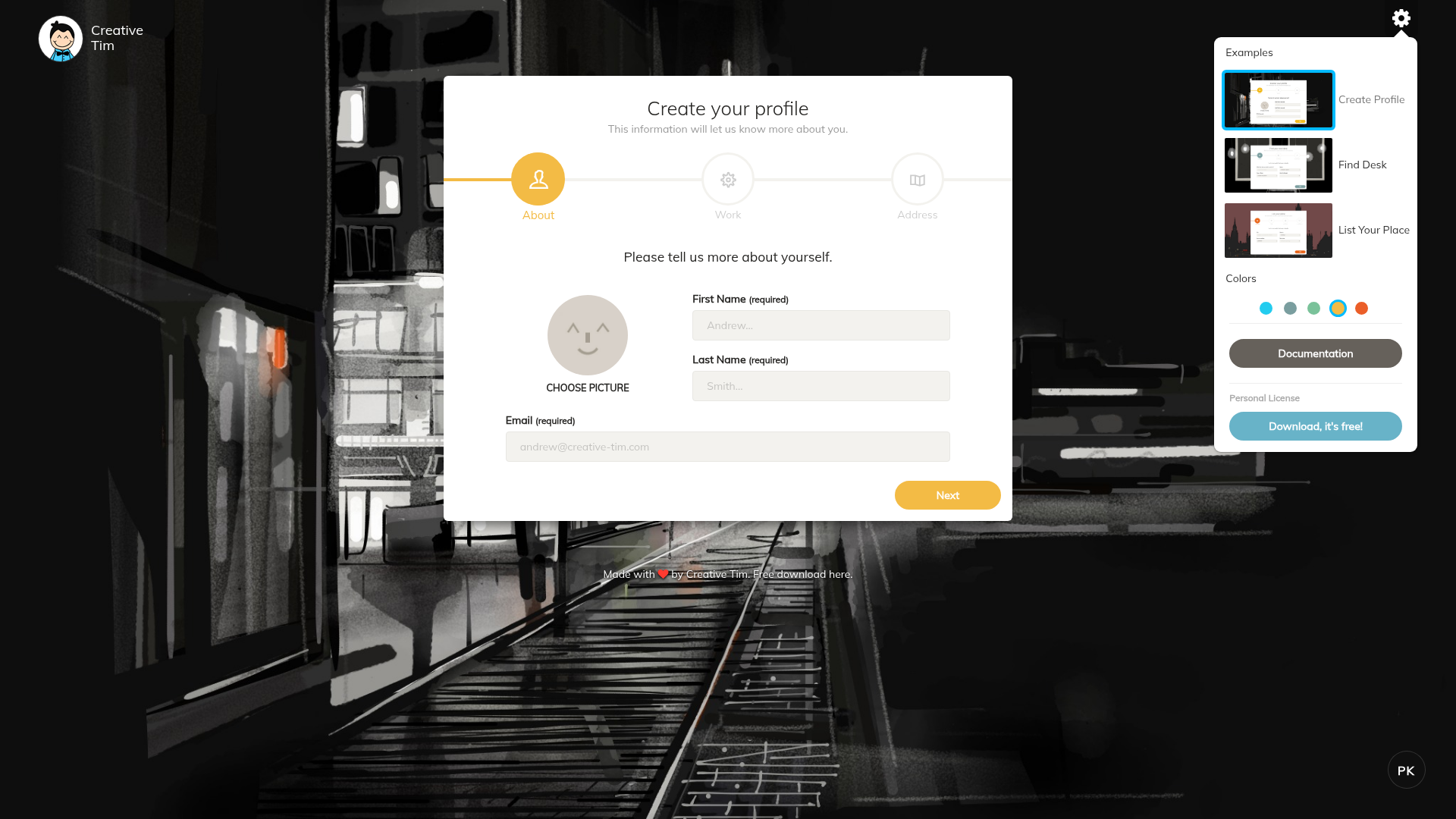
Paper Bootstrap Wizard is a free Bootstrap-based wizard UI template from Creative Tim that splits long forms into sequential multi-step screens, and it includes a one-click deploy button that publishes the project to Genezio.
What is Paper Bootstrap Wizard?
Paper Bootstrap Wizard is a free front-end UI template from Creative Tim that builds a multi-step wizard around a form, walking users through fields one step at a time instead of showing everything on one long page. The template is distributed as a public GitHub repository under the creativetimofficial organization and currently has 40 stars. It takes a Bootstrap-style form layout as its starting point and produces a navigable step-by-step flow with a finish screen. A deploy button on the repository page sends the project to Genezio, a serverless platform, so a live copy can be launched without manually setting up hosting.
What makes Paper Bootstrap Wizard stand out?
- Multi-step wizard layout — the core UI breaks a long form into separate sequential steps with navigation between them, so users complete one section before moving to the next.
- Bootstrap foundation — the template is styled with the Bootstrap framework, so the markup, form controls, buttons, and responsive grid follow standard Bootstrap conventions.
- One-click Genezio deployment — the repository README includes a deploy button that opens Genezio's start-deploy flow with the GitHub repository URL pre-filled, letting you publish the template without cloning or configuring hosting.
- Open GitHub source — the full source is public under the creativetimofficial organization and has accumulated 40 stars.
Who should use Paper Bootstrap Wizard?
- Front-end developers adding a sign-up, onboarding, or checkout wizard to an existing Bootstrap project can take the wizard shell and replace the sample fields with their own.
- Product teams prototyping a multi-step flow can deploy the template to Genezio with one click and get a live URL for user testing without writing backend code.
- Developers evaluating Genezio can use this repository as a small Bootstrap project to test the platform's one-click deployment path.
What can you do with Paper Bootstrap Wizard?
- Onboarding flows: arrange profile, account, and preference questions as separate wizard steps so new users are not confronted with one long form.
- Checkout flows: split shipping, billing, and review into individual steps, a common pattern for breaking up a long checkout process.
- Serverless prototypes: deploy the template to Genezio directly from the GitHub page to stand up a demo URL quickly.
How does Paper Bootstrap Wizard work?
The repository page provides a Deploy to Genezio button. Clicking it opens Genezio's start-deploy flow with the repository URL already inserted, and Genezio provisions a live version of the wizard. For custom use, the template is standard Bootstrap markup, so you edit the HTML form fields and step sections, then redeploy or host the files anywhere.
Pros and cons
- Pros: free to use; built on the widely known Bootstrap framework; one-click deployment to Genezio; the source is open and publicly visible on GitHub.
- Cons: it is a front-end UI only — form submissions need your own backend, and the repository currently shows minimal documentation beyond the deploy button.
Pricing
The template is free. It is published as a public GitHub repository under Creative Tim's account, and the deployment path requires a Genezio account to launch the project.
FAQ
Is Paper Bootstrap Wizard free?
Yes, the template is free. It is published as a public repository under the creativetimofficial GitHub organization, and no purchase step appears anywhere in the repository or its deployment instructions.
What does Paper Bootstrap Wizard do?
It provides a multi-step wizard interface built with Bootstrap. A long form is split into several sequential steps with navigation between them, so users fill in one section at a time and then reach a final step. This is useful for registration, onboarding, and checkout-style flows.
How do I deploy Paper Bootstrap Wizard to Genezio?
The repository README contains a Deploy to Genezio button. Clicking it opens Genezio's start-deploy flow with the repository URL pre-filled, and Genezio provisions a live copy of the template. You need a Genezio account but no server configuration.
What framework is Paper Bootstrap Wizard built on?
The template is built with the Bootstrap framework, as its name and repository indicate. It uses Bootstrap's grid, form components, and button styles, meaning it can be integrated into existing Bootstrap-based front-end projects.