Template details
Petridish
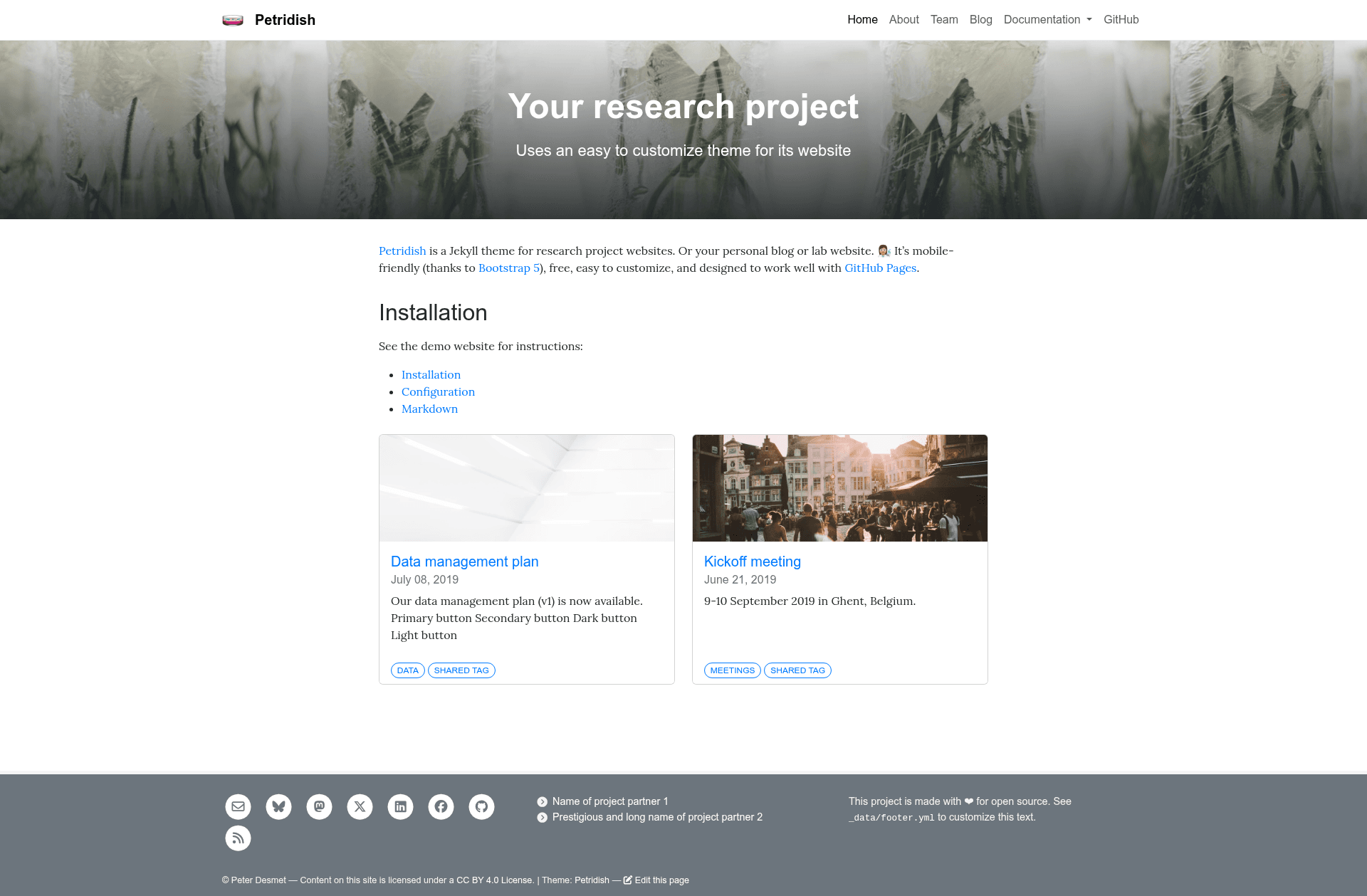
Jekyll theme for research project websites, personal blogs, and lab sites, styled with Bootstrap 5 and built for GitHub Pages.
About this template
Petridish is a free, mobile-friendly Jekyll theme for research project websites, personal blogs, and lab sites, designed to deploy automatically on GitHub Pages.
What is Petridish?
Petridish is a Jekyll theme created by Peter Desmet, released under the MIT License. It takes standard Jekyll content—Markdown posts, pages, and YAML configuration files—and renders a static website styled with Bootstrap 5. The theme runs on any Jekyll installation and is specifically set up for GitHub Pages, so every commit to the main branch triggers an automatic rebuild with no local build step required. The project includes a demo website and separate documentation pages for installation, configuration, and Markdown usage at peterdesmet.com/petridish.
Key Features
- Bootstrap 5 styling — The responsive layout is built on Bootstrap 5, providing mobile-friendly navigation and content blocks out of the box.
- GitHub Pages auto-build — Committing to main automatically publishes the site; local builds are optional via
bundle exec jekyll serve. - YAML-driven site structure — Top navigation, footer, and team members are configured through
_data/navigation.yml,_data/footer.yml, and_data/team.yml. - Research-friendly content folders — Includes
pages/for static pages,_posts/for blog-style updates, andassets/for images and static files. - Tag-based post grouping — Posts support tags to create related groups by topic or project.
- Image guidelines — Background images should be cropped to 2100 x 700 px at 72 dpi and placed in
assets/backgrounds/.
Who is it for?
- Research project teams — Publish project overviews, updates, and team profiles using the provided
team.ymlstructure. - Academic lab groups — Create a lab website with news posts, publication announcements, and a team page.
- Personal bloggers — Run a simple Jekyll blog with Bootstrap 5 responsiveness and free hosting on GitHub Pages.
What can you do with Petridish?
- Build a lab site: Organize team members in
_data/team.ymland add cropped background images to match each page or post. - Write research blog posts: Use Markdown in
_posts/, add tags for grouping, and create internal links with Jekyll'srelative_urlfilter. - Set up static pages: Add pages like About or Contact in
pages/and manage site-wide footer content in_data/footer.yml.
How does Petridish work?
Petridish follows the standard Jekyll workflow: content is written in Markdown and YAML, then Jekyll converts it to static HTML. For local preview, run bundle exec jekyll serve. For production, push to the main branch of a GitHub Pages repository and the site rebuilds automatically.
Pricing
Petridish is free and open source under the MIT License.
Alternatives
- Minimal Mistakes — a popular Jekyll theme offering a wider range of layout and navigation options for blogs and portfolio sites.
FAQ
Is Petridish free?
Yes, Petridish is released under the MIT License, so you can use, modify, and redistribute it freely, including for commercial projects.
Does Petridish work with GitHub Pages?
Yes, the theme is designed for GitHub Pages. Each commit to the main branch of your repository triggers an automatic build, so no local compilation is needed.
Can I use Petridish for a personal blog?
Yes, while it is built for research project websites, it works as a personal blog or lab website. The _posts/ folder supports blog-style content and tagging.
Do I need to build the site locally?
No, GitHub Pages builds the site automatically. You can optionally run bundle exec jekyll serve for local development and preview.
What image dimensions should I use for backgrounds?
The theme recommends cropping background images to 2100 x 700 pixels at 72 dpi, and placing them in assets/backgrounds/ named after the corresponding page or post.