Template details
Worktory
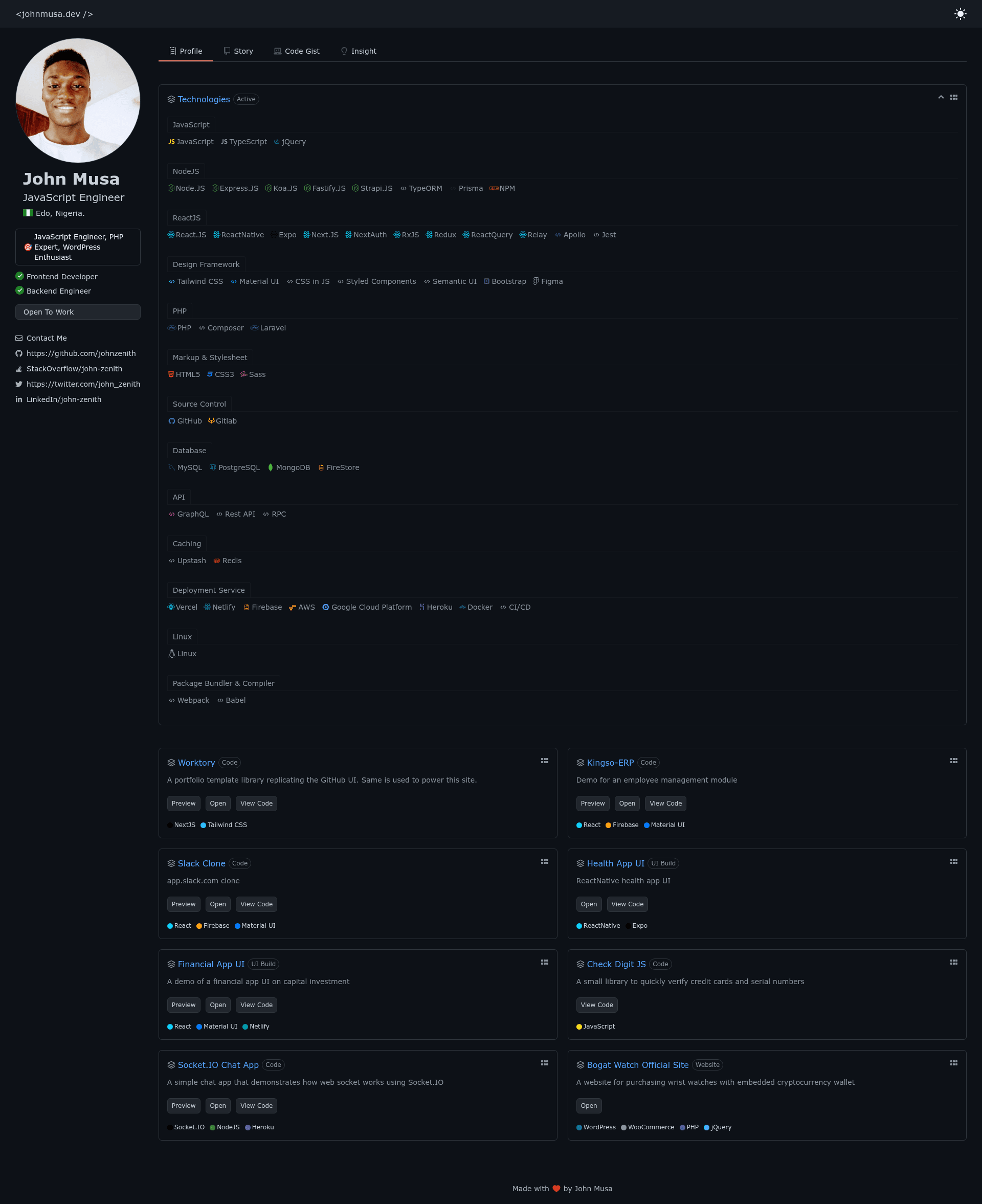
Portfolio library replicating the GitHub UI, built with Next.js, TypeScript, and Tailwind CSS.
About this template
Worktory is a portfolio template built with Next.js that recreates the GitHub interface for showcasing your projects and repositories. It is a free, open-source starter project bootstrapped with create-next-app, combining React, TypeScript, and Tailwind CSS to give developers a familiar, code-first layout for their personal portfolio.
What is Worktory?
Worktory is a portfolio library for developers who want their personal site to look like a GitHub profile. It runs on Next.js, the React-based framework created by Vercel, and uses TypeScript for type-safe props and components. Styling is handled entirely through Tailwind CSS utility classes, so you can adjust colors, spacing, and typography directly in your JSX markup. The template is designed to be deployed on Vercel, as documented in the standard create-next-app README that ships with the project.
Key Features
- Next.js Pages Router — The project uses the Pages Router, with
pages/index.tsxas the entry point for your portfolio homepage. Editing this file automatically updates the page during development. - Built-in API routes — The
pages/apidirectory is mapped to/api/*, letting you add serverless functions or fetch data from external APIs without setting up a separate backend. - TypeScript by default — Components and pages are written in TypeScript, providing intellisense and compile-time checks for your portfolio data.
- Tailwind CSS styling — All UI styles come from Tailwind's utility-first classes, which means no separate CSS files are needed for most layout changes.
- GitHub-style visual language — The template's layout is designed to mimic GitHub's profile and repository pages, giving your projects a familiar context for technical visitors.
- One-command local development — Run
npm run devoryarn devto start the development server onhttp://localhost:3000with hot reloading.
Who is it for?
Worktory is built for developers and technical professionals who want a portfolio that feels at home on GitHub. It's a natural choice for full-stack developers who want to present side projects, open-source contributors who want to highlight their contributions, and front-end developers who appreciate a utility-first styling approach. If you're applying for engineering roles, this template helps you show code samples in an interface your interviewer already uses daily.
What can you do with Worktory?
- Showcase repositories — Present your GitHub projects with a layout that mirrors the repository grid from GitHub profiles, making it easy for visitors to scan your work.
- Add server-side logic — Use the built-in API routes to fetch your latest repositories from the GitHub API or to serve your own content dynamically.
- Customize the theme — Leverage Tailwind's configuration to change the color palette to match your personal branding, then redeploy with a single push to Vercel.
- Learn Next.js patterns — Use the template as a learning project to see how a typed React portfolio is organized, from pages to API routes.
How does Worktory work?
The template follows the standard create-next-app workflow. You clone the repository, install dependencies with npm install or yarn, and start the development server with npm run dev. The main entry point is pages/index.tsx; editing it while the server is running gives you immediate feedback. When you're ready to go live, push the project to a Git repository and import it into Vercel for automatic deployment, or deploy via the Vercel CLI.
FAQ
Is Worktory free?
Yes. Worktory is an open-source portfolio template, and the repository is publicly available with a permissive license (as is standard for create-next-app starters). You can use it for personal or commercial projects without paying a license fee.
Do I need to know React to use Worktory?
A basic understanding of React and Next.js will help, but the template provides a working structure. You can edit the text in pages/index.tsx using standard JSX, and Tailwind classes are applied inline, so you only need to change the content and styling in a few places.
Can I deploy Worktory anywhere besides Vercel?
Yes, because it's a standard Next.js app. You can deploy it to any Node.js-compatible host such as Netlify, AWS Amplify, or a standalone server. Vercel is the easiest option because the project includes deployment instructions and one-click import support.
How do I change the content and add my own projects?
The portfolio content lives in the React components in pages/. You can replace the hardcoded data in the JSX or move it to a separate TypeScript file. For dynamic content, use the API routes in pages/api to fetch data from GitHub or any other source.