Template details
PreviewMarcosxNet
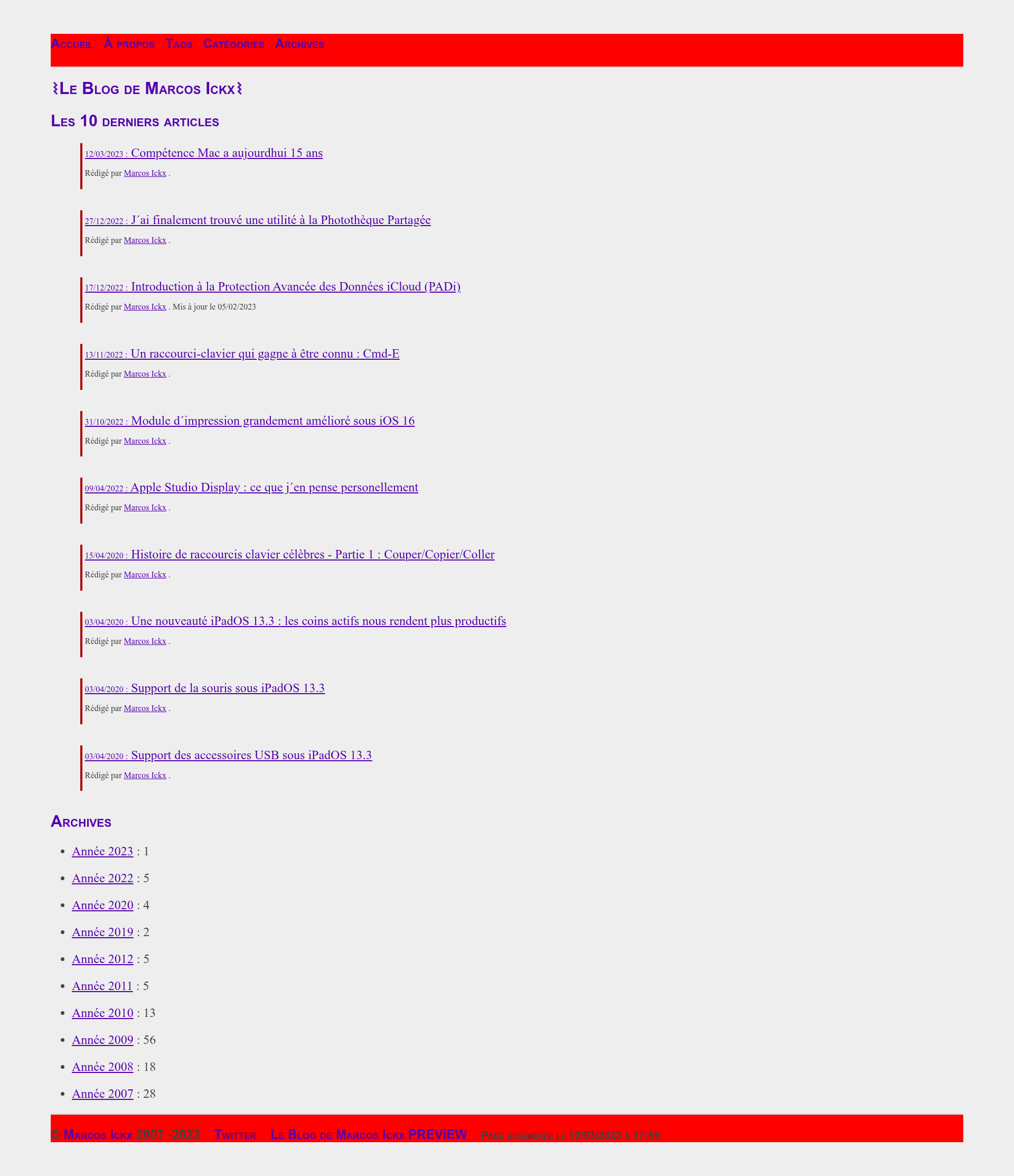
Repository used to preview future blog posts and test changes for blog.marcosx.net without breaking the live site.
About this template
PreviewMarcosxNet is a hand-coded, theme-free Jekyll blog repository that powers the preview site for blog.marcosx.net, hosted on GitHub Pages at marcosickx.github.io. The repository is used to experiment with future posts and site changes before they go live, and it documents the step-by-step rebuild of a WordPress blog into a static Jekyll site with no theme and minimal JavaScript.
What is PreviewMarcosxNet?
PreviewMarcosxNet is the source repository for a personal blog built entirely from scratch with GitHub Pages, Jekyll, Liquid, and kramdown. It takes Markdown posts with YAML front matter as input and produces a static HTML site as output, using only custom HTML and CSS instead of a Jekyll theme. The site is created and maintained by MarcosIckx, who also runs the live blog at blog.marcosx.net, and this preview repo lets changes be tested without breaking the production site.
Key Features
- No-theme HTML/CSS build — The site is constructed with custom HTML5 and CSS only; no Jekyll theme is used, giving complete control over markup and styling.
- Picture include with front matter —
_includes/picture.htmlreads image URLs from post front matter, renders them inside HTML5figureandfigcaptiontags, supports dark-mode image variants, and optional links. - Whitelisted Jekyll plugins — Activates
jekyll-mentionsfor Twitter handles,jekyll-relative-linksfor relative link support, andjekyll-redirect-fromto redirect old WordPress and changed permalink URLs. - RSS and sitemap — Generates an
atom.xmlfeed (fixed on 14 Feb) and asitemap.xml(fixed withlayout: null) to improve search engine indexing. - Taxonomy includes —
_includes/taxonomy/entriesPerTaxonomy.htmlbuilds per-category and per-tag post listings, and the main includes handle headers, navigation, and footer. - Update-aware post sorting — A prototype sorts posts by last-modified date and can pin posts (e.g.,
test-mise-en-evidence-articles.md) to highlight content on the homepage. - SEO and semantic HTML — Adds
rel="author",rel="prev",rel="next"attributes, canonical URLs, and a conditional table of contents using HTML5 elements. - Custom domain with enforced HTTPS — Uses a
CNAMEfile (blog.marcosx.net) and OVH DNS entry with 60-second TTL, plus GitHub's "Enforce HTTPS" setting for auto-renewing certificates.
Who is it for?
- Bloggers moving from WordPress: The author re-imported all old articles (May 2007–May 2012) into this Jekyll blog and used redirects to avoid 404s; anyone in a similar migration can use this structure.
- Developers learning Jekyll: The repository is a real-world example of building a Jekyll site without a theme, showing the progression from a simple HTML page to includes, plugins, and prototypes.
- Static-site enthusiasts: People who want a fast, JavaScript-free blog (only the 404 page has JS) hosted free on GitHub Pages with custom domain and HTTPS.
What can you do with it?
- Preview new posts: Write a Markdown post and see how it renders on the preview site before moving it to the live blog.
- Test Jekyll features: Experiment with Liquid, includes, plugins, and front matter without affecting production.
- Preserve old content: Import legacy posts and set up
redirect_fromto keep search-engine rankings.
How does it work?
- Create a GitHub repository named
marcosickx.github.io. - Add a
CNAMEfile containingblog.marcosx.netand configure an OVH DNS CNAME record pointingblogtomarcosickx.github.iowith TTL 60. - Enable GitHub Pages and set the custom domain with "Enforce HTTPS".
- Write posts in Markdown (kramdown) inside the
_postsfolder or test pages in_pages/Tests/. - Commit to the repository; GitHub Pages rebuilds the site with Jekyll and Liquid.
Pros and cons
- Pros: Free hosting on GitHub Pages with automatic HTTPS certificate renewal; full control over HTML/CSS because no theme is used; minimal JavaScript (only on 404 page) makes the site fast and simple; SEO features like sitemap, RSS, canonical URLs, and redirects.
- Cons: Only Jekyll plugins on GitHub's whitelist are allowed, so custom plugins don't work (the author tried and had to drop one); building a site from scratch requires manual work; the author notes the CSS contrast and picture include still need improvement.
Pricing
The repository and the preview site are free to use: GitHub Pages hosts the static site at no cost, and all tools (Jekyll, Liquid, kramdown) are open source.
FAQ
Does this site use a Jekyll theme?
No. The author intentionally chose to use no theme, relying only on custom HTML and CSS. This is evident from the early commits where a simple index.html was created, then CSS was added separately.
What Markdown processor does the blog use?
It uses kramdown, which the author chose because it extends standard Markdown with additional features. The site is built with Jekyll's Liquid templating on top of kramdown.
Can I install custom Jekyll plugins on GitHub Pages?
No. GitHub Pages only runs plugins on its whitelist. The author tried adding a custom plugin from Stack Overflow and had to abandon it after remembering GitHub's restriction.
Why is there JavaScript on the 404 page?
The 404 page contains the only JavaScript on the site: it suggests alternative URLs to visitors, such as archives for the year requested. All other pages are pure HTML/CSS.
How is the custom domain and HTTPS configured?
A CNAME file in the repository holds blog.marcosx.net, and an OVH DNS CNAME record points the blog subdomain to marcosickx.github.io with a TTL of 60 seconds. GitHub's "Enforce HTTPS" option provides an automatically renewed certificate.