Template details
research-website-template
React + Next.js template for research websites (for PhD students, researchers, etc)
About this template
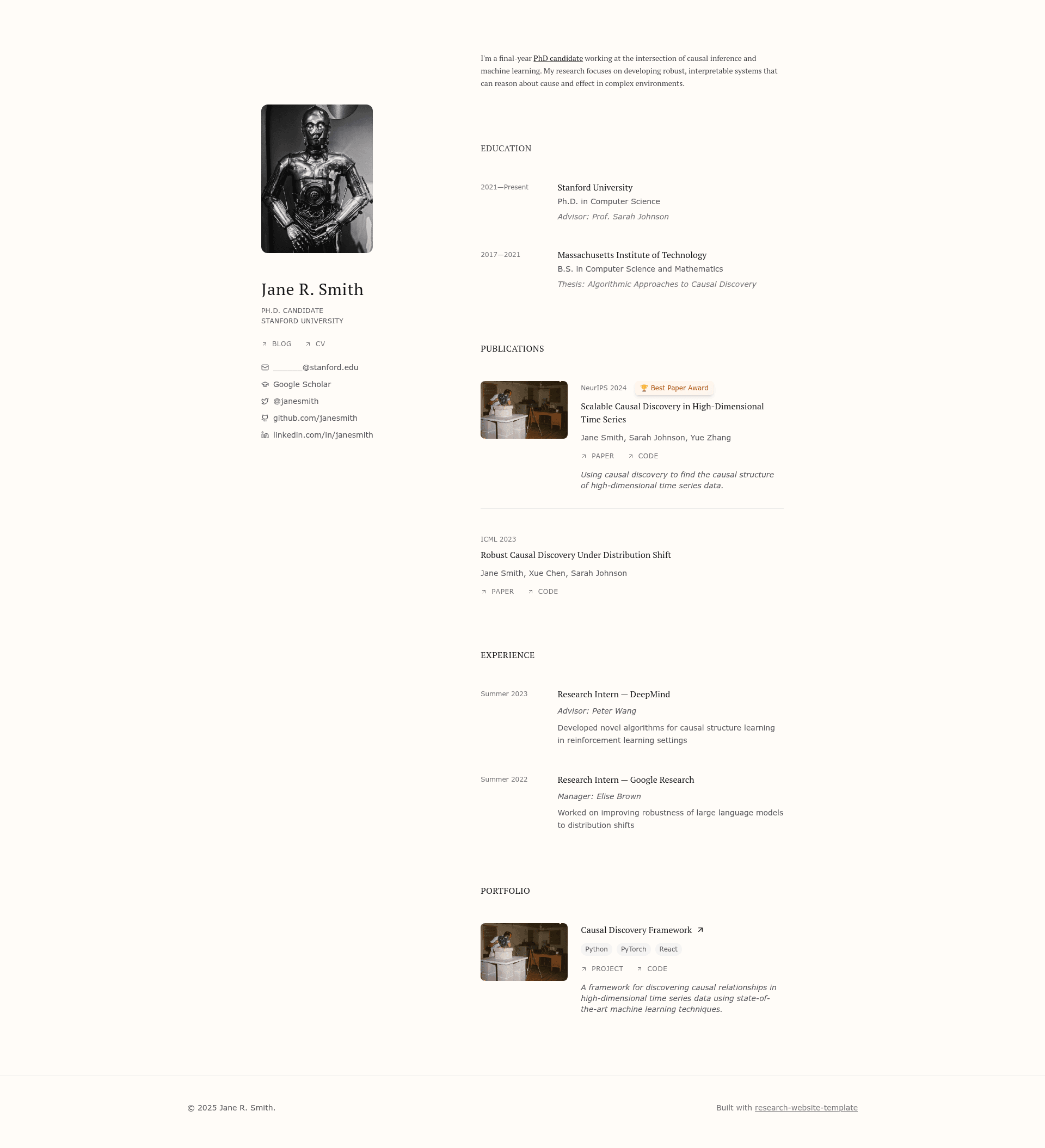
research-website-template is a React + Next.js portfolio template built for academic research websites, generating publication lists, project sections, and personal bio pages from typed TypeScript data files instead of hand-written HTML.
What is research-website-template?
research-website-template is a React + Next.js template for building research or academic personal websites. It takes content defined as TypeScript arrays in the src/data folder — for example, a publication array with fields like year, conference, title, and authors — and renders them into a complete website with minimal configuration. The project runs on Node.js/npm and is designed to deploy to GitHub Pages or Vercel. It was created as a maintainable alternative to popular hand-maintained HTML templates like the Jon Barron template, which the author notes can grow to over 4000 lines of duplicate code.
Key features
- Data-driven page generation — All site content is declared in typed arrays under
src/data(e.g.src/data/publication.ts), and the template renders the site sections from that data, so there is no need to edit JSX for routine updates. - Typed schemas with optional fields — Each data file defines an interface such as
Publication, with fields marked optional via?; filling an optional field (paperUrl,codeUrl,bibtex,tldr,imageUrl,award) automatically creates the corresponding UI button, badge, or excerpt. - Configurable section order — The order of sections on the page is controlled by
src/data/section-order.ts, letting you rearrange the homepage without touching component code. - Full component-level access — If the data layer is not enough, every piece of UI can be modified in the React components under
src/components. - Next.js framework — Built on Next.js, giving file-based routing, React Server Components, and a standard npm development workflow:
npm run devserves the site at http://localhost:3000. - Tailwind CSS styling — The repository lists Tailwind CSS in its topics, so the template ships with utility-first styling that can be customized with Tailwind classes.
- GitHub Pages deployment — The README documents a step-by-step path to deploy on GitHub Pages: name the repo
[your-github-username].github.io, push to main, set the Pages source to GitHub Actions, and commit the suggested Next.js build script. - Vercel deployment for custom domains — For a personal domain, the author recommends importing the repo to Vercel, which auto-detects the Next.js build settings and deploys with minimal setup.
Who is it for?
- PhD students and academic researchers — They can publish a professional personal homepage with a publications section that links to arXiv papers, code repositories, BibTeX entries, and award badges from the data file.
- Graduate students creating a portfolio — They can stand up a complete website in under an hour by forking the repo, running
npm install, and editing the data arrays, then deploy to GitHub Pages as ausername.github.iosite. - Developers who prefer data-driven templates — Those who want a React/Next.js codebase where content is maintained as typed objects and section ordering is a one-line config change rather than HTML editing.
- Maintainers of academic websites — Those who found the Jon Barron template's single HTML file hard to maintain due to duplication and want a more modular, code-minimal alternative.
What can you do with research-website-template?
- Publish an academic homepage: Add publications to
src/data/publication.tswith links to the paper and code, a BibTeX string, a TL;DR, an image, and an optional award; the website automatically renders these as the corresponding UI elements. - Launch a personal portfolio quickly: Use the same template outside academia, since the README notes it "could probably be used by anyone" — just edit the data files and section order to match your content.
- Deploy to GitHub Pages or Vercel: Follow the documented deployment flows: for GitHub Pages set the repository name to your
username.github.io, enable GitHub Actions as the source, and commit the build script; for a custom domain, import the project into Vercel and click Deploy.
How does research-website-template work?
The template reads content from TypeScript data files, maps them to React components, and renders the homepage sections in the order defined in src/data/section-order.ts. Optional fields in the data interfaces trigger extra UI components automatically. Deployment is handled through standard Next.js builds, with GitHub Actions for GitHub Pages and Vercel for custom domains.
Alternatives
- Jon Barron's website template — The popular HTML/CSS academic homepage template that research-website-template explicitly positions itself against, citing its duplicated code and a 4000+ line index file as pain points.
FAQ
Is research-website-template free to use?
Yes, it is an open-source template hosted on GitHub. You can fork the repository, use it for your own site, and contribute changes through a pull request; the README even invites contributions.
What are the prerequisites for running it?
You need Node.js and npm installed on your machine. Verify with node --version and npm --version, then fork and clone the repository, run npm install, and start the development server with npm run dev.
How do I add a new publication to my site?
Open src/data/publication.ts and add an object to the publicationData array. The required schema fields are year, conference, title, and authors; optional fields like paperUrl, codeUrl, bibtex, tldr, imageUrl, and award will render links, excerpts, and badges automatically.
How do I deploy to GitHub Pages?
Rename your repository to [your-github-username].github.io, push your changes, then in the repo's Settings go to Pages and choose GitHub Actions as the source. Commit the suggested Next.js build script, and the site will be available at https://[your-github-username].github.io/.
Can I use this for a personal portfolio that is not academic?
Yes, the README states that in practice it could probably be used by anyone. Since the content is data-driven, you can edit the TypeScript arrays to list projects, talks, or other work, and change the section order in src/data/section-order.ts.