Template details
Sci-Fi UI (Astro)
A small, Astro-first sci-fi interface kit with HUD components, Tailwind v4 tokens, and optional React islands.
About this template
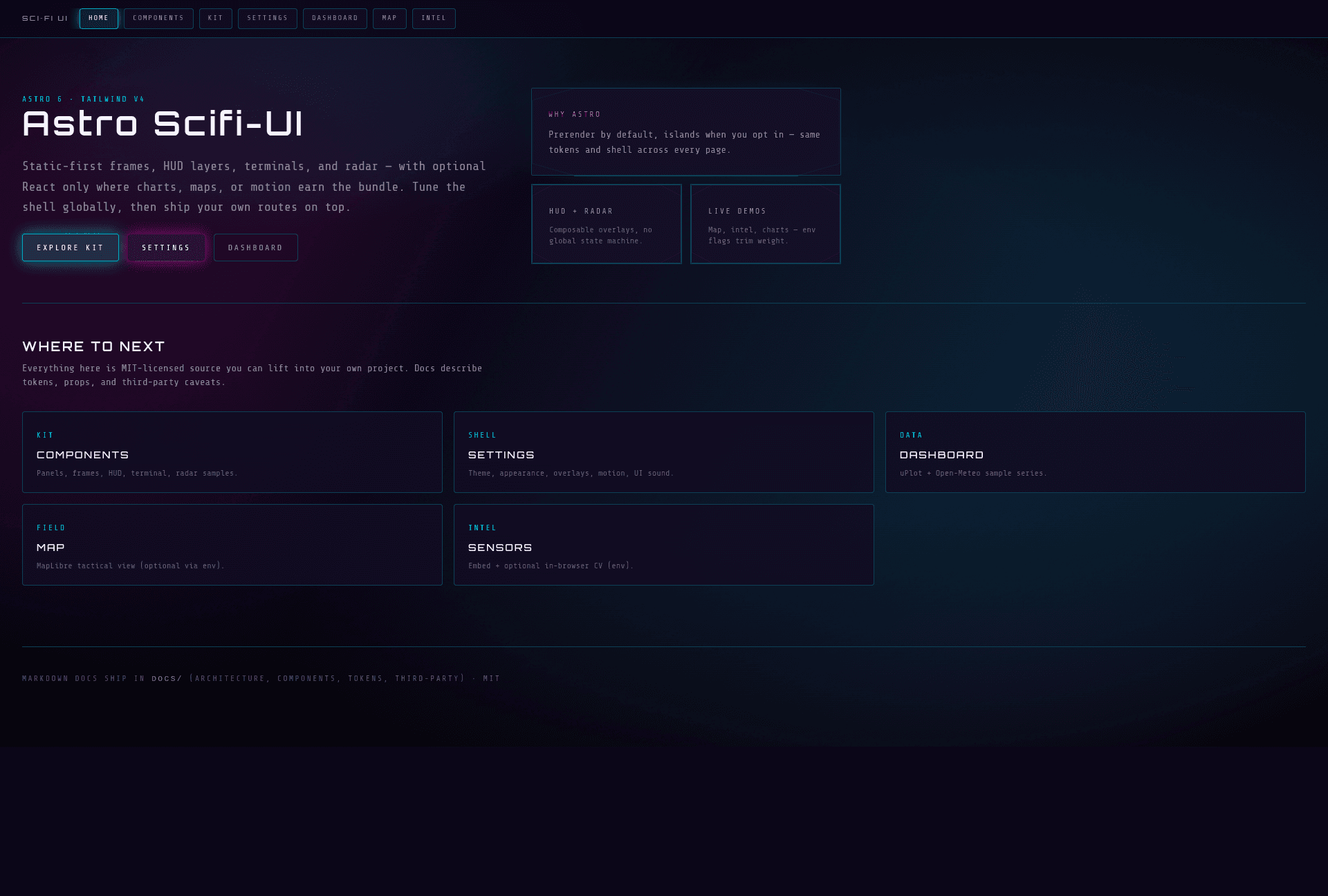
Sci-Fi UI is an Astro-first interface kit (boilerplate starter) for building cockpit-style sci-fi layouts out of composable frames, panels, HUD primitives, a terminal stack, and a passive radar.
What is Sci-Fi UI (Astro)?
Sci-Fi UI is an MIT-licensed, Astro 6-based interface kit that produces static-first pages using Tailwind v4 via the @tailwindcss/vite plugin and shared design tokens. The kit takes Astro components, CSS variables, and optional environment flags as input and outputs HTML pages with optional React islands for charts (uPlot), a MapLibre tactical map, Framer Motion borders, and a TensorFlow.js object-detection panel. The repository includes component docs, a settings page, and seven routes: landing, components, kit, settings, dashboard, map, and intel.
Key Features
- Astro-first core — Most UI is static HTML and CSS; React is used only for uPlot charts, MapLibre map, Framer Motion borders, and TensorFlow.js on the /intel route.
- Tailwind v4 tokens — Styling uses Tailwind v4 through @tailwindcss/vite with shared design tokens covering themes, glow, scanlines, and optional sound; themes include synthwave (default), nebula, ember, matrix, and void.
- Composable HUD primitives — Provides corners, reticle, status bars, tickers, panels, frames, terminal, and radar components that you can combine in any Astro page.
- AppShell and AppNav — Global shell ties pages together with background, vignette, scanlines, and navigation; settings for theme, overlays, motion, and sound persist in localStorage under sf:settings.
- Environment-gated features — Set PUBLIC_FEATURE_INTEL_ML=false to drop COCO-SSD from /intel, or PUBLIC_FEATURE_MAP=false to replace the MapLibre map with a placeholder.
- Routes included — Ships with landing (/), component docs (/components), kit showcase (/kit), settings (/settings), uPlot dashboard with Open-Meteo sample (/dashboard), MapLibre map (/map), and intel page with a YouTube embed and optional local ML (/intel).
- Sound system — Boot script wires hover/click sounds via data-sf-sound-hover and data-sf-sound-click attributes, or the sound prop on Button.astro.
Who is it for?
- Astro developers who want a ready-made sci-fi UI foundation rather than building HUD components from scratch.
- Game and creative devs building cockpit-style dashboards, terminal interfaces, or radar views for web projects.
- Dashboard builders who need uPlot charts, a MapLibre tactical map, and a settings page in an unusual aesthetic.
What can you do with it?
- Build a sci-fi landing page: Use ScifiLayout, AppShell, AppNav, and Panel with variants like primary and glow.
- Create a tactical map view: Enable MapLibre on /map and overlay sci-fi frames, or disable it with PUBLIC_FEATURE_MAP=false.
- Add in-browser object detection: The /intel route runs COCO-SSD locally on webcam or file input, with a YouTube embed for non-scriptable content.
- Prototype a dashboard: The /dashboard route includes uPlot charts plus an Open-Meteo sample.
How does Sci-Fi UI work?
Install dependencies with npm install, then run npm run dev for the dev server on port 4321. Pages are Astro files that import components from src/components (core, effects, hud, terminal, radar, shell, charts, map, intel) and wrap content in AppShell and AppNav. The settings module stores theme, sound, and appearance preferences in localStorage.
Pros and cons
- Pros: Free under MIT license; static-first with optional React islands; multiple themes and appearance modes; env flags let you strip heavy dependencies; includes a component documentation route.
- Cons: Requires Node 22.12 or later (Astro 6); the demo map uses public raster tiles that you must replace with compliant tiles for production; YouTube iframes cannot be read by the computer-vision script, so /intel's ML only works on webcam/file inputs.
Pricing
Sci-Fi UI is MIT-licensed, so it is free to use, modify, and redistribute. No paid tiers or accounts are mentioned in the repository.
FAQ
Is Sci-Fi UI free?
Yes. The repository is MIT-licensed, so you can use it for personal and commercial projects without a license fee.
What Node version do I need?
Node 22.12 or higher is required for Astro 6. The dev server runs on port 4321 by default.
Can I disable the map or the machine-learning panel?
Yes. Set PUBLIC_FEATURE_MAP=false to show a map placeholder without MapLibre, and PUBLIC_FEATURE_INTEL_ML=false to drop COCO-SSD from the /intel route.
What themes are included?
The default synthwave theme is cyan/magenta on violet-black. Optional data-theme values are nebula, ember, matrix, and void, plus data-sf-appearance values high-contrast and light.
How do I add sound?
Use the data-sf-sound-hover and data-sf-sound-click attributes on elements, or the sound prop on Button.astro. Sound is initialized from boot.ts through AppShell, and preferences save under sf:settings in localStorage.