Template details
Serene Ink
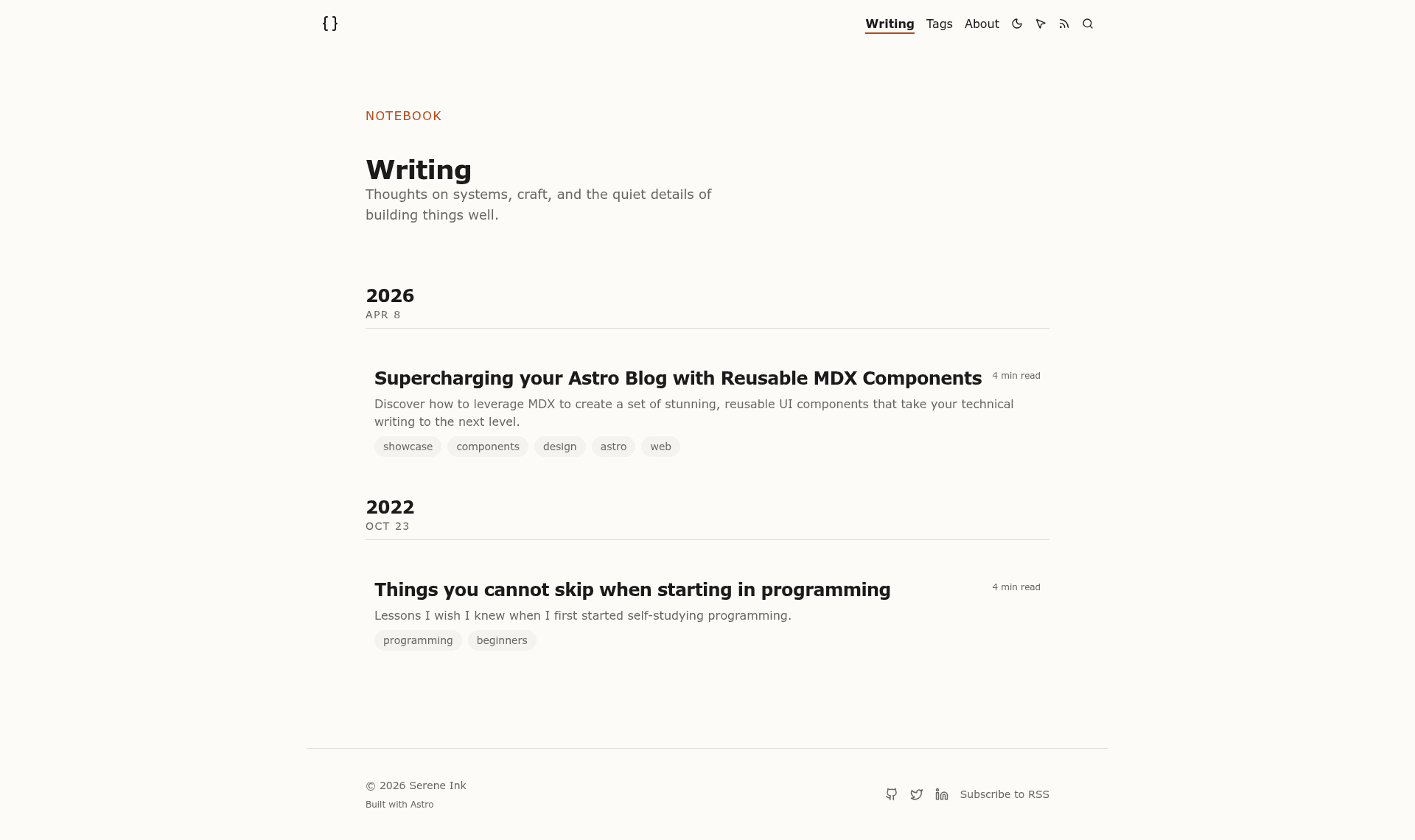
Minimalist Astro blog template with MDX, Tailwind CSS, dark mode, Cmd+K search, and Umami analytics.
About this template
Serene Ink is an open-source Astro blog template for developers and writers that outputs a static site from MDX content, featuring dark mode, built-in search, and a central configuration file.
What is Serene Ink?
Serene Ink is a minimalist, open-source blog template built with Astro, MDX, and Tailwind CSS v4. It takes blog posts written as MDX files in the src/posts/ folder and generates a static site complete with RSS, sitemap, Open Graph, and structured data. The template is designed to achieve 100/100 Lighthouse performance scores and runs on any static host. It is released under the MIT License.
Key Features
- Modern stack — Built with Astro, MDX, and Tailwind CSS v4 for fast, static output.
- Rich blogging — Includes tags, pagination, related posts, draft support, expressive code snippets, and a set of custom MDX components.
- Premium UX — Dark/light mode toggle, view transitions, Cmd+K search, custom cursor, reading progress bar, and dynamic Table of Contents.
- SEO & Analytics — Fully configured RSS, canonical URLs, Open Graph, sitemaps, structured data, and a ready-to-use Umami analytics integration.
- Centralized config — Personalize the entire site from a single
src/config.tsfile, covering title, navigation, socials, posts per page, and analytics. - New post automation — Run
pnpm run new-postto scaffold a new MDX post with frontmatter. - Flexible content organization — Nest posts in subdirectories under
src/posts/; Astro generates the corresponding URL structure automatically. - Open source — Released under the MIT License, free for personal and commercial use.
Who is it for?
- Developers who want a fast, SEO-ready blog with minimal configuration and full control over the source code.
- Writers and creators who want to publish MDX-based content with dark mode, search, and reading progress.
- Devlog authors who want a clean, minimalist theme for documenting projects, as reflected in its GitHub topics.
What can you do with Serene Ink?
- Personal blogging: Publish articles with tags, related posts, and RSS feeds without building a site from scratch.
- Devlogs: Document project progress with expressive code snippets and a dynamic table of contents.
- Technical writing: Embed custom MDX components like Callout directly into posts for richer documentation.
How does Serene Ink work?
Clone the repository or use the GitHub template, install dependencies with pnpm install, then run pnpm dev to start the local server at localhost:4321. Add posts as MDX files in src/posts/ or use the new-post script, then build with pnpm run build to produce a static site in the dist directory for deployment.
Pricing
Serene Ink is free and open source under the MIT License, so you can use it for personal or commercial projects without licensing fees.
FAQ
Is Serene Ink free?
Yes. Serene Ink is released under the MIT License, so it is free to use for personal and commercial projects.
What stack does Serene Ink use?
Serene Ink is built with Astro, MDX, and Tailwind CSS v4. It includes built-in support for RSS, sitemaps, Open Graph, and structured data.
How do I add a new blog post?
Run pnpm run new-post in the project directory, or create a new MDX file in src/posts/ with frontmatter fields including title, date, tags, draft, and image.
Can I deploy Serene Ink to Cloudflare Pages?
Yes. Serene Ink builds as a static site with the build command pnpm run build and output directory dist, which is compatible with Cloudflare Pages, Vercel, and Netlify.