Template details
Signs for Trucks
A Next.js ecommerce frontend for selling custom vinyl truck lettering, connected to a Django REST API and Stripe payments.
About this template
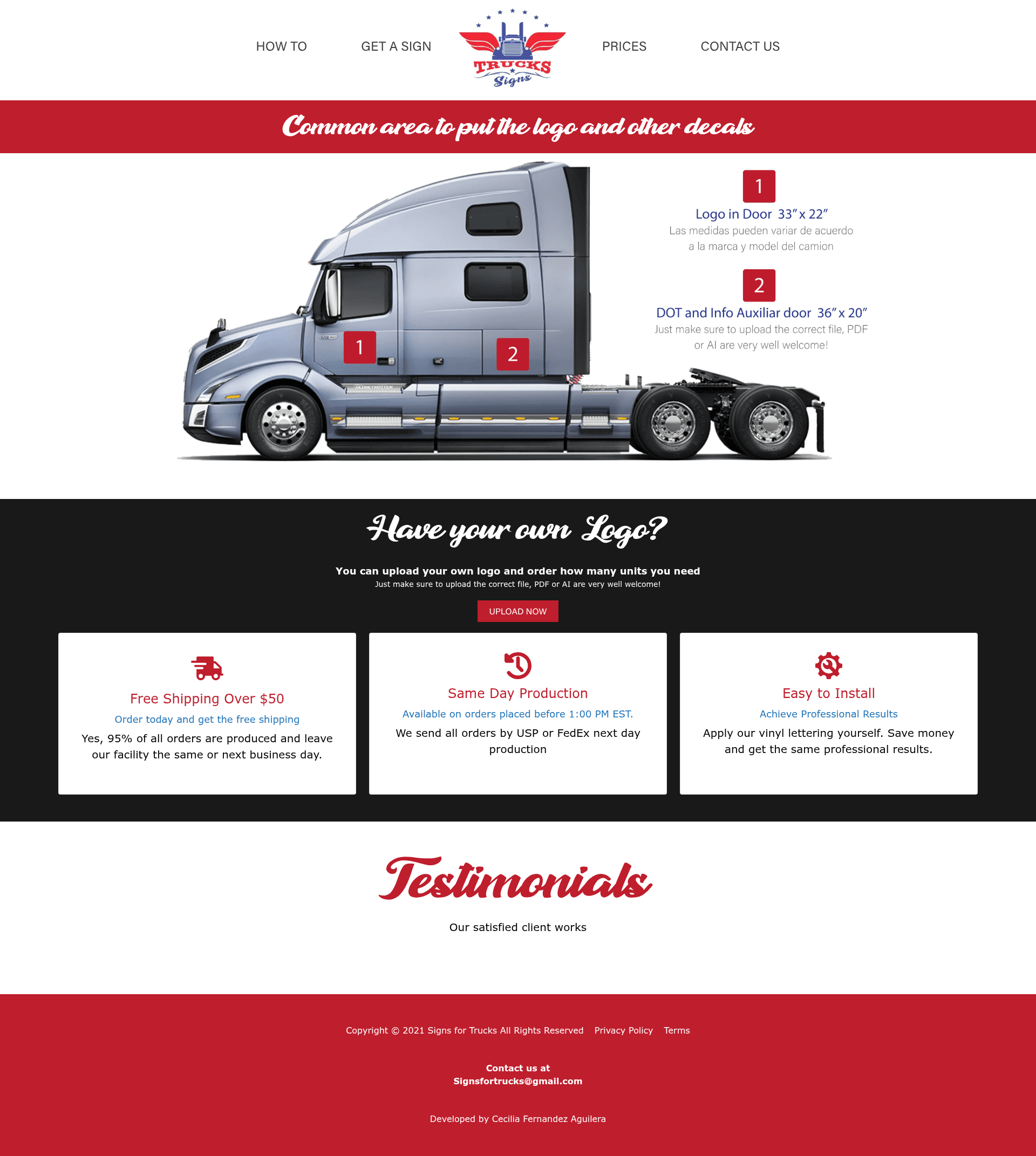
Signs for Trucks is an open-source ecommerce template for selling custom vinyl lettering for trucks, built as a Next.js frontend that connects to a Django REST API backend. This repository contains the frontend application only; the matching backend lives in the separate truck_signs_api repository. The store lets customers choose from pre-designed vinyls, upload their own image, add custom text lines, and pay through Stripe.
What is Signs for Trucks?
Signs for Trucks is an online store template that takes product and order data from a Django backend and renders a responsive shopping experience for custom truck vinyls. As input it receives customer selections such as a pre-designed vinyl or an uploaded image, lettering text, color, and payment details; as output it produces an order that the backend processes. The frontend runs on Next.js 12.1.0 and uses Bootstrap 5.0.2 for styling.
Key Features
- Pre-designed vinyl catalog — The store fetches products from the Django backend and displays them in a product grid; only items in the "Truck Sign" category appear, so admins must create that category first.
- Custom image upload — Clients can upload a PNG or JPG photo to use as a vinyl template, then proceed to the editing section.
- Vinyl editor — Customers add lettering lines, select a text color, leave custom instructions, and provide an email address for previews and contact before checkout.
- Stripe payments — Payment processing is integrated via Stripe; the customer's payment information is sent to the Django backend for processing and the vinyl moves to production.
- Responsive layout — The frontend is responsive with distinct mobile and desktop views, covering landing, logo grid, pricing grid, and detail pages.
- Django admin integration — The companion backend offers an admin panel where store owners manage categories and products, and the README includes screenshots of the admin views.
- Docker Compose support — Both docker-compose and a connect-file are provided so the frontend and API can be run together; the frontend serves on localhost:3000.
- Non-logo product options — Besides full truck vinyls, the store supports simple lettering vinyls, fire extinguisher vinyls, and single-number vinyls.
Who is it for?
- Truck vinyl shops — They can deploy this as a complete online storefront, customize the design, and start taking orders with Stripe without building an ecommerce platform from scratch.
- Full-stack developers — They can use the Next.js frontend and Django REST API as a reference implementation of a customizable product store, including image upload, order flow, and payment integration.
- Truck owners and fleet managers — They can order custom lettering by uploading a design or picking a pre-made vinyl, adding unit numbers, and paying online.
What can you do with Signs for Trucks?
- Truck owners: Upload your own logo or choose from pre-designed vinyls, then edit text and color to match your truck before ordering.
- Store operators: Add new products in the Django admin panel, and they appear automatically in the grid — no front-end code changes are needed for new vinyls.
- Custom jobs: Include precise instructions and a contact email with each order so the seller can send a preview or clarify details before production.
- Small product lines: Sell extras like fire extinguisher vinyls or number-only vinyls alongside the main truck signs.
How does Signs for Trucks work?
The ordering flow is three steps: first a customer selects a pre-designed vinyl or uploads their own image; second, they enter lettering lines, choose a text color, and add a comment and email; third, they pay via Stripe, after which the backend processes the order and the vinyl goes into production. The frontend reads a single environment variable, NEXT_PUBLIC_API_DOMAIN_NAME, to locate the backend API.
Technical stack and setup
The frontend uses Next.js 12.1.0 with Bootstrap 5.0.2, and is designed to pair with a Django 2.2.8 backend running Django REST Framework 3.12.4. Setup options include cloning the repo, installing dependencies with npm install, setting NEXT_PUBLIC_API_DOMAIN_NAME, and running npx next dev, or using Docker Compose with docker-compose up --build. The repo also documents how to clone and connect the Django backend API from the truck_signs_api repository.