Template details
SolidJS Tailwind Starter
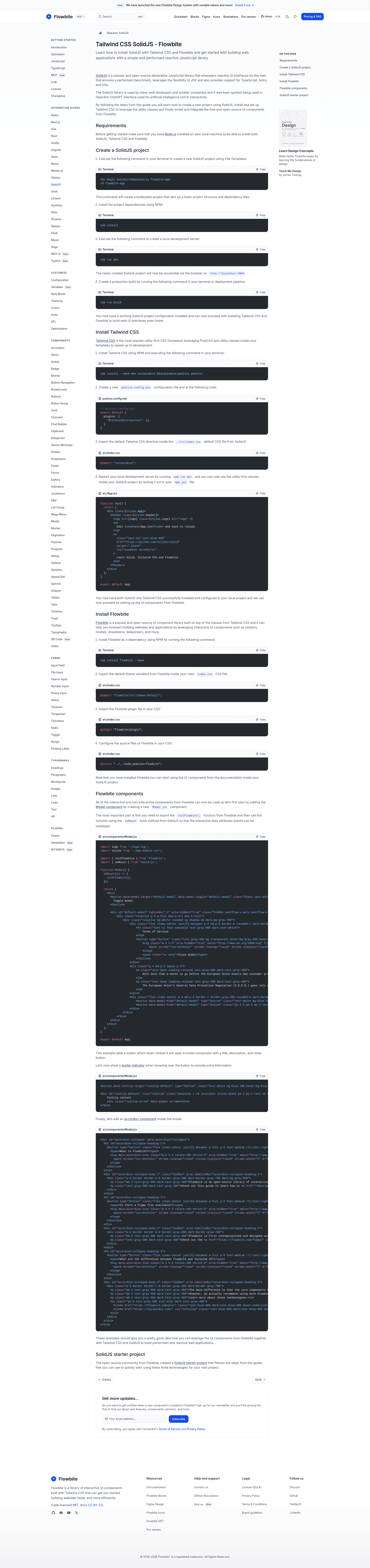
Free and open-source starter that combines SolidJS, Tailwind CSS, and Flowbite UI components with step-by-step setup.
About this template
SolidJS Tailwind Starter is a free and open-source boilerplate that scaffolds a SolidJS application, wires up Tailwind CSS via PostCSS, and integrates the Flowbite UI component library for interactive web interfaces.
What is the SolidJS Tailwind Starter?
It is a starter project and setup guide that accompanies Flowbite's official documentation for using SolidJS. The project takes terminal commands and CSS configuration files as inputs and produces a working SolidJS app with Tailwind utility classes and interactive Flowbite components such as modals, dropdowns, and navbars. The repository contains the full code examples, including an App.jsx that demonstrates Tailwind classes and a Modal.jsx component that calls initFlowbite() inside SolidJS's onMount hook.
Key Features
- Vite-based SolidJS boilerplate — Created with
npx degit solidjs/templates/js flowbite-app, it includes a local dev server athttp://localhost:3000vianpm run devand a production build commandnpm run build. - Tailwind CSS v4 setup — Installs
tailwindcss,@tailwindcss/postcss, andpostcssas dev dependencies, with apostcss.config.mjsthat loads the@tailwindcss/postcssplugin and asrc/index.cssthat imports thetailwindcssdirective. - Flowbite integration — Adds
flowbiteas a dependency, importsflowbite/src/themes/defaultin the CSS, registers theflowbite/plugin, and points the@sourcedirective to../../node_modules/flowbite. - Interactive component example — Includes a modal component that imports
initFlowbitefrom Flowbite and calls it inside theonMounthook from SolidJS, enabling click-to-open and click-to-close behavior. - Copy-paste commands — Every configuration step is presented as exact npm and shell commands, so the setup can be reproduced without guesswork.
Who is it for?
Developers already using SolidJS who want Tailwind CSS and Flowbite without reading separate tutorials. It is also a reference for Flowbite users who need the specific integration steps for SolidJS, since Flowbite's docs cover React, Vue, and Svelte alongside this one. Finally, it serves as a learning resource for beginners who want to understand how utility-first CSS and a component library plug into a Vite-based SolidJS project.
What can you do with the SolidJS Tailwind Starter?
- Prototype a SolidJS interface — Scaffold the project, open the dev server, and immediately start using Tailwind classes and Flowbite components like modals and navbars.
- Build a production-ready front end — Run
npm run buildto generate an optimized bundle from the configured SolidJS + Tailwind + Flowbite stack. - Learn the integration pattern — Follow the exact commands and CSS imports to see how Tailwind v4 and Flowbite are configured in a modern SolidJS project.
How does it work?
The guide is a sequence of shell commands and file edits. First, it creates a project directory with degit, installs dependencies, and starts the dev server. Then it installs Tailwind and PostCSS, writes a postcss.config.mjs, and imports tailwindcss in src/index.css. Finally, it installs Flowbite, adds the theme import, plugin, and source path, and shows how to call initFlowbite() inside a component's onMount hook.