Template details
Split
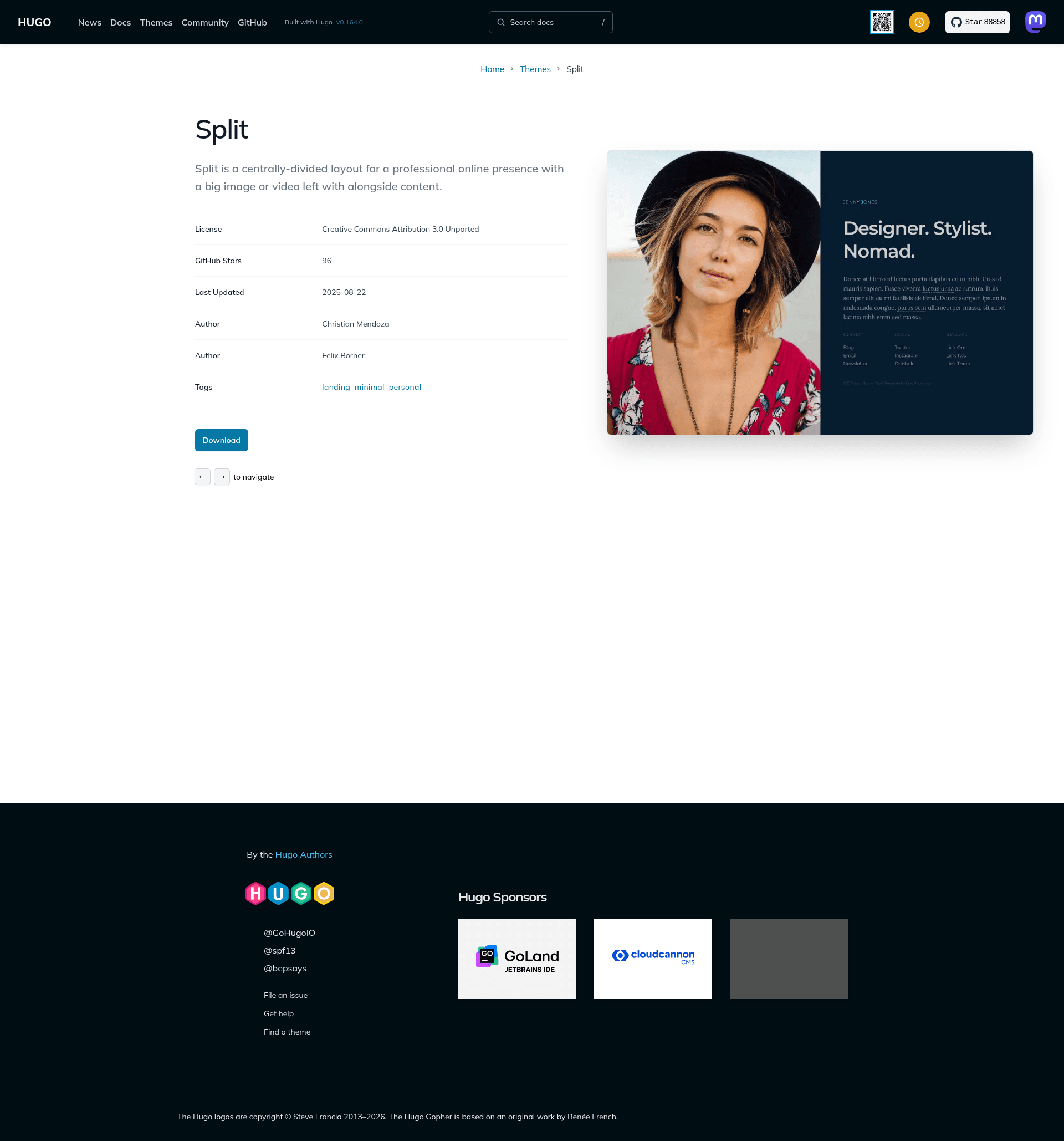
Single-page Hugo theme with a centrally-divided layout: large image or video left, personal content right.
About this template
Split is a single-page Hugo theme that creates a centrally-divided online presence with a large image or video on the left and personal content on the right. It is a port of the Split template by One Page Love, maintained by developer christianmendoza on GitHub.
What is Split?
Split is a Hugo theme built for a professional online presence. It takes configuration in a TOML file and renders a static single page with two halves: a visual section that displays either a background image or a looping video, and a content section that shows your name, tagline, bio, and link lists. As a Hugo theme, it requires Hugo to generate the final site; the source code lives in the repository christianmendoza/hugo-split-theme.
Key Features
- Image or video visual section — The left half can show an image with configurable CSS position, or an autoplaying, looping video that can be either self-hosted (MP4) or embedded from YouTube via a video ID.
- Configurable content block — The right half displays name, tagline, and a bio that supports Markdown links, all set from the config.toml file.
- Up to three link lists — The links section supports up to three columns, each with a heading and any number of text/URL pairs, suitable for Connect, Follow, or Contact links.
- Social sharing metadata — Config fields for name, description, shareImage, and twitterHandle improve how the page appears in search results and social media embeds.
- Google Analytics integration — Add a tracking ID to the config to enable analytics on the single page.
- Custom favicon and copyright — Replace the included favicon.ico and set a copyright line in the config.
- Based on Hugo — The theme uses Hugo's static site generation, requiring no database or server-side runtime; the exampleSite provides a starting config.
- Open-source license — Released under Creative Commons Attribution 3.0, with an optional paid license to remove the attribution requirement.
Who is it for?
- Freelancers and professionals — Use Split to create a one-page personal landing site that introduces who you are and links to your portfolio, blog, or contact methods.
- Designers and creatives — Showcase a large portfolio image or video as the visual centerpiece next to a short bio and social links.
- Developers — Use Split as a fast, minimal Hugo starter for a personal homepage; the simple TOML config makes it easy to redeploy with different images and links.
- Job seekers — Build an online business card-style page with a professional photo or introductory video plus links to résumé and LinkedIn.
What can you do with Split?
- Create a link-in-bio page: Set your name, tagline, and up to three link columns to point visitors to your social profiles, newsletter, and website.
- Present an intro video: Use a self-hosted MP4 or a YouTube ID to show a looping background video that plays muted or with sound.
- Set up a personal brand page in minutes: Clone the theme, edit config.toml, and run hugo server to preview locally before deploying.
- Prepare a shareable presence: Configure shareImage and twitterHandle so links show a preview card on social media.
How does Split work?
The theme is installed by cloning the repository into Hugo's themes folder. After copying the exampleSite config.toml to the site root, you edit the TOML values: enable the visual image or video, set file paths or a YouTube ID, and add your personal content and links. Run hugo server to preview at localhost:1313, and hugo to build a static site for deployment.
Pricing
Split is free to use under the Creative Commons Attribution 3.0 License, which requires keeping the original attribution link. A paid license option is offered through the template author's website for those who want to use the design without attribution.
FAQ
Is Split free?
Yes. The theme is released under Creative Commons Attribution 3.0, meaning you can use and modify it freely as long as you retain the attribution link. A paid commercial license is available via the One Page Love website to remove that requirement.
How do I use a YouTube video instead of an image?
In config.toml, disable the image by setting its enable value to false, enable the video section, and add the YouTube video ID to the youtubeId field while removing any file value. The theme will embed and autoplay that video as the left-half visual.
How many link lists can I have?
You can define up to three link lists in the links configuration. Each list has a heading and an array of link text and URL pairs. Unused lists can simply be removed from the config.
Does Split support Google Analytics?
Yes. Add your tracking ID to the googleAnalytics field in config.toml, and Hugo will include the analytics snippet on the generated page.
What do I need to run Split?
You need Hugo installed on your machine. After cloning the theme into the themes directory, copy the example config and run hugo server locally. No database or build step beyond Hugo is required.