Template details
Stardrive
Production-ready Astro boilerplate with TypeScript, TailwindCSS, WebMCP, SEO, i18n, and AI-agent-friendly setup.
About this template
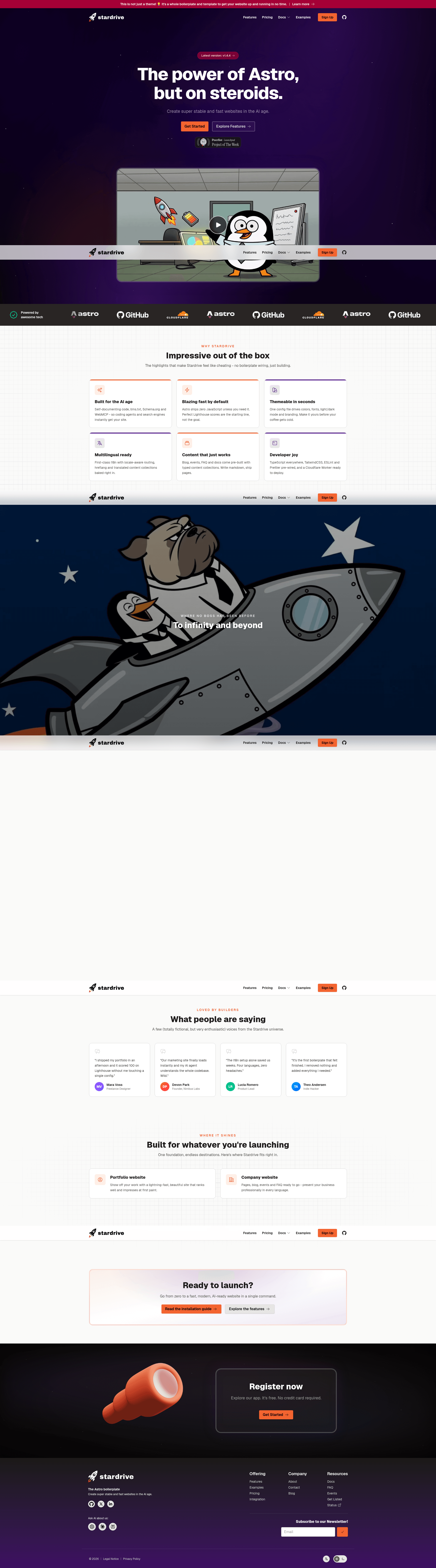
Stardrive is an opinionated Astro boilerplate that generates a production-ready, AI-agent-friendly website skeleton with TypeScript, TailwindCSS, and Cloudflare deployment baked in. It was created by Jens Kuerschner of Peltmonger Ventures GmbH and is licensed under the MIT License.
What is Stardrive?
Stardrive is an opinionated boilerplate for the Astro framework, created by Jens Kuerschner (Peltmonger Ventures GmbH). It takes a fresh Astro project and turns it into a fully configured website with pre-built pages (home, about, pricing, blog, events, FAQ, docs, contact), i18n, SEO, accessibility, and AI-agent tooling. The project runs on Astro with static site generation by default and is optimized for Cloudflare Workers, with on-demand rendering available for selected content collections.
Key Features
- LLM-friendly by design — The repo ships with AGENTS.md, a .ai folder containing SETUP.md and a TRIMMING_GUIDE.md, so AI agents can configure the whole project from a single prompt.
- WebMCP + llms.txt — An experimental webmcp-tools.astro component exposes tools to visitors' AI agents, and a build script (generateLLMFiles.js) auto-populates llms.txt from your content.
- Schema.org structured data — JSON-LD for the website and articles is auto-generated from the src/components/structured folder.
- Full TypeScript — The entire codebase is typed end to end, with tsconfig, ESLint, and Prettier preconfigured.
- TailwindCSS styling — Utility-first CSS is configured in src/styles/tailwind.config.css, where you set fonts, brand colors, and breakpoints.
- Blog engine — Markdown articles get an auto-generated table of contents, optimized YouTube embeds, external-link auto-highlighting, reading-time calculation, RSS feed, and auto-generated social preview images.
- Events — Markdown-driven and i18n-ready events include one-click Add to Calendar buttons, time zones, and an optional bridge to Add to Calendar PRO via API key.
- Cloudflare-ready — Includes wrangler.jsonc, worker-configuration.d.ts, a cache-purge script, and public/_headers and _redirects files for edge deployment.
Who is it for?
- Developers who want a production-ready Astro starter — skip the first setup steps and get security headers, meta tags, SEO defaults, and accessibility already in place, then replace the demo content.
- Teams using AI coding agents — the documentation is written for AIs, so an agent can read AGENTS.md and SETUP.md and run the suggested kick-off prompt to reconfigure the project.
- Startups launching marketing sites — the included pricing table, blog, events, FAQ, and contact pages cover standard SaaS site needs without building from scratch.
- Agencies building multi-language client sites — i18n JSON files, per-language content folders, and a language switcher reduce translation setup.
What can you do with Stardrive?
- Launch a SaaS landing page: use the pre-built pricing table with monthly/annual/lifetime toggles, tax display options, and a typed plan config that supports hard-coded or API-fed prices from Paddle or Stripe.
- Publish a blog: write Markdown articles in src/content/articles and get table of contents, reading time, social preview images, RSS, categories, and tags automatically.
- Run an event listing: write Markdown event files with add-to-calendar buttons and timezone support, or connect Add to Calendar PRO via an API key for external event management.
- Create a docs site: use the included docs routes (index, guide, configuration) and the long-text-content.css for text-heavy pages like privacy policies.
How does Stardrive work?
Stardrive is installed via the CLI command npm create stardrive@latest (or pnpm, yarn, and bun variants), which scaffolds a new project and runs an installer that adjusts the boilerplate. The central configuration lives in theme.config.ts, where you set site URL, brand color, languages, blog settings, promo slots, and llms.txt generation. A 21-step guide walks through replacing favicons, fonts, images, content, and deploying to Cloudflare via wrangler, including disabling Speed Brain to avoid conflicts with Astro's prefetching.
FAQ
Is Stardrive free to use?
Stardrive is licensed under the MIT License, so it is free to use and modify, including for commercial projects. The repository is public on GitHub.
What hosting works best with Stardrive?
The boilerplate is optimized for Cloudflare Workers, with wrangler.jsonc and a cache-purge script included. Any hoster works for static files, but on-demand rendering requires an Astro server adapter for non-Cloudflare hosts.
Can Stardrive be used with any package manager?
Yes, npm, pnpm, yarn, and bun are supported. The docs note that bun also works as long as Node is installed as well.
Does Stardrive include dark mode?
Yes, it includes automatic light/dark mode based on the user's device, with a manual toggle, plus a dynamic favicon SVG that handles both modes.