Template details
Zendesk Garden Jekyll Theme
Jekyll theme based on Zendesk Garden
About this template
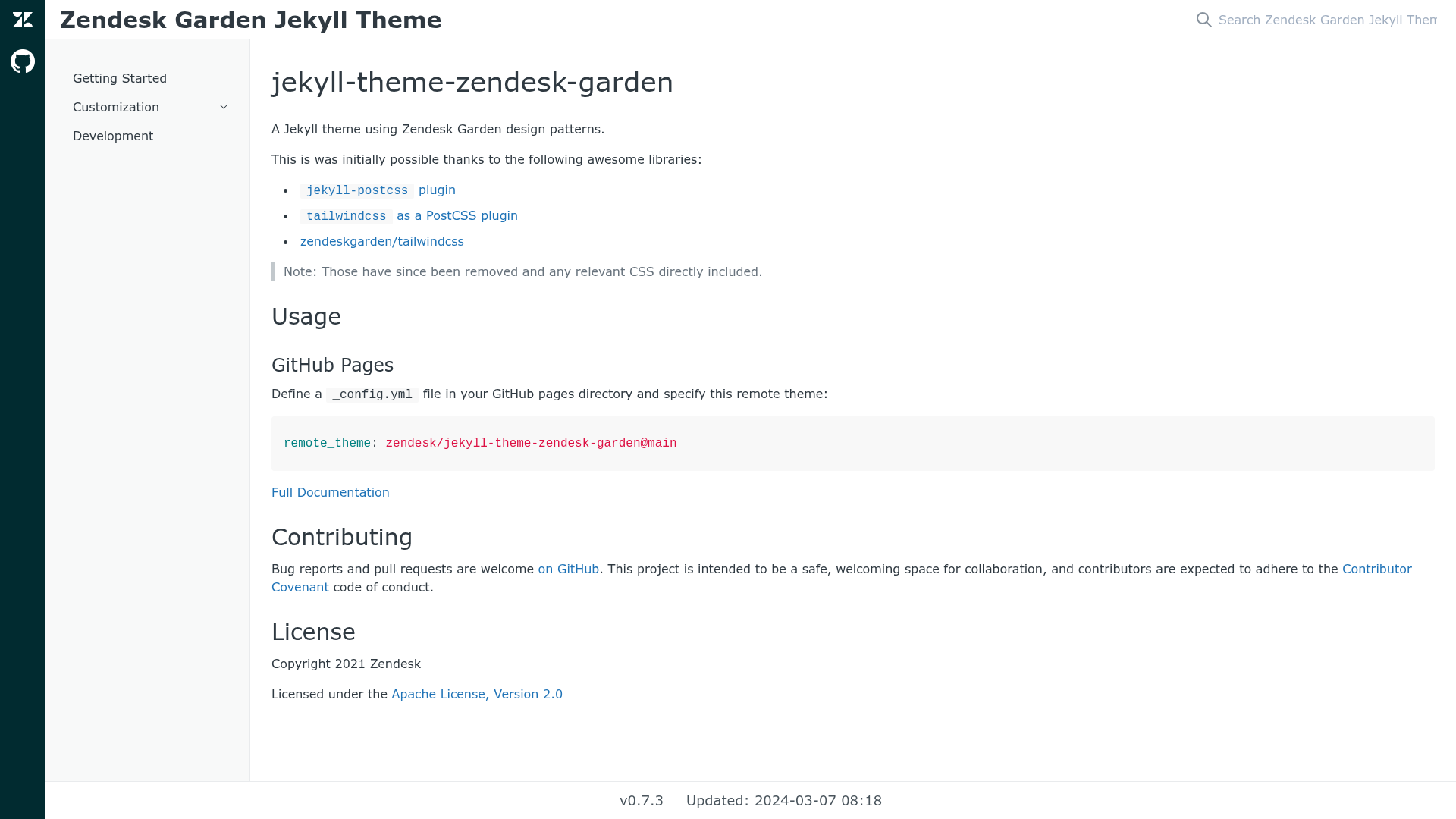
The Zendesk Garden Jekyll Theme (jekyll-theme-zendesk-garden) is a Jekyll theme that applies Zendesk Garden design patterns to GitHub Pages sites, producing a static documentation or blog site from Markdown content. It is published by Zendesk and distributed as a remote theme, so you can adopt it by adding one line to a _config.yml file.
What is the Zendesk Garden Jekyll Theme?
The Zendesk Garden Jekyll Theme is a Jekyll theme created by Zendesk that applies the Zendesk Garden design system to static sites hosted on GitHub Pages. It takes Markdown content and a _config.yml file as input and generates a styled static HTML site, using the default layout. The theme is installed as a remote theme, meaning GitHub Pages builds it for you without needing a local Jekyll installation. It is open source under the Apache License 2.0 and maintained on GitHub.
What makes the Zendesk Garden Jekyll Theme stand out?
- Zendesk Garden design patterns — The theme is built around Zendesk Garden, the design language used across Zendesk products, giving sites a familiar, product-consistent look.
- Remote theme installation — Add
remote_theme: zendesk/jekyll-theme-zendesk-garden@mainto your_config.ymland GitHub Pages handles the rest, with no local build toolchain required. - Markdown-driven content — Content is authored as standard Jekyll pages and posts, so you can focus on writing instead of styling.
auto_titlefront matter option — The theme's_config.ymlexample includesauto_title: false, letting you suppress automatic page titles when you want full control.- No PostCSS or Tailwind dependency — The theme originally relied on the
jekyll-postcssplugin and Tailwind CSS via PostCSS, but those were removed and the required CSS is now directly included, simplifying builds. - Open contribution model — Hosted on GitHub with bug reports and pull requests welcome, guided by the Contributor Covenant code of conduct.
Who should use the Zendesk Garden Jekyll Theme?
- Jekyll site owners — who want a ready-made theme with a polished look instead of building layouts from scratch.
- Zendesk ecosystem developers — who are building companion sites, docs, or tools and want them to match Zendesk Garden styling.
- GitHub Pages users — who prefer a remote theme workflow where pushing to a repository triggers a build without local setup.
What can you do with the Zendesk Garden Jekyll Theme?
- Create project documentation: Structure Markdown files in a
docsfolder, configure the remote theme, and publish a styled documentation site on GitHub Pages. - Launch a personal blog: Use Jekyll's post system to publish blog entries, each rendered with the Garden-themed layout automatically.
- Build a product landing page: Create a simple marketing page with Markdown and front matter, relying on the default layout to apply consistent styling.
How does the Zendesk Garden Jekyll Theme work?
To use the theme, create a _config.yml file in your GitHub Pages directory and add the line remote_theme: zendesk/jekyll-theme-zendesk-garden@main. Then push your repository to GitHub; GitHub Pages compiles the Jekyll site, applying the theme's layouts and CSS to your Markdown content automatically. The full documentation is available at https://zendesk.github.io/jekyll-theme-zendesk-garden/.
Pricing
The theme is free and open source, distributed under the Apache License 2.0. There is no paid tier; you can use it on any GitHub Pages site.
Alternatives
- minima — the default Jekyll theme that ships with new sites, offering a simpler, unopinionated layout and broad plugin compatibility.
FAQ
Is the Zendesk Garden Jekyll Theme free?
Yes. The theme is open source and licensed under the Apache License 2.0, so you can use, modify, and distribute it free of charge. Attribution is required per the license terms.
How do I install the Zendesk Garden Jekyll Theme?
Add remote_theme: zendesk/jekyll-theme-zendesk-garden@main to your _config.yml file in the GitHub Pages directory. When you push the repository, GitHub Pages builds the site with this theme. Full setup instructions are in the theme's documentation page.
Does this theme still use Tailwind CSS?
No. The original version used the jekyll-postcss plugin and Tailwind CSS via PostCSS, but those dependencies have been removed. The theme now directly includes the relevant CSS, so you don't need to configure PostCSS or Tailwind for builds.
What is Zendesk Garden?
Zendesk Garden is the design system created by Zendesk, containing design guidelines, components, and styling patterns. This Jekyll theme applies Garden's visual patterns to a static site, giving it a look consistent with Zendesk products.
Who maintains the theme?
Zendesk maintains the theme on GitHub at https://github.com/zendesk/jekyll-theme-zendesk-garden. Bug reports and pull requests are welcome, and all contributors are expected to follow the Contributor Covenant code of conduct.