Template details
Tail
Jekyll blog theme, designed for better writing workflow
About this template
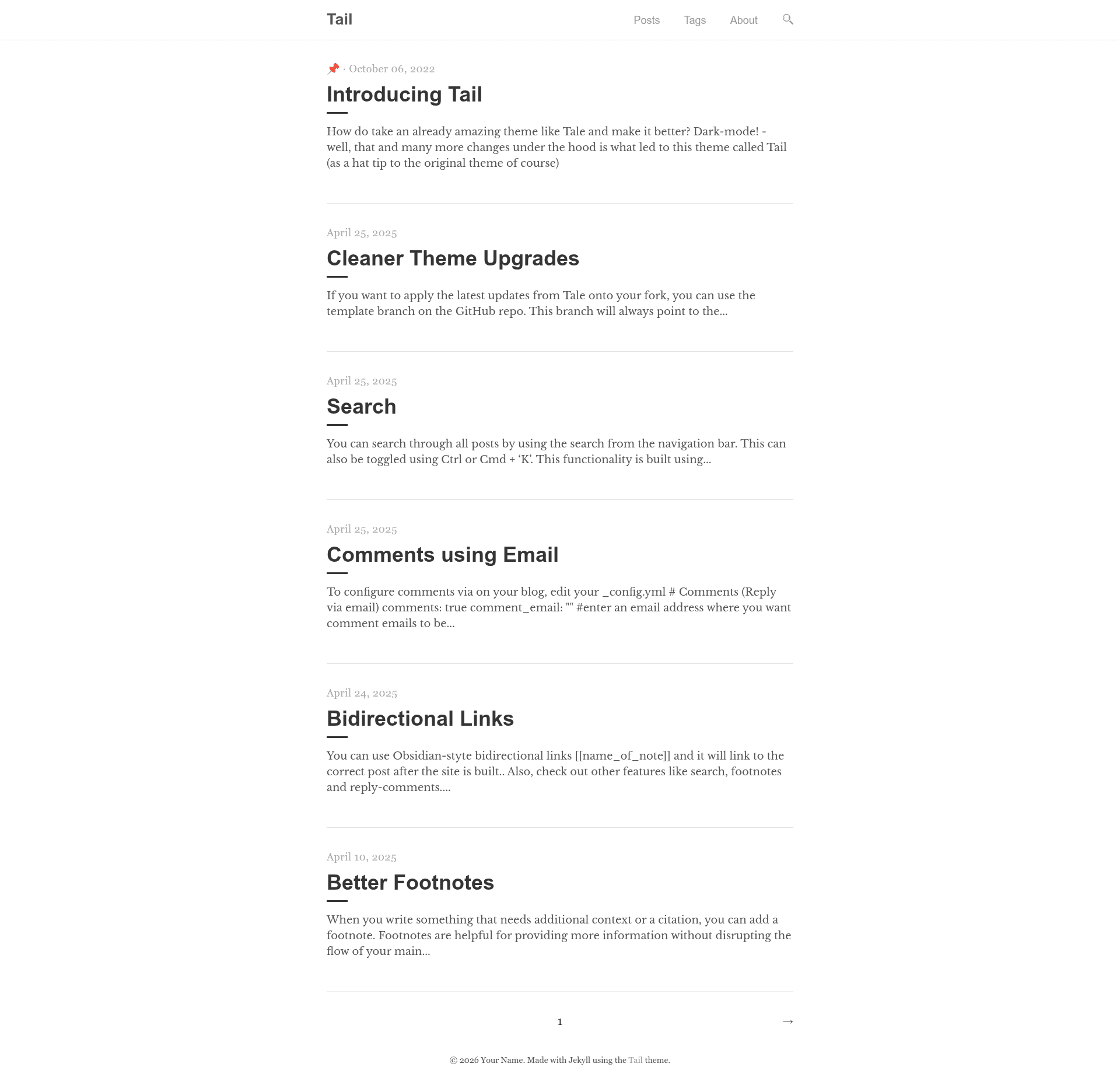
Tail is a minimal Jekyll blog theme, forked from Tale, that adds dark mode, Pagefind-powered search, and Obsidian-compatible wiki-style linking to make publishing a blog from existing markdown files faster.
What is Tail?
Tail is a static blog theme built on Jekyll, the Ruby-based site generator, and distributed as a GitHub repository by Jitinnair1. It takes markdown posts from the _posts folder and renders a responsive blog site with pagination, tags, and excerpt management. As a fork of Tale, it keeps the clean typography of the original theme while introducing under-the-hood improvements aimed at writers who already maintain notes in markdown.
Key Features
- Dark Mode — Tail ships with a built-in dark mode, letting readers switch between light and dark appearances without a plugin.
- Posts without dates in filenames — Unlike standard Jekyll, Tail accepts posts whose filenames do not start with
YYYY-MM-DD, so you can publish files with just a slug. - Pagefind search — Search is implemented with Pagefind, a static-search library that indexes the generated site without requiring a server or external service.
- Popup Footnotes — Footnotes render in a popup near the text, so readers do not need to jump to the page bottom.
- Obsidian-compatible wiki-style links — Tail supports bi-directional
[[wikilinks]]that work with Obsidian, making it possible to move notes directly from an Obsidian vault into the blog. - Comments via Email — Instead of a third-party comment service, Tail lets readers send comments by email, which the author can moderate manually.
- GitHub Pages compatibility — The theme works out of the box with GitHub Pages, so you can publish by pushing to a repository that uses Jekyll builds.
- Pagination and sticky posts — Posts can be pinned to the top of the listing, and the blog automatically paginates older entries.
- Responsive design — The layout adapts to mobile and desktop screens, similar to the original Tale theme.
Who is it for?
- Writers with existing markdown notes — Anyone who keeps a folder of
*.mdfiles can drop them into_posts, adjust_config.yml, and have a working blog without converting content. - Obsidian users — People who write in Obsidian and want to publish the same notes can keep their internal links working because Tail understands wiki-style links.
- GitHub Pages users — Developers who want a free, low-maintenance blog hosted on GitHub Pages will find Tail compatible with the platform's Jekyll build pipeline.
What can you do with Tail?
- Publish an Obsidian vault — Copy notes that use
[[wikilinks]]into the_postsfolder, and Tail will render them with the links intact. - Launch a personal blog quickly — Fork the repository, edit
_config.yml, and add a few markdown files; there is no build configuration or database setup required. - Maintain a privacy-friendly comment system — Use the email-based comment feature to collect feedback without relying on Disqus or similar embeddable services.
How does Tail work?
- Fork the Tail repository on GitHub.
- Copy your
*.mdfiles into the_postsfolder. - Make changes to
_config.ymlsuch as the site title and author. - Push to a GitHub repository that has Jekyll enabled, and GitHub Pages builds the static site automatically.
Pros and cons
- Pros: Free and open source; supports dark mode; works with GitHub Pages; has built-in search via Pagefind; and lets you reuse Obsidian-style links.
- Cons: Comments rely on email, which means there is no native threaded discussion area; and you need a GitHub account and basic Jekyll familiarity to set it up.
Alternatives
- Tale — the original theme Tail is forked from, which lacks dark mode, Pagefind search, and wiki-link support.
FAQ
How do I install Tail?
Fork the repository on GitHub, then copy your existing *.md files into the _posts directory. After editing _config.yml to match your site, push the changes to a GitHub repository configured with Jekyll, and GitHub Pages will build the site.
Can Tail show posts without dates in filenames?
Yes, Tail accepts posts whose filenames do not begin with YYYY-MM-DD. This is different from standard Jekyll, which usually requires the date prefix to parse post dates.
Does Tail support Obsidian wiki-style links?
Yes, Tail supports bi-directional wiki-style linking compatible with Obsidian, so you can keep [[wikilinks]] and have them render as links in the blog.
How does search work in Tail?
Search is powered by Pagefind, a static search library. Pagefind indexes the generated HTML files and provides a search UI without needing a server, a database, or an external search service.
How can readers comment on a Tail blog?
Tail uses comments via email: readers send an email to the address you configure, and you moderate those messages manually. There is no built-in comment engine like Disqus.