Template details
tailwind-rails-starter
A free and open-source starter project to help you get started with the core Flowbite Library components and Ruby on Rails.
About this template
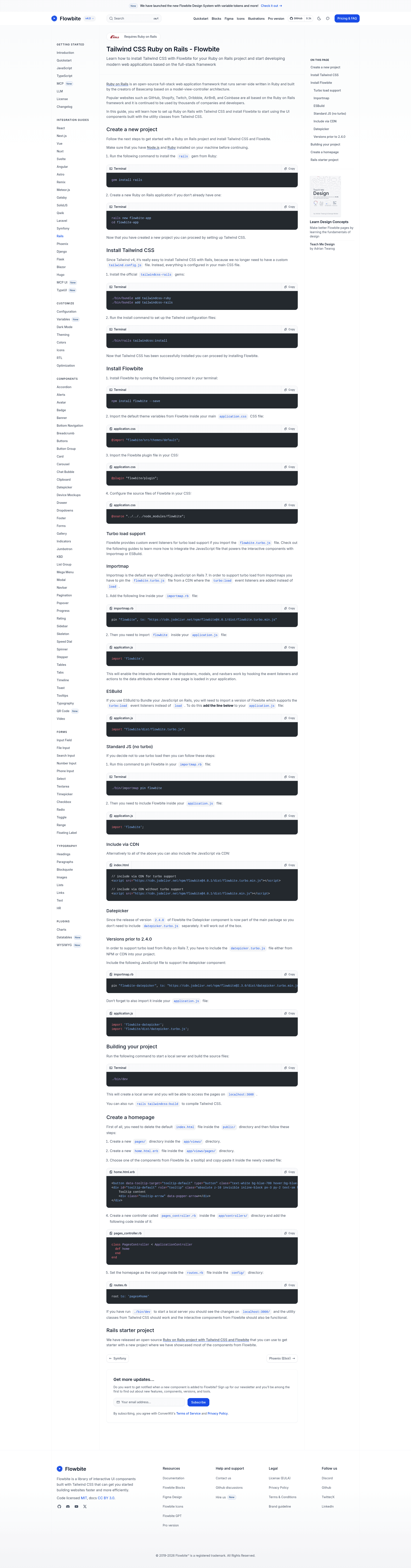
The Flowbite Ruby on Rails starter, also known as tailwind-rails-starter, is a free, open-source boilerplate that scaffolds a Rails application with Tailwind CSS v4 and the Flowbite UI component library, giving you prebuilt interactive components without writing custom JavaScript.
What is the Flowbite Rails starter?
This starter project combines Ruby on Rails, Tailwind CSS, and Flowbite. It is distributed through a GitHub repository (13 stars) and documents a step-by-step setup: create a new Rails app, install Tailwind via the official tailwindcss-rails gem, then install Flowbite with npm and import its theme and plugin. The output is a Rails application where Tailwind utility classes and Flowbite interactive components work together out of the box.
Key Features
- Rails 7 + Tailwind v4 — Uses the official tailwindcss-rails gem; no custom tailwind.config.js is needed since all configuration lives in your main CSS file.
- Flowbite component library — Provides UI components (dropdowns, modals, navbars) built on Tailwind utility classes, activated by data attributes.
- Turbo load support — Includes a special flowbite.turbo.js file that listens for the turbo:load event instead of load, making components work across page navigations in Rails 7.
- Flexible JavaScript loading — Supports three integration paths: importmap (default in Rails 7), ESBuild, and plain CDN inclusion.
- Datepicker included — Since Flowbite v2.4.0, the datepicker component is part of the main package and requires no separate file.
- Simple build commands — Run ./bin/dev to start a local server at localhost:3000, or rails tailwindcss:build to compile CSS only.
Who is it for?
- Rails developers building admin panels, dashboards, or content-rich sites who want a head start on the front-end.
- Tailwind CSS users who want a verified setup pairing Tailwind v4 with Rails without hand-editing config files.
- Prototypers who need interactive UI quickly and prefer using Flowbite's data-attribute-driven components over writing JavaScript.
What can you do with the Flowbite Rails starter?
- Build interactive Rails interfaces: Add dropdowns, modals, and navbars that initialize on turbo:load and stay functional during page updates.
- Rapidly prototype a web app: Scaffold a new Rails project, then apply Tailwind classes and Flowbite components to pages without a build tool like Webpacker.
- Add a datepicker without extra dependencies: On Flowbite 2.4.0+, the datepicker works immediately after the main Flowbite script is imported.
How does the installation work?
The setup is a four-step process: (1) install the rails gem and create an app with rails new flowbite-app; (2) add tailwindcss-ruby and tailwindcss-rails gems and run rails tailwindcss:install; (3) install Flowbite with npm and import its theme, plugin, and source paths into your CSS; (4) import the Flowbite JavaScript either through importmap, ESBuild, or CDN. For Turbo apps, you must use the flowbite.turbo.js variant.
FAQ
Is the Flowbite Rails starter free?
Yes. The repository metadata describes it as "free and open-source." There are no paid tiers or licensing fees mentioned, and it is hosted as a public GitHub project.
How do I install Flowbite in a Rails app?
You need to install the tailwindcss-rails gem, run the Rails Tailwind installer, then add Flowbite via npm. In your application.css, import the Flowbite theme, plugin, and source files, and in your application.js import the Flowbite JavaScript. The page details commands for each step.
Does the starter support Rails Turbo?
Yes. Flowbite ships a flowbite.turbo.js file with custom event listeners for the turbo:load event. You can pin it via importmap, import it through ESBuild, or load it from a CDN. This ensures components initialize correctly when Turbo navigates between pages.