Template details
Tanka
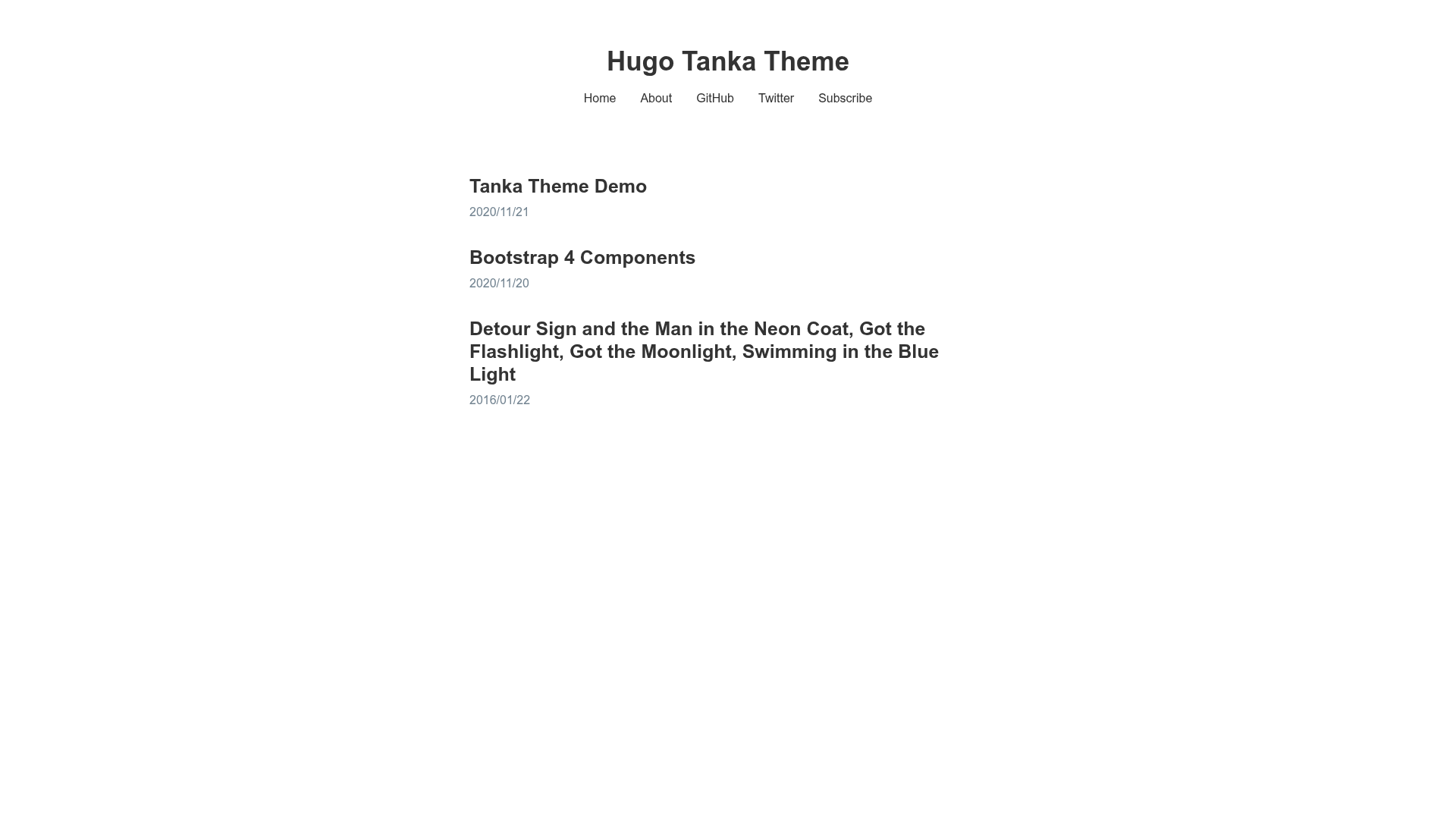
A minimalist Hugo/blogdown theme with Bootstrap 4, MathJaX, and zero tracking.
About this template
Tanka is a minimalist Hugo theme for blogs and blogdown sites, built for fast, text-focused publishing.
What is Tanka?
Tanka is a minimalist theme for the Hugo static site generator and blogdown, the R package that builds Hugo sites from R Markdown. It renders a responsive, mobile-first blog layout using Bootstrap 4 as its styling foundation, with the layout ported and modified from the Black & Light theme by David Hamp-Gonsalves. The theme is maintained by nanxstats on GitHub, released under GPLv3, and has 86 stars. A live preview is available at nanx.me/hugo-tanka.
Key Features
Tanka packs a set of practical features into a lightweight design, with no build step beyond standard Hugo processing.
- Minimalist, text-oriented design — The repository describes the theme as "text-oriented and performant," meaning the layout prioritizes reading by reducing visual clutter and site weight.
- Responsive via Bootstrap 4 — The theme uses the Bootstrap 4 grid, making it mobile-first without requiring custom CSS frameworks or JavaScript dependencies.
- Math typesetting with MathJaX — Include LaTeX-style math in your Markdown or R Markdown posts; MathJax renders it in the browser for scientific writing.
- Syntax highlighting with highlight.js — Code blocks are highlighted client-side by highlight.js, supporting many programming languages without server-side processing.
- Utterances comments — Comment threads are powered by Utterances, which stores comments as GitHub Issues. Readers with a GitHub account can leave comments without a separate database.
- Open Graph and Twitter Cards meta tags — The page head includes structured metadata so shared links display rich previews on social platforms.
- Zero web tracking by default — No analytics scripts, tracking pixels, or external telemetry are bundled, making the theme privacy-friendly out of the box.
- Native font stack — The theme uses system fonts, avoiding font downloads and improving loading speed.
Who is it for?
Tanka is aimed at bloggers and technical writers who use Hugo or blogdown and want a clean, fast theme without extra scripts.
- R users / statisticians — Publish reproducible research notes or tutorials by writing R Markdown files and building the site with blogdown.
- Academic writers — Post lecture notes, papers, or math-heavy content, since MathJaX renders LaTeX math natively.
- Privacy-conscious individuals — Run a personal blog with zero tracking by default, while still getting social sharing meta tags.
- Developers — Maintain a simple Hugo blog with built-in syntax highlighting and GitHub-issues comments, using the exampleSite config as a starting point.
What can you do with Tanka?
The theme supports several concrete workflows that leverage its feature set.
- R Markdown publishing: Use blogdown to create a Tanka site inside RStudio, then render
.Rmdfiles into blog posts with code highlighted by highlight.js. - Math documentation: Write math formulas in posts and have them displayed via MathJaX, useful for engineering or scientific blogs.
- GitHub-based commenting: Enable Utterances to let readers comment using GitHub accounts, storing all comments as issues in your repository.
- Privacy-focused blogging: Launch a personal blog with no analytics or trackers, relying only on the built-in Open Graph and Twitter Cards for sharing.
How does Tanka work?
The theme is installed as a Git submodule into the themes folder of a Hugo site. After installation, you copy the exampleSite config.toml as a reference, then write content in Markdown (or R Markdown for blogdown) and run Hugo to generate the static site. The design and features are configured through the standard Hugo config file, so no special command or build tool is required beyond Hugo itself.
FAQ
Is Tanka free?
Yes. Tanka is released under the GPLv3 license, so you can use, modify, and redistribute it freely, including for commercial projects, as long as derivative work remains under GPLv3.
Does Tanka work with blogdown?
The repository description explicitly states it is designed for Hugo/blogdown. It is commonly used by R users who build websites from R Markdown via the blogdown R package.
How do I install Tanka?
Run the command git submodule add https://github.com/nanxstats/hugo-tanka.git themes/hugo-tanka inside your Hugo site folder, then copy the config.toml from the exampleSite to your site root.
Does Tanka include comment support?
Yes. Tanka supports Utterances comments, which are based on GitHub Issues. To enable it, you must link the theme to a GitHub repository; readers need a GitHub account to comment.
What styling system does Tanka use?
Tanka uses Bootstrap 4 for its responsive grid and a native font stack for text. It does not include a CSS preprocessor or custom icon set, keeping the generated pages lightweight and fast.