Template details
Jekyll Podcaster
A Jekyll theme for podcasters to showcase their show with episode posts, audio player, and social links.
About this template
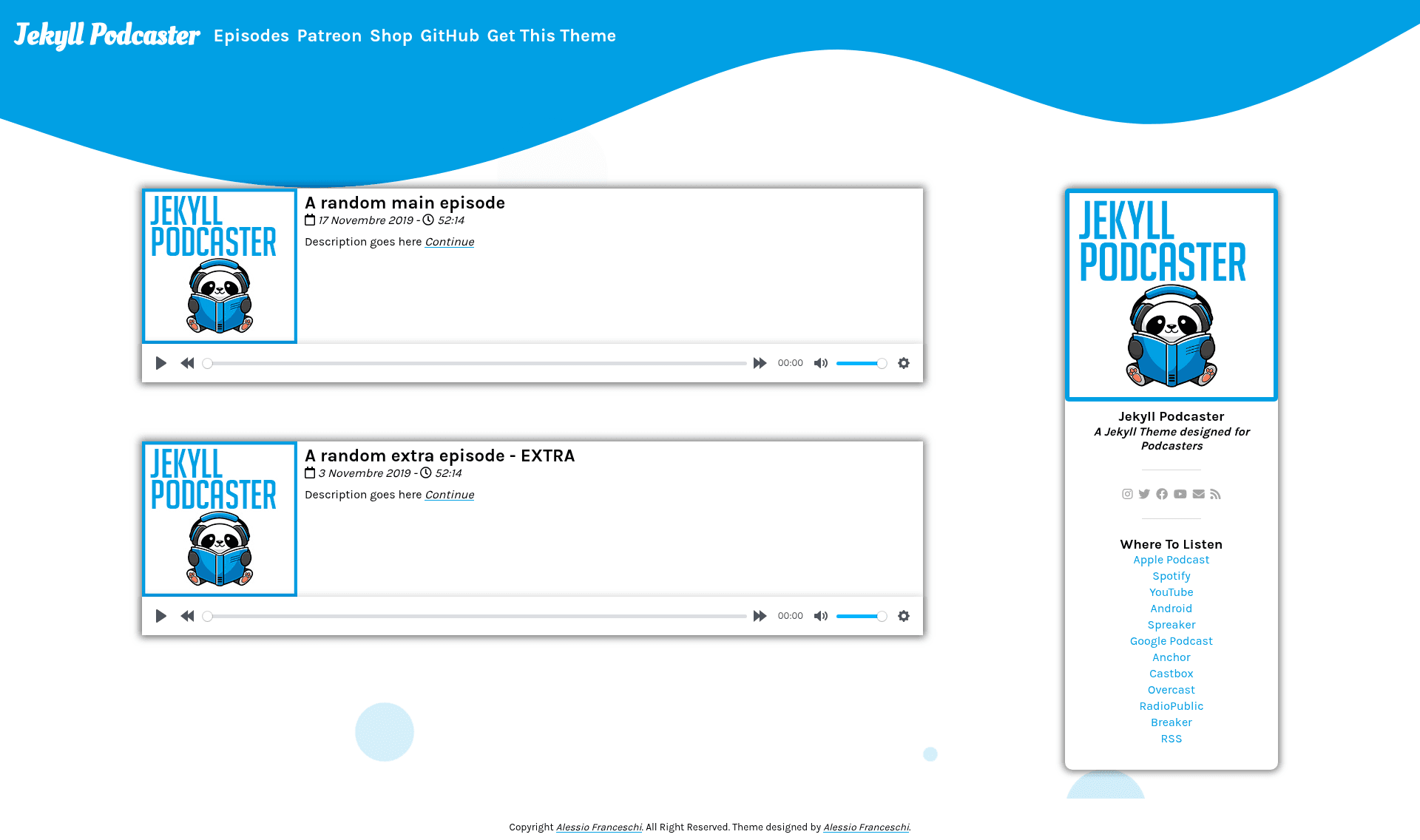
Jekyll Podcaster is an open-source Jekyll theme built specifically for podcasters to showcase their show, with episode posts, a custom audio player, and social links — but no RSS feed generation.
What is Jekyll Podcaster?
Jekyll Podcaster is a free, MIT-licensed Jekyll theme designed and maintained by Alessio Franceschi (GitHub: PandaSekh). It takes ordinary Jekyll posts as podcast episodes and renders them through podcast-specific layouts, including a homepage, post pages, and a sidebar. The theme runs on any standard Jekyll setup and can be deployed through Netlify, GitHub Pages, a remote theme, or as a gem installed via Bundler. A key caveat stated in the documentation: this theme does not build an RSS feed for your podcast, so it only showcases the show and you still need a distribution platform for actual audio delivery.
Key Features
- Episode posts — Write each episode as a standard Jekyll post; the theme renders it with a podcast-oriented layout and an optional shownotes include.
- Built-in audio player — The
_includes/playerjs.htmlinclude embeds a customizable player; its labels can be translated. - Centralized settings —
_data/settings.ymlcontrols Disqus comments (via shortname), month translation for dates, and adds a shownotes block to every episode. - Social and sidebar links — Add links next to the podcast title and in the sidebar; each social link has a Font Awesome type (
fasfor solid,fabfor brand) and a configurable color insidebar.css. - Cover image presets — Requires three podcast cover sizes in
assets/img/:Podcast_Cover_500.jpgat 500×500,Podcast_Cover_Small.jpgat 210×210, and a high-resolutionPodcast_Cover.jpg(documentation uses 3000×3000). - Color theming — Colors are edited in
_sass/base.scssand_sass/sidebar.scss; the animated wave background is an encoded SVG whose path fill must be decoded at mothereff.in/url, changed, re-encoded, and prefixed withdata:image/svg+xml;utf8,. - Multiple deployment paths — Netlify (build command
bundle exec jekyll build, publish directory_site/), GitHub Pages via agh-pagesbranch (with the caveat that Jekyll's--safeflag disables custom plugins), a GitHub remote theme, and a gem-based installation. - Mobile responsive design — The repo includes mobile screenshots and a responsive two-view layout.
Who is it for?
- Podcasters who want a home on the web — Set up a professional-looking show site without a CMS by forking the repo, editing
_data/settings.yml, and deploying on Netlify. - Podcasters who already use an RSS distribution platform — Because the theme deliberately omits RSS generation, it pairs well with third-party podcast hosting services that handle distribution while this site handles episode pages and shownotes.
- Jekyll users looking for a podcast layout — Add the theme to a Gemfile or
_config.ymlas a remote theme to get podcast-specific styling with minimal changes. - Theme developers and designers — Fork the repository to customize the SASS files, translate the date and player includes, or contribute back via the GitHub issues.
What can you do with Jekyll Podcaster?
- Indie podcasters: Launch a clean website with episode posts, an audio player, and social sidebar links by only editing settings and adding cover images.
- Non-English podcasters: Translate the month names and player labels by editing
_includes/date.htmland_includes/playerjs.html. - Creators with merch or Patreon: Enable the shownotes include so every episode automatically displays the same promotional text, store link, or Patreon call-to-action.
- Self-hosters: Deploy the static output anywhere Jekyll builds, or host for free on Netlify with a five-minute configuration.
How does Jekyll Podcaster work?
Installation is a four-step process: download or fork the repository, add your podcast metadata to _config.yml, configure _data/settings.yml and add the three cover images, then build with bundle exec jekyll build (or preview with bundle exec jekyll serve). For Netlify deployment, set the build command to bundle exec jekyll build and the publish directory to _site/. On GitHub Pages, create a gh-pages branch, but note that Jekyll's --safe flag disables custom plugins.
Pricing
Free and open source under the MIT License, with the only requirement from the author being to keep their name in the footer. No paid tiers or hidden costs are mentioned in the documentation.
FAQ
Does Jekyll Podcaster generate an RSS feed?
No. The documentation explicitly states the theme will not build an RSS feed for your podcast, so it is for showcasing the show, not distributing it. You still need a separate podcast distribution platform.
How do I deploy to Netlify?
Fork the repository, go to Netlify and create a New site from Git, select your forked repo, set the build command to bundle exec jekyll build and the publishing directory to _site/, then deploy. After deployment you can change the subdomain or add a custom domain under domain settings.
What image sizes do I need?
The theme requires three podcast cover images in /assets/img/: Podcast_Cover_500.jpg at 500×500 pixels, Podcast_Cover_Small.jpg at 210×210 pixels, and Podcast_Cover.jpg at high resolution (the author uses 3000×3000).
How do I change the theme colors?
Edit _sass/base.scss and _sass/sidebar.scss. For the wave background, you must decode the SVG in _sass/background.scss using mothereff.in/url, change the path fill attribute, re-encode, and add data:image/svg+xml;utf8, before the encoded URL.
Is Jekyll Podcaster free?
Yes, it is released under the MIT License so you can use it for free, including commercial projects. The only condition is keeping the author's name in the footer as stated in the license summary.