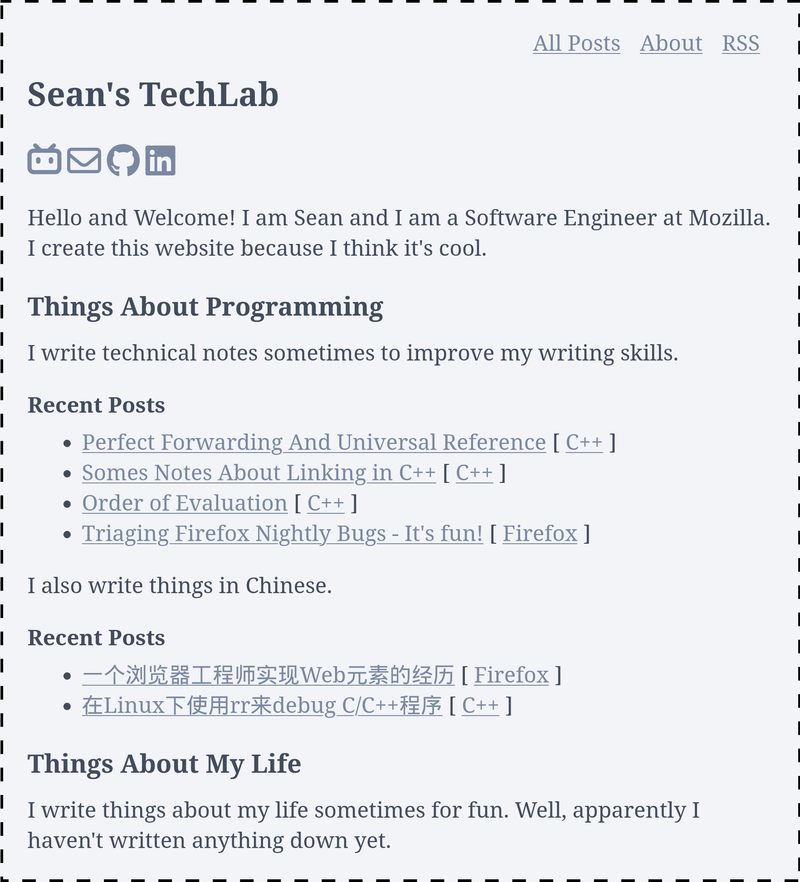
TechLab Hugo Theme is a minimal Hugo theme created by sefeng211 that targets simplicity as its core goal, serving as the foundation for personal static websites. It takes Hugo site content (markdown files and configuration) as input and produces a static HTML website as output, running entirely on the Hugo static site generator. The project includes a live demo at https://techlab.seanfeng.dev/, and the repository hosts an example site in the techlab-example-site directory with sample content and configuration you can copy for your own project.
What is TechLab Hugo Theme?
TechLab Hugo Theme is a publicly available Hugo theme by sefeng211, hosted on GitHub, built for the Hugo static site generator. Its input is standard Hugo content (markdown and config), and its output is a plain HTML site with no runtime dependencies. The repository includes a live demo at https://techlab.seanfeng.dev/ and a more realistic production usage example at https://seanfeng.dev.
Key Features
- Hugo-native — Built for the Hugo static site generator, so the output is plain HTML with no JavaScript runtime or server-side dependencies.
- Simplicity-focused design — The theme keeps layouts minimal so content remains the primary focus, as demonstrated on the live demo.
- Example site included — The repository ships a
techlab-example-sitefolder with ready-to-copy content and config, making it easy to start a new project. - Git submodule install — Install by running
git submodule add [email protected]:sefeng211/techlab-hugo-theme.git themes/techlab, then setting the theme in your Hugo configuration file. - Live demonstration — A working demo at https://techlab.seanfeng.dev/ shows the default look, and https://seanfeng.dev offers a more realistic production usage of the same theme.
Who is it for?
- Hugo developers who need a clean, minimal starting point for a personal website and want example content to model their own.
- Technical bloggers looking for a simple static blog theme that focuses on reading, without the overhead of a full-featured framework.
- Static site enthusiasts who prefer to work with Hugo and want a theme that is easy to inspect, customize, and extend because of its minimal footprint.
What can you do with TechLab Hugo Theme?
- Personal tech bloggers: publish markdown posts and generate a static blog with the theme's example site structure, then deploy the HTML output to any static host.
- Developers creating a portfolio: adapt the example configuration to showcase projects and writing, using a theme with no external build steps beyond Hugo.
- Learners exploring Hugo themes: study the theme's source files (available in the GitHub repo) to understand how a no-frills Hugo theme is structured.
How does TechLab Hugo Theme work?
The workflow is straightforward: first, run git submodule add [email protected]:sefeng211/techlab-hugo-theme.git themes/techlab in your Hugo project. Second, add theme = 'techlab' to your Hugo configuration file. Finally, run the Hugo build command to generate the static site, using the content from your own site or the example directory provided.
FAQ
Is TechLab Hugo Theme free?
Yes, the theme is hosted publicly on GitHub, so you can view and use the source code without payment. The repository does not explicitly state a license, so check the project's files if you plan to redistribute it.
What static site generator does TechLab Hugo Theme use?
TechLab Hugo Theme is built for Hugo, a Go-based static site generator. It outputs plain HTML/CSS, and the only required dependency is Hugo itself.
How do I install TechLab Hugo Theme?
Install the theme as a git submodule with the command shown in the repository, then set the theme name in your Hugo configuration. The repository's example site directory shows the expected content structure.