Template details
Test Staticman Lab
Minimal Jekyll template demonstrating Staticman v3 comments with YAML storage and pull-request moderation.
About this template
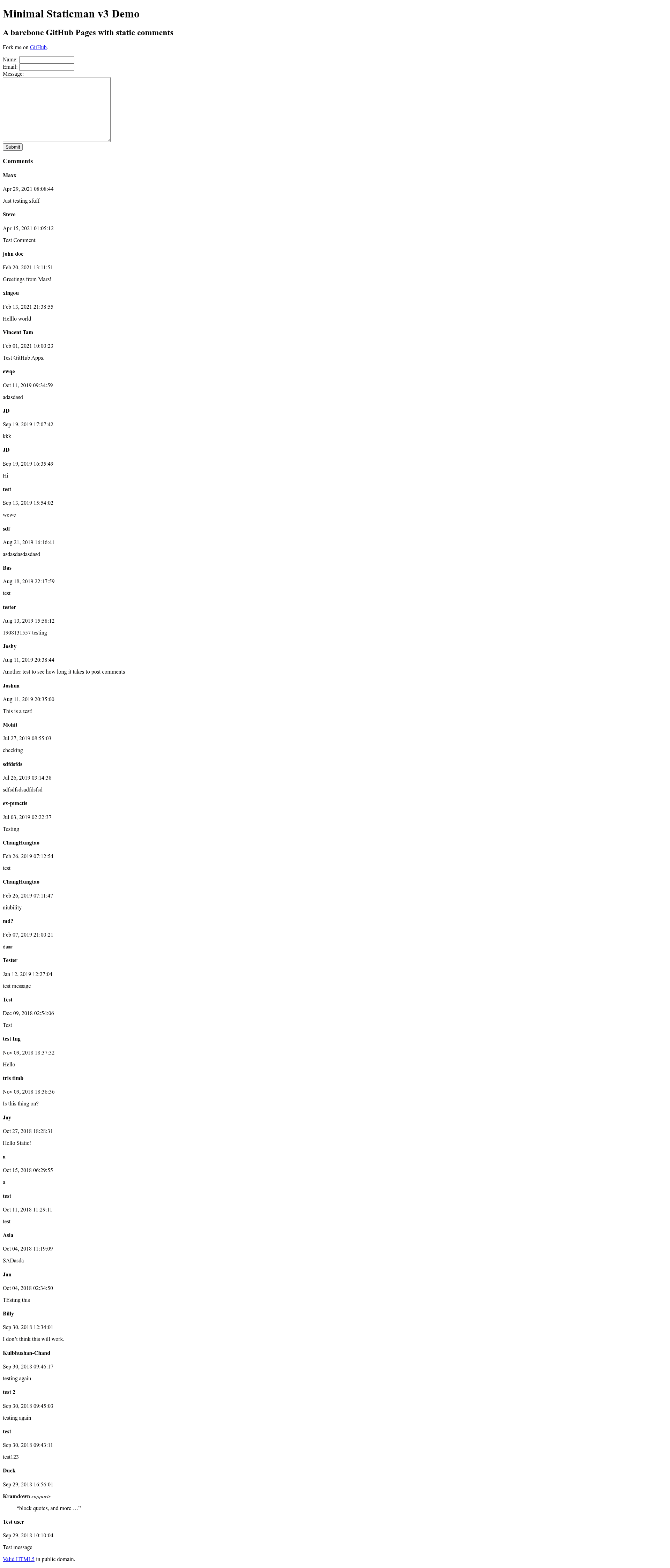
Test Staticman Lab is a minimal Jekyll template that demonstrates how to integrate Staticman v3 comments into a static site, delivering each comment as a YAML data file via GitHub pull requests.
What is Test Staticman Lab?
Test Staticman Lab is a minimal Jekyll static site template whose core function is to show how Staticman v3 works with Jekyll. It takes a standard Jekyll project and adds a comment form, a Staticman API configuration, and a data pipeline that stores each comment as a YAML entry under _data/comments/<slug>/. The template runs on Jekyll, a Ruby-based static site generator, and is maintained by Vincent Tam; the live demo is served by the @staticmanlab GitHub account using Staticman's hosted API.
Key Features
- Staticman v3 integration — Comments are submitted through a form that POSTs to the Staticman
/entryendpoint configured in_config.yml. - GitHub pull request moderation — With
moderation: true(the default instaticman.yml), each comment arrives as a pull request; set it tofalseto merge automatically. - Jekyll site data storage — Comments are stored as
entry-<timestamp>.ymlfiles under_data/<propertyname>/<slug>/, so no external database is needed. - Minimal six-file infrastructure — The source consists of
index.html,_includes/comments.html,_layouts/default.html,_config.yml,staticman.yml, and generated data files. - Configurable site parameters —
_config.ymlexposestitle,subtitle,url, andstaticman.apito point the form at your own repo and branch. - Simple deployment steps — Clone the repo, delete sample comments and the license file, edit config values, then invite @staticmanlab and connect via
https://staticman3.herokuapp.com/v3/connect/github/<username>/<repo>. - HTML validation helper — The default layout links to W3C's HTML validator for two-click validation of rendered pages.
- Based on Staticman's official demo — The infrastructure follows Popcorn, Staticman's reference implementation.
Who is it for?
- Jekyll developers who want to add a database-free comment system to a static blog, using this repository as a complete reference.
- Staticman users who want to experiment with v3's pull-request delivery and moderation behavior.
- Developers learning Staticman — the README explicitly invites modification, such as adding custom CSS or changing the comment renderer.
- Site owners who prefer storing comments directly in their GitHub repo as YAML, giving them full control and version history.
What can you do with Test Staticman Lab?
- Add comments to a Jekyll blog: Use the built-in HTML form to accept reader comments and route them through Staticman to your repo.
- Customize comment rendering: Fork the repo and edit
_includes/comments.htmlto change how each comment field (author, email hash, message) is wrapped in HTML tags and classes. - Test Staticman v3 features: Use the demo to see how Staticman generates MD5 email hashes and delivers entries to
_datafolders. - Bootstrap a new static site: Follow the minimal setup to clone and reconfigure the template with your own title, URL, and GitHub repository.
How does it work?
The setup process is: clone the repository, remove any existing comments under _data and the public-domain LICENSE file, then edit _config.yml with your site title, URL, and a Staticman API endpoint pointing at your GitHub user, repo, branch, and property name. Push the repo to GitHub, invite @staticmanlab as a collaborator, and visit the connect URL. When a reader submits the form, Staticman posts a new YAML entry to your repository, either as a pull request or as a direct commit depending on the moderation flag.
FAQ
Does Test Staticman Lab require a server?
No. The site is static Jekyll; Staticman's hosted API handles the comment ingestion and writes files to your GitHub repository.
How are comments moderated?
By default, moderation: true in staticman.yml makes each comment arrive as a pull request for review. Changing it to false enables automatic merging.
Where are comments stored?
Each comment is stored as a YAML file named entry-<timestamp>.yml in the _data/comments/<slug>/ directory, where the slug comes from the form's test-slug value.