Template details
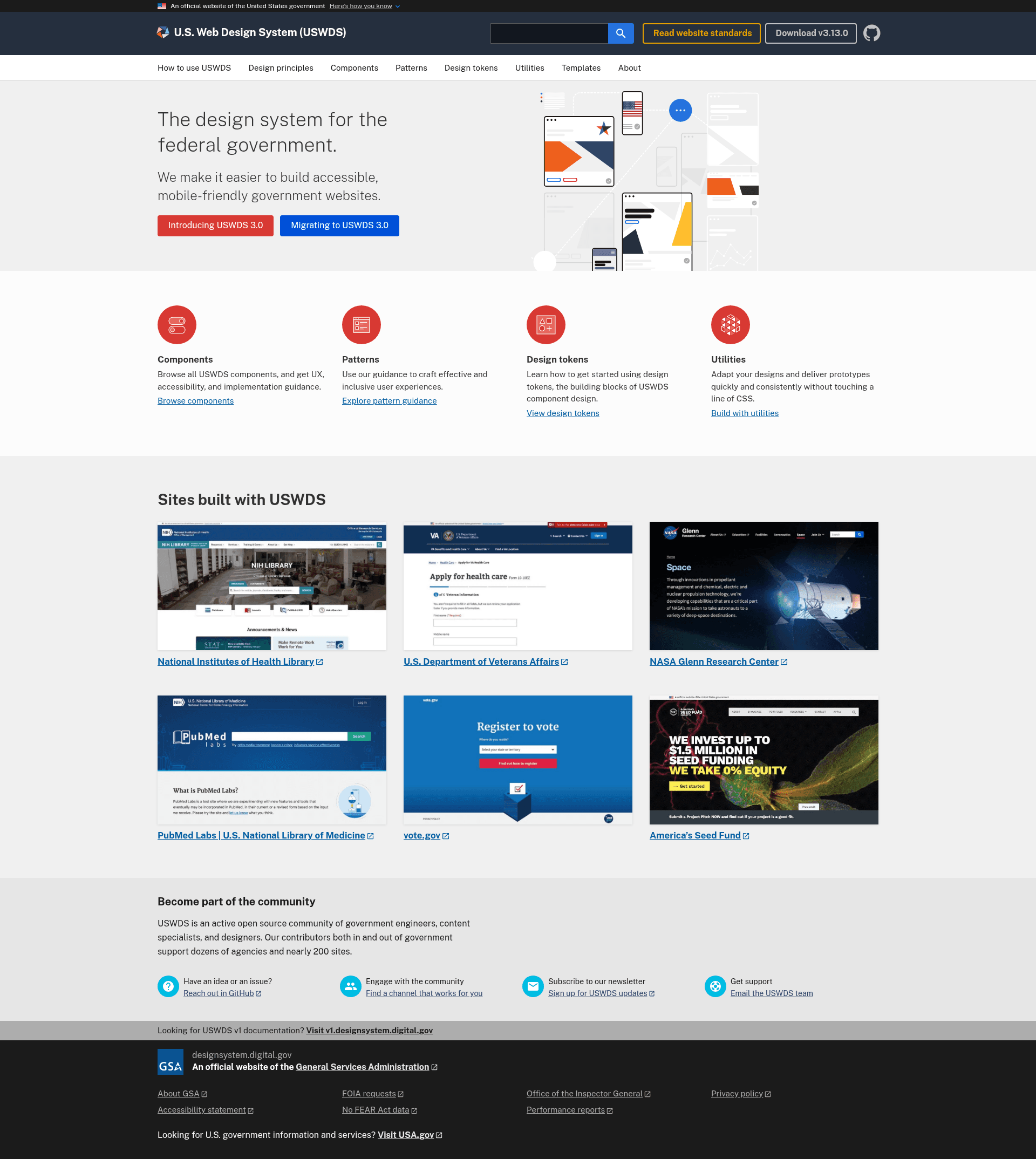
USWDS Site
The U.S. Web Design System documentation website, a design system for the federal government.
About this template
The USWDS Site is the Jekyll-based static site that powers the official documentation and component showcase for the U.S. Web Design System (USWDS), the design system for U.S. federal government digital services.
What is the USWDS Site?
The USWDS Site is a static website project that builds the official documentation for the U.S. Web Design System (USWDS). It is built with Jekyll and Gulp.js and uses the stable USWDS npm package to provide design system assets. The site takes Jekyll templates, SCSS, and Markdown content as input and outputs a deployable static website, originally intended for hosting on cloud.gov Pages. The repository is maintained by the USWDS team as part of the open-source U.S. federal government design system.
Key Features
- Jekyll static site generator — The entire site is compiled by Jekyll, allowing content to be written in Markdown and layouts in HTML/Liquid.
- Gulp.js task automation — Gulp handles build tasks such as copying dependency assets, running linters, and watching files for changes.
- USWDS npm package integration — The stable USWDS package is included as a dependency; its version can be updated via
npm install --save "uswds/uswds#v1.3.1"or a specific commit hash. - Pre-built HTML component templates — Components are stored in the
html-templatesdirectory and rendered using a customlibrary_componentJekyll tag. - Development version linking — The site can run against a local development build of USWDS using
npm linkand theLIBRARY_BASE_URLenvironment variable. - Cloud.gov Pages deployment — Pushes to the
mainbranch automatically deploy to the live site; each branch generates a public preview. - Dynamic GitHub content — Some content is fetched from GitHub; setting a
GITHUB_ACCESS_TOKENavoids API rate limits and the cache can be cleared withrm -rf .jekyll_get_cache. - Useful npm scripts —
npm run clean,npm run lint,npm test,npm run watch, andnpm run serveprovide standard development workflows.
Who is it for?
- Federal government web developers — They can run the site locally to browse USWDS components, copy HTML templates, and learn how to implement the design system in their own projects.
- USWDS contributors — Developers and content writers can submit pull requests to fix documentation, add component examples, or publish new updates via the
_postsdirectory. - Digital service teams — Teams building government websites use the USWDS documentation as the reference for accessible, compliant design patterns.
Use cases
- Design system reference: Government developers consult the component pages to ensure their applications match federal web standards.
- Local development and testing: Developers set up the site on their own machine to test how USWDS components look and behave before deploying.
- Contributing to open source: Contributors can add new updates or improve existing documentation by working with the Jekyll content and HTML templates.
- Previewing unreleased USWDS features: By linking a local USWDS build, maintainers can see how the latest development version of the design system will affect the documentation site.
How does it work?
To run the site locally, clone the repository, run npm install and bundle install, then start the server with npm start and open http://127.0.0.1:4000. For development against the latest USWDS code, clone the uswds repository, run npm run build and npm link, then link it into the site and set LIBRARY_BASE_URL to the local USWDS preview server. The site rebuilds on file changes with npm run watch.
FAQ
How do I run the USWDS documentation site locally?
Clone the repository, install dependencies with npm install and bundle install, then run npm start. The site will be served at http://127.0.0.1:4000 in your browser.
Can I use the latest development version of USWDS with this site?
Yes. Clone the uswds repository, build it with npm run build, run npm link in that directory, then run npm link uswds inside the uswds-site directory. Set the LIBRARY_BASE_URL environment variable to point to the local USWDS preview server, then run npm run serve and npm run watch.
How do I update the USWDS version used by the site?
The USWDS code is included as a Git dependency in package.json. To install a specific commit, run npm install --save "uswds/uswds#commit-hash"; for a version tag, use something like npm install --save "uswds/uswds#v1.3.1". Use an official version tag for commits to the main branch.
Where is this site deployed?
The site is deployed with cloud.gov Pages. Changes pushed to the main branch automatically update the live production site, and public previews are created for other branches.
How do I contribute to the USWDS documentation?
Review the contributing guidelines in the repository, then submit a pull request. To add an item to the "Updates" section, follow the instructions in the _posts directory.