Template details
Vercel Cron Job Example
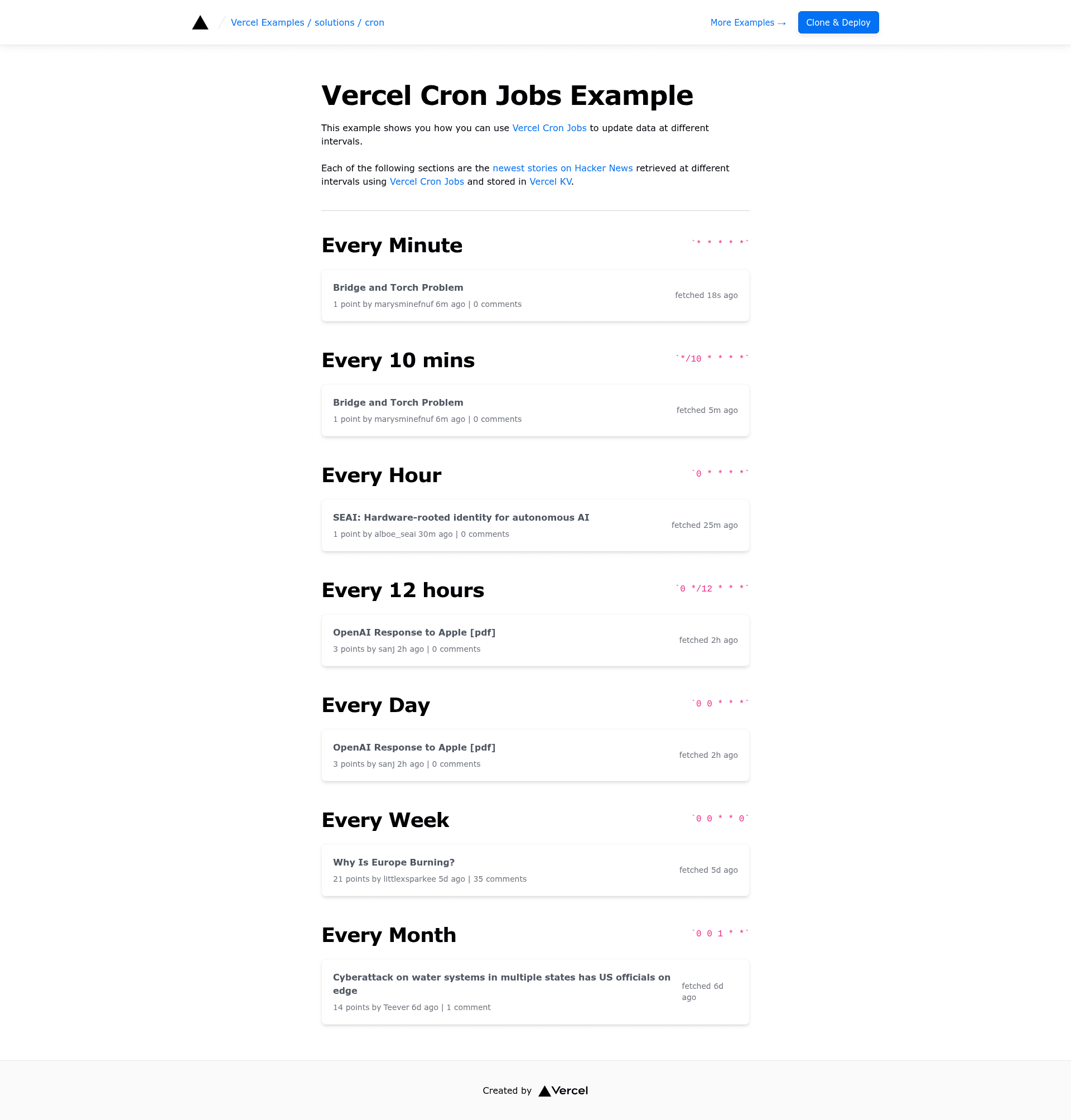
A Next.js app that uses Vercel Cron Jobs to update data at different intervals.
About this template
Vercel Cron Job Example is a Next.js starter from Vercel's official examples repository that demonstrates how to schedule serverless functions with Vercel Cron Jobs so data updates automatically at different intervals.
What is the Vercel Cron Job Example?
Vercel Cron Job Example is a Next.js application in the solutions/cron directory of Vercel's public examples repository. It pairs Next.js API routes with Vercel Cron Jobs, the platform's scheduled-trigger feature, so the app can update data on a defined cadence without a separate scheduler service. The template runs on Vercel, is styled with Tailwind CSS, and ships with a one-click deploy button that provisions a Vercel KV store alongside the project. A live demo is deployed at cron-template.vercel.app, and the repository lists two related templates in the same collection: hacker-news-slack-bot and cron-og.
What makes it stand out?
The template's defining trait is its direct use of Vercel Cron Jobs backed by a Vercel KV data store.
- Vercel Cron Jobs integration — the app is built around Vercel's cron scheduling, so recurring API route invocations are defined in the Vercel project configuration rather than in a third-party scheduler.
- Vercel KV storage — the one-click deploy flow includes a Vercel KV store configuration, giving the scheduled functions a place to persist and read data between runs.
- One-click deploy — the Deploy with Vercel button clones the repository, names the project "cron", attaches a KV store, and opens the Vercel setup flow in a single step.
- create-next-app bootstrap — developers can pull the example locally with
pnpm create-next-app --example https://github.com/vercel/examples/tree/main/solutions/cron cronand start developing withpnpm dev. - Tailwind CSS styling — the demo interface is built with Tailwind CSS, so the front end relies on utility classes rather than a custom design system.
- Live demo site — a deployed instance at cron-template.vercel.app shows the template running in production.
Who should use it?
This template is aimed at developers building or learning about scheduled serverless functions on Vercel.
- Next.js developers — learn the exact project structure and Vercel configuration needed to attach cron schedules to API routes.
- Developers automating data refreshes — teams that need data pulled or updated on a timer can fork this template instead of operating a separate cron service.
- Vercel platform users — anyone already deploying to Vercel who wants a minimal, working reference for combining cron triggers with Vercel KV.
Use cases
With this template you can build a scheduled data-update pipeline end to end on Vercel.
- Scheduled data updates: define multiple cron intervals in the Vercel configuration and each one triggers the corresponding Next.js API route on schedule.
- Persistent state between runs: use the provisioned Vercel KV store to write results from each invocation and read them back on the next scheduled run.
- Reference implementation: study the repository as a minimal pattern for cron-based serverless functions, then reuse the same structure in larger projects.
How does it work?
Setup follows two documented paths in the README. The first is one-click deploy: pressing the Deploy with Vercel button clones the repository, sets the project name to "cron", and opens the Vercel flow where you add required environment variables. The second is local development: bootstrap with pnpm create-next-app --example, run pnpm dev, then deploy to Vercel. Once deployed, Vercel Cron Jobs invoke your API routes according to the intervals defined in the project configuration.
FAQ
Can I run the template locally?
Yes. The README shows bootstrapping the example with pnpm create-next-app --example https://github.com/vercel/examples/tree/main/solutions/cron cron and then running pnpm dev for development mode. Keep in mind that the cron scheduling itself is a Vercel platform feature, so scheduled triggers fire after deployment.
Does the template require Vercel to run its cron jobs?
Yes — the entire point of the template is to use Vercel Cron Jobs, which are part of the Vercel platform. Both the one-click deploy path and the deployment documentation assume Vercel as the hosting target.
What environment variables do I need to set?
The README says to set the required environment variables after the one-click deploy step, though it does not list them by name on this page. The deploy flow provisions a Vercel KV store, so the KV connection details are part of the configuration you provide.
What does the live demo show?
The demo runs at cron-template.vercel.app and is the live instance of this template deployed on Vercel. It is the same URL referenced by the project's demo metadata in the deploy configuration.