Template details
Volt Dashboard Laravel
Free and open-source Laravel admin dashboard built with Livewire & Alpine.js on Bootstrap 5.
About this template
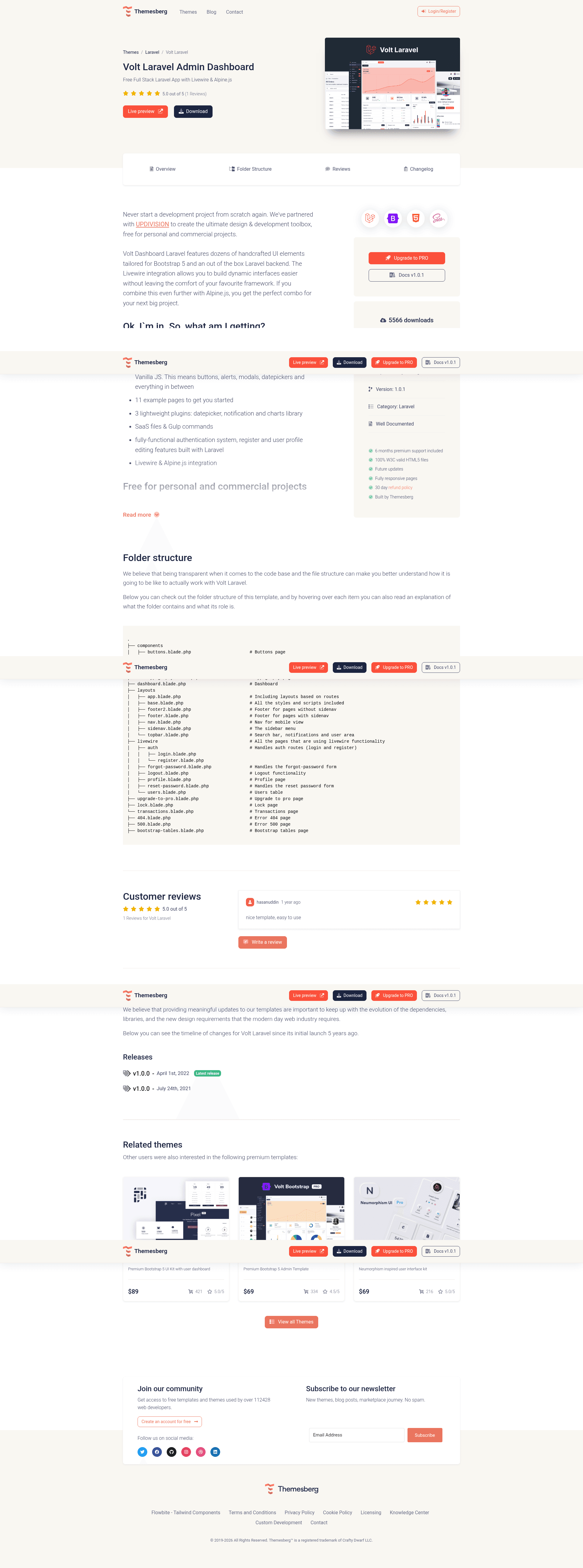
Volt Dashboard Laravel is a free, open-source Laravel admin dashboard template that pairs a Bootstrap 5 UI with Livewire and Alpine.js to deliver a fully functional application backend out of the box.
What is Volt Dashboard Laravel?
Volt Dashboard Laravel is a starter project for building admin interfaces on Laravel, created by Themesberg and UPDIVISION. It takes a fresh Laravel installation and gives you a prebuilt dashboard with authentication, user profile editing, and 11 example pages, all styled with Bootstrap 5 and enhanced with Livewire for dynamic components. The output is a runnable Laravel application you can extend with your own models, controllers, and views.
Key Features
- 100+ UI components — Buttons, alerts, modals, datepickers, and other Bootstrap 5 elements with Vanilla JS, ready to drop into your views.
- 11 example pages — Includes dashboard, transactions, forms, sign in/up, forgot/reset password, lock screen, 404, 500, and documentation pages.
- 3 lightweight plugins — A datepicker, a notification system, and a charts library included without heavy dependencies.
- Livewire & Alpine.js integration — Build dynamic interfaces with server-rendered Livewire components and Alpine.js interactivity, with auth flows already implemented as Livewire components.
- Sass files & Gulp commands — Customize the design system with Sass and automate builds using the provided Gulp workflow.
- Fully functional auth — Login, register, forgot password, reset password, and profile editing (name, email, photo, password) implemented in Laravel with validation rules.
- MIT license — Free for personal and commercial projects; you can use it for client work without fees.
- Detailed documentation — Component and feature docs plus a file structure guide hosted on the live demo site.
Who is it for?
- Laravel developers — Use it as a starting point for admin panels and internal tools, skipping the repetitive auth and layout setup.
- Freelancers and small agencies — Build client dashboards quickly and legally reuse the template under the MIT license.
- Developers learning Livewire — Study the included Livewire auth components (login, register, profile) to see real-world patterns.
- Teams prototyping new products — Get a polished Bootstrap 5 UI and a working user system in a day, then replace the placeholder pages with real features.
What can you do with Volt Dashboard Laravel?
- Launch an admin panel fast: Install the project, run migrations, and you have a dashboard with authentication and profile management before writing your own feature code.
- Customize the auth flow: Edit the Livewire classes in app/Http/Livewire/Auth/ to change validation rules or redirect logic.
- Build dynamic interfaces: Use the included Livewire and Alpine.js setup to add real-time interactions to your own pages.
- Design a custom UI: Modify the Sass files and rebuild assets with Gulp to match your brand.
How does Volt Dashboard Laravel work?
- Download the project and run
composer installandnpm installto pull dependencies. - Copy
.env.exampleto.env, configure your database, and runphp artisan key:generate. - Run
php artisan migrate --seedto create tables and seed roles and users, thenphp artisan storage:link. - Log in with demo credentials admin@volt.com / secret or register a new user; the profile page lets you edit user info and password.
Pricing
Volt Dashboard Laravel is free under the MIT license for personal and commercial projects. The page also advertises a Pro version with over three times more components and pages, five times more Laravel features, and six months of premium support — however, the Pro price is not listed on this page.
FAQ
Is Volt Dashboard Laravel free?
Yes, it is released under the MIT license and can be used in personal and commercial projects at no cost. There is a separate, paid Pro version with additional components and support, but the free version includes the full base functionality.
What tech stack does Volt Dashboard Laravel use?
It runs on Laravel with Livewire and Alpine.js on the front end, styled with Bootstrap 5 and Vanilla JS. It uses Sass for styling, Gulp for task automation, and includes a datepicker, notification plugin, and charts library.
How do I install Volt Dashboard Laravel?
After downloading, run composer install and npm install, configure the .env file with your database, then run php artisan key:generate, php artisan migrate --seed, and php artisan storage:link. Full steps are in the README.
What are the default login credentials?
The seeded admin account is admin@volt.com with password secret. After running the migrations and seeders, you can log in with those credentials or register your own user on the sign-up page.
Does it include authentication?
Yes, it ships with a working authentication system built with Laravel and Livewire, covering login, registration, forgot password, reset password, and user profile editing with validation rules.