Template details
Website
Hugo framework repository for the Intelops website, with blog, docs, learning center, and configurable theme.
About this template
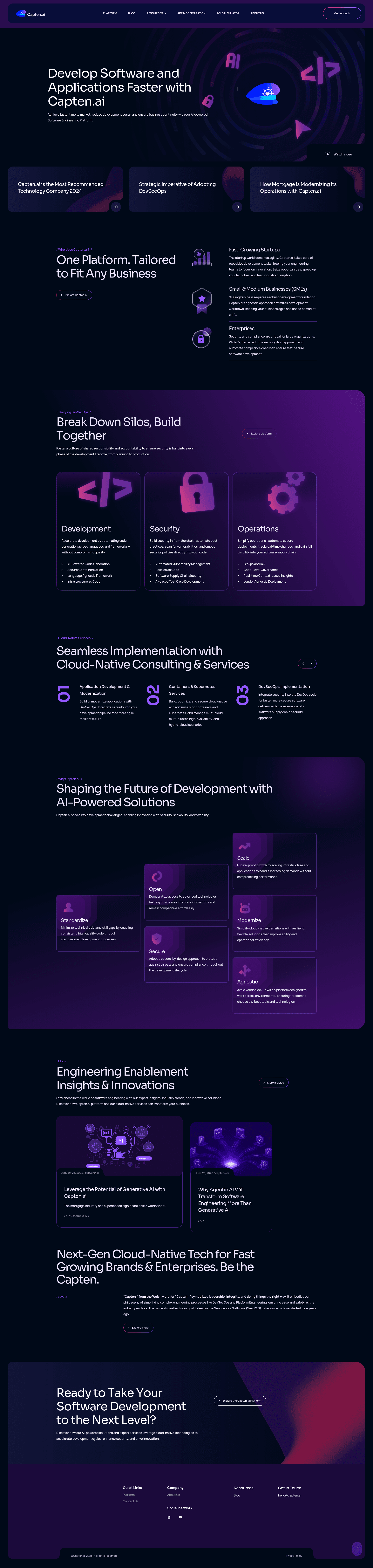
Website is the Hugo framework repository behind the Intelops corporate site, built to manage multi-section content like Blog, Docs, Learning Center, and Open-Source pages from Markdown files.
What is Website?
Website is a static site project powered by Hugo, maintained on GitHub at github.com/intelops/website. It takes Markdown content, a theme configuration, and shortcodes as input and generates the production website as output. The repository is managed under the Intelops GitHub organization and currently has 5 stars, with topics including hugo, hugo-site, hugo-theme, and website.
Key Features
- Hugo static site generator — builds a fast, static website from Markdown content; navigation menus are edited in config/_default/menus.en.toml.
- Multi-section content structure — includes Home, Platform, Learning-Center, Blogs, Services, Open-Source, Docs, About Us, and Resources pages.
- Theme customization — background colors, text colors, call-to-action area, and footer styling are configurable; how-tos are documented in issues 99, 107, and 140.
- Disqus comments integration — steps to add Disqus discussions to the site are provided in issue 17.
- Netlify Forms support — shortcodes enable multiple form styles and campaign landing pages, per issue 329.
- Mermaid diagram support — interactive mindmaps can be added to blogs and learning-center articles using Mermaid in Markdown (issue 105).
- SEO and analytics tools — OpenGraph metadata can be customized (issue 176) and Google Tag Manager can be added (issue 201).
- Content visibility control — pages can be enabled or disabled from public view, as described in issue 51.
- Illustration color reference — the repository specifies the undraw.co color code #FB7E44 for consistent image styling.
- Advanced layout examples — the /learning-center/docbox-layouts/ URL demonstrates fancy content layouts when run in debug mode.
Who is it for?
Website is built for the Intelops team and external contributors who need to maintain a corporate web presence. Content editors can author blog posts and learning-center articles in Markdown, developers can extend the Hugo theme and configuration, and site administrators can manage menus, metadata, and page visibility.
- Content editors — write blog posts, learning-center articles, and docs in Markdown, and control whether pages are publicly visible.
- Frontend developers — customize menus, colors, and theme behavior; integrate Disqus, Google Tag Manager, OpenGraph, and Netlify Forms.
- Site administrators — manage platform menu items via config/_default/menus.en.toml and adjust footer and call-to-action styling.
What can you do with Website?
- Add interactive mindmaps — embed Mermaid diagrams in blog posts or learning-center articles directly from Markdown.
- Create campaign landing pages — use Netlify Forms shortcodes to build forms with different styles.
- Customize the look and feel — change background and text colors for banners, rows, call-to-action, and footer using the documented methods.
- Manage content visibility — enable or disable pages from public view without deleting content.
FAQ
How do I add Disqus comments to the website?
Follow the steps in GitHub issue 17 in the repository, which explains how to integrate Disqus into the Hugo site.
How do I change the background color of a content row?
The repository links to a commit (8338aa4b47257da3038df9356f21fe78a2655e85) that shows how to change the background color of a full row block. The specific configuration is documented in that change.
How do I update the Platform menu items?
Edit the menus.en.toml file inside the config/_default directory, per the repository's instructions.
How do I add Google Tag Manager to the website?
See issue 201 in the GitHub repository, which provides instructions for adding or updating Google Tag Manager code.
How do I add a mindmap to a blog post?
Use Mermaid syntax in your Markdown. Issue 105 includes sample references for adding mindmaps to blogs and learning-center articles.