Template details
Academic Website
Simple Jekyll-theme website template for academic websites, resume pages, and research portfolios with YAML-based content management.
About this template
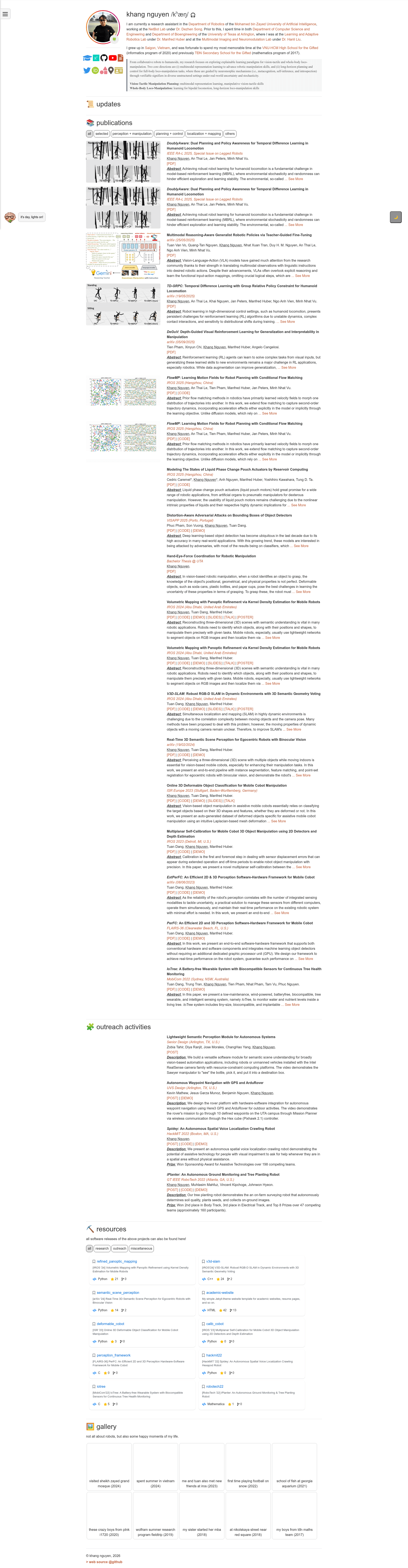
Academic Website is a Jekyll-based template for building academic homepages, CV pages, and research portfolios, driven entirely by YAML data files instead of hand-edited HTML. The repository, by author mkhangg, is the source code of the live site at mkhangg.com and is open for anyone to clone.
What is Academic Website?
Academic Website is a static website template built with Jekyll 4.3.2 and Ruby 3.2.2 that produces a one-page academic homepage assembled from section files. It takes personal information stored in YAML files (about, research, gallery, outreach, footer) and renders a deployable static site with sections for About, Research, Gallery, Outreach, and Footer. The template is distributed as a GitHub repository under the author's invitation to clone for personal use, and it runs on any host that can serve static files, including AWS and GitHub Pages.
Key Features
- YAML-based content management — Edit five data files in the _data folder (about.yaml, research.yaml, gallery.yaml, outreach.yaml, footer.yaml) to update every section; empty fields are simply omitted from the generated HTML.
- Project filtering and pagination — Research and project entries get category filter buttons and pagination powered by Isotope.
- GitHub widgets in a Resources section — Pull repository information into the page using the GitHub REST API and display it with Isotope layout.
- Dark/Light theme with client-time detection — A toggle button switches themes, and the initial theme is chosen based on the visitor's local time; dark mode also enables animated "firefly" particles.
- News and updates carousel — Recent items rotate through an OwlCarousel2 carousel.
- Flippable contact card — A card that flips to reveal email and phone number.
- Interactive extras — A draggable Messenger-style pop-up icon that sinks to disappear, plus sound effects on widget interactions.
- Straightforward layout structure — The page is assembled from _layouts/main.html, _sections HTML files, and reusable _libs widget partials, so each section's widget iterates over its matching YAML data.
Who is it for?
Academic Website is aimed at researchers, PhD students, postdocs, and professors who want a personal homepage without learning a full CMS. It is equally suited to job seekers who need a clean online CV or resume page with publication lists, and to anyone comfortable with the Jekyll stack who wants a template they can restyle by editing styles.css and scripts.js.
What can you do with Academic Website?
- Researchers: Publish a publication list where each entry can link to PDF, code, demo, slides, and a talk video, with expandable abstract text.
- Academic job seekers: Present your CV-style homepage with About, Gallery, and Outreach sections, deployable to GitHub Pages with one repository push.
- Lab groups or course pages: Reuse the filterable project grid and carousel to showcase multiple projects or news items from a single data file.
- Jekyll learners: Study a concrete example of Jekyll's separation between layouts, includes (widgets), sections, and data files.
How does Academic Website work?
Setup takes four steps: clone the repository, edit _config.yml and the YAML data files, run bundle exec jekyll server to preview at localhost:4000, then deploy the generated _site folder to a static host such as AWS or GitHub. The README links to tutorials for both hosting options.
FAQ
Is Academic Website free to use?
Yes. The README explicitly invites visitors to clone the repository for personal use and states that you can scrape and modify the code based on your wishes, so there is no stated fee or license restriction.
Do I need to fill in every data field?
No. The README states that leaving any field blank simply means that information is omitted from the resulting HTML, so a research entry can include only the metadata you actually have, such as a PDF link without a demo.
What Jekyll version does it require?
The template was built with Jekyll 4.3.2 on Ruby 3.2.2-1 with DevKit; the README installs both via gem install bundler jekyll.
Can I deploy it to GitHub Pages?
Yes. The README includes hosting instructions for both GitHub and Amazon Web Services, and deployment happens by serving the static files generated in the _site folder.