Template details
Alkaline
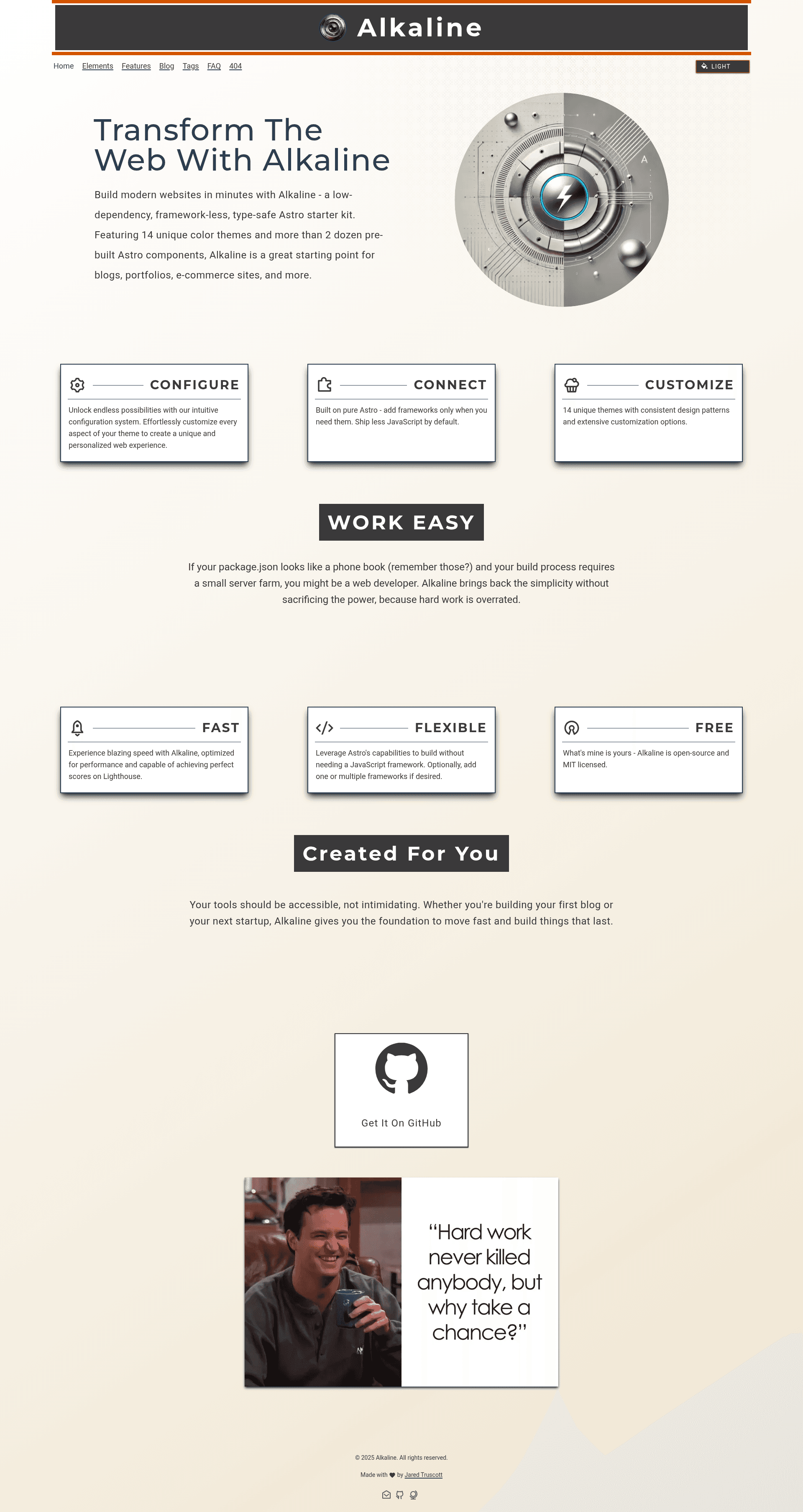
A sleek, performance-first Astro theme with 14 color themes, blog/docs layouts, 24 components, and near-zero JS.
About this template
Alkaline is a free, MIT-licensed Astro starter theme for building clean, low-JavaScript content sites, shipping with 14 color themes, 24 components, and blog and documentation layouts.
What is Alkaline?
Alkaline is an open-source theme for Astro 5.2.4 that generates static sites with Tailwind CSS 3.4.17 and TypeScript. It takes site metadata from an alkaline.config.ts file and produces a full blog or documentation site with SEO meta tags, light/dark color themes, and near-zero client-side JavaScript. The theme is maintained by AMagicianNamedGob and licensed under MIT.
Key Features
- Near zero-JS — The theme ships with almost no client-side JavaScript by default, helping pages load fast and score 100 on Lighthouse audits out of the box.
- 14 color themes — Includes light and dark themes with a simple system for adding custom themes; sample themes named Old Couch and Pop Punk are shown in the README.
- Blog & Docs layouts — Prebuilt layouts for both blogging and documentation content, with MDX support baked in.
- 24 components — A library of reusable Astro components that ship with inline documentation for each one.
- SEO ready — OpenGraph and meta tags are included in every page.
- TailwindCSS styling — Styling is handled through Tailwind CSS 3.4.17, configured in
tailwind.config.js. - Config-driven —
alkaline.config.tscontrols site metadata, authors, fonts, and global settings across the site. - 250 Google Fonts — The
google-fonts.tsfile is preloaded with 250 font options and accepts additional font names.
Who is it for?
Alkaline is aimed at developers who want a fast, customizable Astro starter for personal blogs, portfolios, or documentation. It suits static-site builders who prefer Tailwind CSS and TypeScript and want a theme that scores 100 on Lighthouse without much tuning. It is also a fit for designers who want to experiment with the built-in color theme switching.
What can you do with Alkaline?
- Bloggers: publish MDX articles with a prebuilt blog layout, SEO meta tags, and a choice of 14 color themes.
- Documentation authors: structure docs pages using the included docs layout and content collections configuration.
- Portfolio owners: customize the theme with the config file and a selection of Google Fonts to create a personal site.
- Theme tinkerers: add new color themes by extending the existing theme system shown in the README's sample themes.
How does Alkaline work?
Alkaline runs on Astro's static-site generation. Clone the repository, install dependencies with pnpm or npm, and run pnpm dev to start a local server at http://localhost:4321. Content is written in MDX and configured through alkaline.config.ts, with TypeScript definitions in Types/types.ts ensuring type safety.
Pricing
Alkaline is completely free and open source under the MIT license. The author accepts donations via Buy Me a Coffee and PayPal but the theme itself has no paid tiers.
FAQ
Is Alkaline free?
Yes, Alkaline is released under the MIT license and is completely free to use, modify, and distribute. The author accepts optional donations through Buy Me a Coffee and PayPal.
What frameworks does Alkaline use?
Alkaline is built on Astro 5.2.4 and uses TailwindCSS 3.4.17 for styling, TypeScript 5.x for type safety, and MDX for content. It requires Node 18 or later.
Does Alkaline have a documentation layout?
Yes, Alkaline ships with both blog and documentation layouts, and the README notes that documentation is provided in each component.
Can I contribute to Alkaline?
Currently, pull requests are not being accepted because the project is slated for a Next.js rebuild (Alkaline v2). Discussions and feedback are welcome via GitHub issues.
What are the limitations?
The README notes a known quirk where type hints only work when you trigger autocomplete on the closing tag of a component. Also, the project's long-term direction is a Next.js rebuild, so the Astro version is considered a foundation rather than a long-term home for contributions.