Template details
Next.js & HeroUI Template
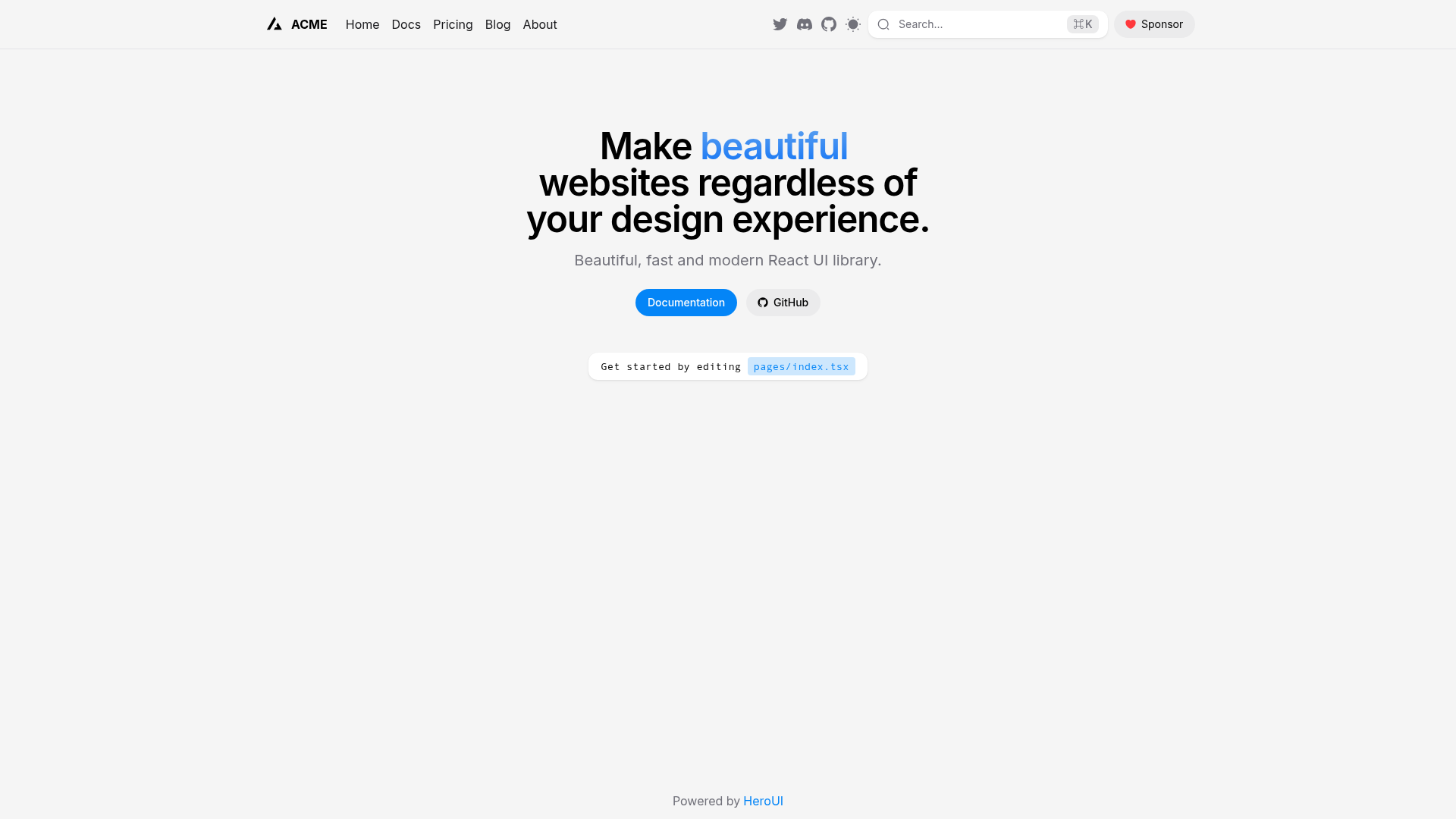
A Next.js 16 pages-directory template pre-configured with HeroUI v3, Tailwind CSS v4, and TypeScript.
About this template
The Next.js & HeroUI Template is a GitHub boilerplate that scaffolds a Next.js 16 application using the pages directory, pre-configured with HeroUI v3 components and Tailwind CSS v4 for styling.
What is the Next.js & HeroUI Template?
The Next.js & HeroUI Template is a boilerplate for creating Next.js 16 applications using the pages directory, pre-configured with HeroUI v3 components and Tailwind CSS for styling. You give it a GitHub repository URL via create-next-app, and it produces a local project with dependencies and configuration ready to run. It is made by heroui-inc, the team behind HeroUI, and is released under the MIT license.
Key Features
- Next.js 16 (pages directory) — Uses the pages router rather than the newer App Router; the README notes that migration to the App Router is recommended since Next.js 15.
- HeroUI v3 — Pre-integrated HeroUI (formerly NextUI) component library, ready to use out of the box without manual setup.
- Tailwind CSS v4 — Tailwind is pre-configured for utility-first styling, along with Tailwind Variants for managing component variants.
- TypeScript — The template is written in TypeScript, providing type safety across components and pages.
- next-themes integration — Includes next-themes for light/dark mode switching with minimal configuration.
- Multiple package managers — Works with npm, yarn, pnpm, and bun; the README demonstrates npm but explicitly lists all four.
- CodeSandbox support — A direct GitHubBox link lets you try the template in CodeSandbox without cloning it locally.
Who is the Next.js & HeroUI Template for?
The template is for developers who want to start a Next.js project on the pages router with HeroUI v3 and Tailwind CSS already integrated. It suits teams that still rely on the pages directory, developers evaluating HeroUI v3 as a component library, and prototypers who want a preconfigured environment to speed up initial development.
What can you do with the Next.js & HeroUI Template?
- Prototypers: run
npx create-next-app -e https://github.com/heroui-inc/next-pages-templateto get a working Next.js 16 project with HeroUI and Tailwind configured, no manual wiring needed. - Developers exploring HeroUI v3: open the CodeSandbox preview to inspect how HeroUI components are integrated in a pages-router environment before committing to the setup.
- Teams standardizing on pages directory: clone the repository to share a consistent starting point that includes TypeScript, Tailwind Variants, and next-themes.
How does the Next.js & HeroUI Template work?
The template works as a Git remote that create-next-app clones via the -e flag. After running the command, install dependencies with a package manager like npm install, then start the development server with npm run dev. The template includes the necessary configuration files for Tailwind, TypeScript, and next-themes, so the project is immediately runnable.
Pros and cons
- Free and open source — MIT license means you can use and modify it freely, including in commercial projects.
- Current versions — Built with Next.js 16, HeroUI v3, and Tailwind CSS v4 (per repository metadata).
- Con: Uses the pages directory, which Next.js no longer recommends for new projects; the README itself advises migrating to the App Router to "leverage React's latest features."
Pricing
The template is free to use because it is released under the MIT license. You can download the source code from GitHub and inspect the LICENSE file for the full terms.
FAQ
Is the Next.js & HeroUI Template free?
Yes, the template is open source and licensed under the MIT license, so you can use it in commercial projects without restrictions (subject to MIT terms). No payment or account is required.
What versions does this template use?
It uses Next.js 16 with the pages directory, HeroUI v3, Tailwind CSS v4, Tailwind Variants, TypeScript, and next-themes. The README lists Tailwind CSS without a version, but the repository metadata specifies v4.
How do I create a project from this template?
Run npx create-next-app -e https://github.com/heroui-inc/next-pages-template in your terminal, then install dependencies (for example npm install) and start the dev server with npm run dev.
Does this template use the App Router or the Pages Router?
It uses the Pages Router (the pages directory). The README notes that since Next.js 15, the Pages Router is not recommended for new projects and suggests migrating to the App Router to take advantage of React's latest features.