Template details
Argon Dashboard Chakra
Free React admin dashboard template built with Chakra UI, featuring 70+ components and prebuilt pages.
About this template
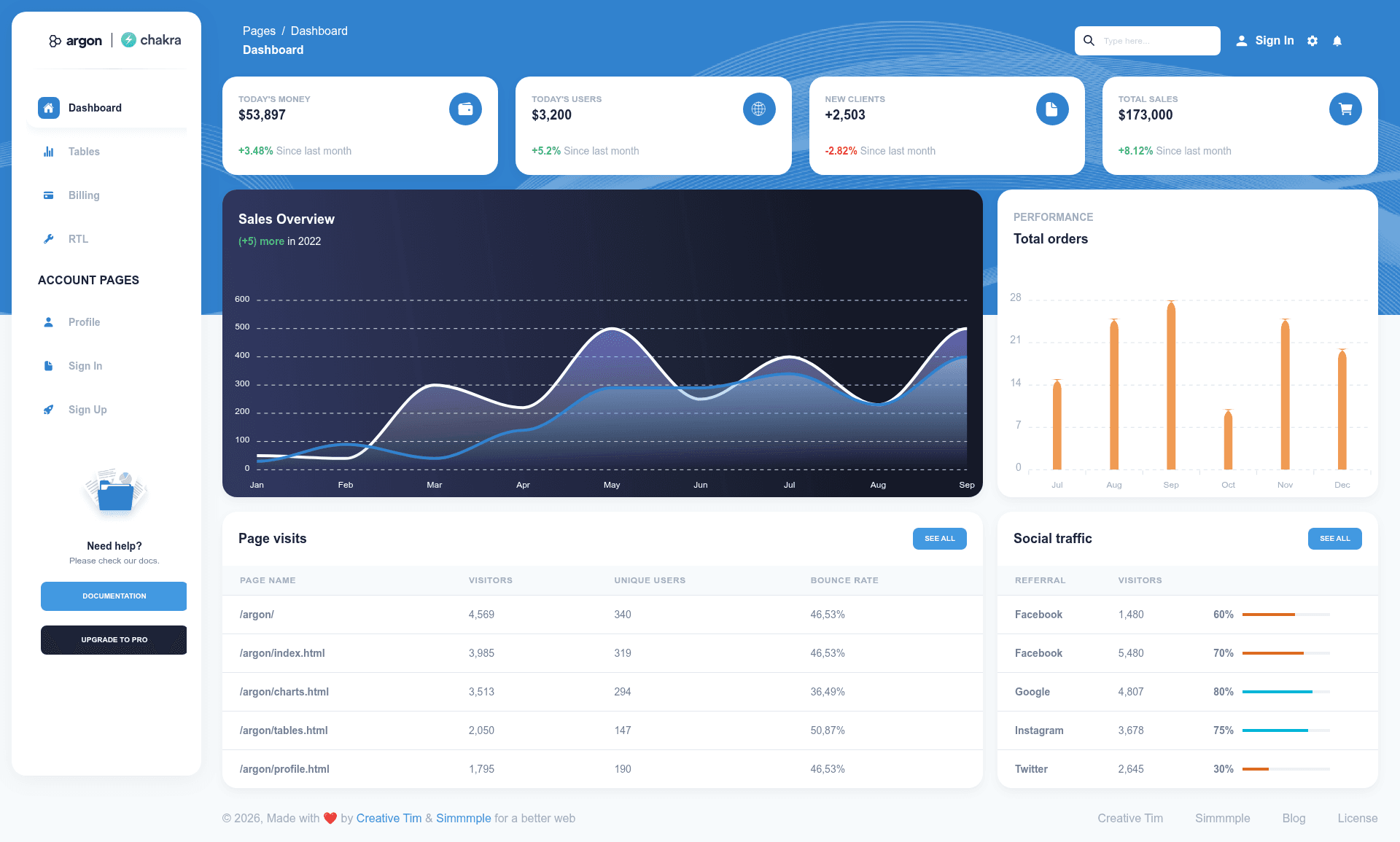
Argon Dashboard Chakra is a free React admin dashboard template built on Chakra UI by Simmmple and Creative Tim, providing developers with more than 70 pre-built UI components to assemble modern admin panels. It delivers a complete starting point: a customizable Chakra UI theme, multiple prebuilt pages (Dashboard, Billing, Profile, Tables, Sign In, Sign Up), an RTL layout, and integrated chart, table, and text-editor components.
What is Argon Dashboard Chakra?
Argon Dashboard Chakra is a free admin dashboard template for React that runs on the Chakra UI component library. It takes a standard React project and layers on a prebuilt theme, layout system, and over 70 frontend elements — such as buttons, inputs, navbars, nav tabs, cards, and alerts — so developers can go from a blank project to a styled admin panel without building UI from scratch. The template was created by Simmmple and Creative Tim and is version 1.0.0.
Key Features
- 70+ UI components — Includes buttons, inputs, navbars, nav tabs, cards, and alerts, with colors that can be changed through JSS files and classes.
- Custom Chakra UI theme — The src/theme folder contains component overrides, foundation breakpoints, and global styles, so you can adapt the design system to your brand.
- Prebuilt admin pages — Ships with Dashboard, Billing, Profile, and Tables views, plus Sign In and Sign Up auth pages and a separate RTL layout.
- ApexCharts integration — Includes LineChart and BarChart components built on ApexCharts.js for adding data visualizations to dashboards.
- React Table integration — Uses React Table hooks to power dashboard tables, billing rows, invoices rows, and transaction rows.
- Quill text editor — Bundles react-quill so you can embed a rich text editor into forms or content management screens.
- Right-to-left language support — A dedicated RTLProvider and RTL layout help localize the dashboard for Arabic, Hebrew, or other RTL languages.
- One-click deploy to Genezio — The README includes a deploy button that pushes the template to Genezio without manual cloud configuration.
Who is Argon Dashboard Chakra for?
- React developers who need an admin panel quickly and want a tested Chakra UI setup they can extend.
- Agencies and freelancers building CRM, smart home, automotive, or virtual-reality admin interfaces can use the prebuilt example pages as a visual starting point for client projects.
- Internal tool teams creating billing, analytics, or user-management dashboards can reuse the tables, charts, and card layouts from this template.
What can you do with Argon Dashboard Chakra?
- Build a CRM admin: Combine the Tables, Billing, and Profile pages to create customer records, invoice lists, and employee profiles.
- Create a smart home dashboard: Use the example page style with ApexCharts line and bar charts to display device status and energy usage.
- Develop an automotive fleet dashboard: Track vehicles, maintenance schedules, and driver data using the card and table components.
- Localize an admin for RTL markets: Enable the included RTL layout to serve Arabic or Hebrew users without redesigning the interface.
How does Argon Dashboard Chakra work?
To run it locally, download Node.js LTS from the official site, go to the project root, and run yarn install or npm install to install dependencies. The repository also includes a one-click deploy button that sets up the template on Genezio.
Pricing
Argon Dashboard Chakra is free to download from Creative Tim's website and from its GitHub repository. Creative Tim also sells an Argon Dashboard Chakra Pro version, linked from the README, with additional pages and components.
Alternatives
- Argon Dashboard Bootstrap — the same visual style built with Bootstrap instead of Chakra UI, listed in the Versions section of the README.
FAQ
Is Argon Dashboard Chakra free?
Yes, Argon Dashboard Chakra is a free dashboard template. Creative Tim also offers a paid Pro version with extra features, which is linked from the README's Resources section.
What tech stack does Argon Dashboard Chakra use?
It is built on ReactJS and Chakra UI. It also uses ApexCharts.js for charts, React Table for table functionality, and react-quill for the text editor. Styling customizations are done through JSS files and classes.
What pages are included in Argon Dashboard Chakra?
The free version includes Dashboard, Billing, Profile, and Tables views, along with Sign In and Sign Up authentication pages. It also offers Admin, Auth, and RTL layouts, and a right-to-left language layout.
Is documentation available for Argon Dashboard Chakra?
Yes, Creative Tim hosts full documentation at demos.creative-tim.com/docs-argon-dashboard-chakra, which covers each component and page included in the template.
Can I deploy Argon Dashboard Chakra without a server?
Yes, the README provides a one-click deploy button for Genezio, which hosts the template without manual infrastructure setup. For local development, you just install Node.js and run npm or yarn.