Template details
Astro CV theme
CV theme for Astro with Forestry CMS integration, Google Fonts, Font Awesome icons, and one-click Netlify deployment.
About this template
Astro CV theme is a free and open-source resume website template built with the Astro framework that turns content managed in Forestry CMS into a static, deployable CV site. This theme is designed for developers and job seekers who want a clean online curriculum vitae without building a site from scratch, and it can be deployed to Netlify with a single click.
What is Astro CV theme?
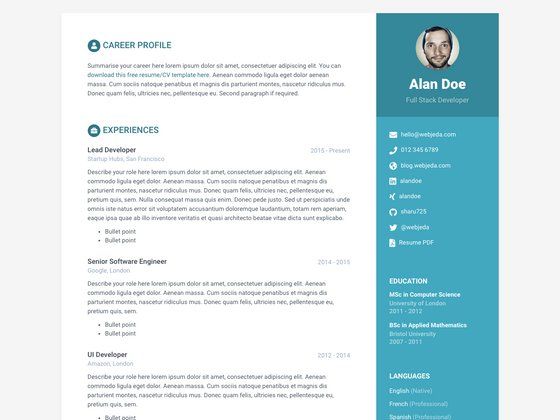
Astro CV theme is a CV/resume theme for Astro, authored by dofbi and released under the MIT License. The template takes structured resume content — typically work experience, education, and skills — and renders it as a static website using the Astro build process. It is based on the w3.css CV template by W3Schools and ships with a live demo hosted on Netlify at astro-cv-theme.netlify.app.
What makes Astro CV theme stand out?
- Astro framework — The theme is built for Astro, with standard npm commands to install, run a dev server on localhost:3000, build a production version to ./dist/, and preview the build.
- Forestry CMS integration — The GitHub repository can be imported into Forestry with a one-click button, allowing non-technical users to edit CV content visually instead of editing markup.
- Fast Netlify deployment — A one-click Deploy to Netlify button is included so the site can go live immediately; the project also has a Netlify build status badge in its README.
- Google Fonts typography — Uses Google Fonts variable fonts to set typefaces.
- Font Awesome icons — Includes Font Awesome 4 icons for links, contact details, and skill areas.
- w3.css foundation — The layout is adapted from the W3Schools w3.css CV template, giving it a simple, functional design.
- MIT license — The theme is free to use, modify, and redistribute, including for commercial purposes.
Who should use Astro CV theme?
- Software developers and IT professionals — Publish a personal CV page that stays up to date with their latest experience and skills.
- Job seekers — Quickly create a presentable online resume and host it on a subdomain or custom domain via Netlify.
- Astro beginners — Study a minimal, real-world Astro project that shows how a theme integrates with a headless CMS and static hosting.
Use cases
- Online resume hosting: Build a CV with the included npm commands and deploy it to Netlify, as shown by the demo at astro-cv-theme.netlify.app.
- Content-managed updates: Use the Forestry one-click import to let a recruiter or resume owner edit their CV sections without touching code.
- Template customization: Fork the repository and adjust the w3.css-based layout and Google Fonts to match a personal brand.
FAQ
Is Astro CV theme free?
Yes. The theme is licensed under the MIT License, so it can be used freely, modified, and redistributed, including in commercial projects.
How do I run Astro CV theme locally?
Clone the repository and run npm install from the project root, then npm run dev. The dev server starts at localhost:3000 by default. For production, run npm run build and npm run preview.
How do I edit the CV content?
The recommended path is the Forestry CMS one-click import. That opens the repository in Forestry, where resume content can be managed through a visual editor. Alternatively, you can edit the Astro files directly in the repository.
Does the theme support deployment to Netlify?
Yes. The README includes a Deploy to Netlify button that connects the repository to Netlify for automatic builds, and the live demo runs on astro-cv-theme.netlify.app.
Where can I get support for the theme?
The repository lists a Buy Me a Coffee link to support the author, and the Astro community Discord server is available for framework-level questions via the Astro docs links.