Template details
ChapterLog
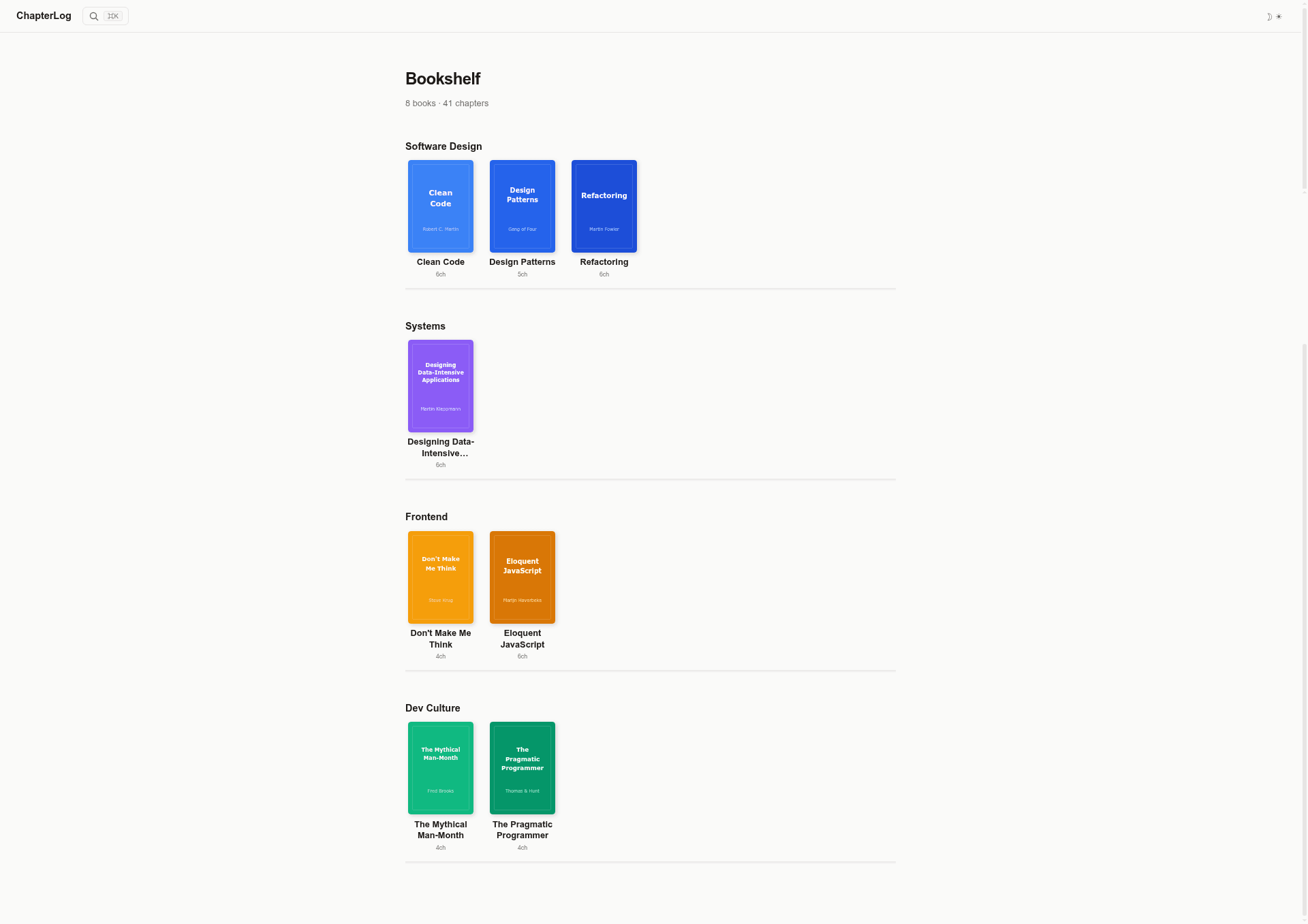
An Astro theme for building your personal bookshelf — organize books by chapter with a clean, wiki-style layout.
About this template
ChapterLog is a minimal Astro theme for building a personal bookshelf, organizing books by chapter with a clean, wiki-style layout. The open-source theme, published under an MIT license, generates a fully static site from YAML and Markdown files, so you can deploy it to any static hosting service.
What is ChapterLog?
ChapterLog is an Astro content-collection theme created by GitHub user IMMINJU. It takes book metadata in a book.yaml file and chapter content in Markdown files as inputs, and outputs a bookshelf home page, per-book overview pages, and a chapter reader with sidebar navigation. The theme uses Astro's content collections, marked for Markdown parsing, and js-yaml for YAML parsing, and it ships with search, RSS, sitemap, and Open Graph support built in.
Key Features
- Bookshelf home page — Groups books by the
categoryfield inbook.yamland displays cover images; up to 5 color palettes are assigned automatically per category. - Wiki-style chapter reader — Shows a sidebar with book parts and chapter links, rendered in the
WikiLayout.astrolayout. - Search (Ctrl+K) — A modal search index built from the static site, covered by
api/search-index.json.ts, lets visitors filter books and chapters as they type. - Dark/light theme toggle — Switches between light and dark styles defined with CSS variables in
styles/global.css. - Mobile responsive — On narrow viewports, the chapter sidebar collapses into a slide-in drawer.
- SEO-ready — Includes
rss.xml.tsfor RSS, a sitemap, Open Graph metadata, and canonical URLs. - Fully static output — Every page is pre-rendered at build time, so the site runs on any static host with no server required.
- Localization-friendly — UI strings live in
src/data/labels.ts, so you can edit or translate them without touching component code.
Who is it for?
- Developers — A ready-made Astro project using content collections, with a clear file structure and a quick-start command using
npm create astro. - Book note-takers — Anyone who wants to publish their reading notes chapter by chapter, with each chapter's section headings turned into a sidebar.
- Writers and bloggers — Creators who want a clean, minimal site to share structured book summaries and reading progress, with SEO features already configured.
What can you do with ChapterLog?
- Build a personal bookshelf — Create a
book.yamlplus Markdown chapter files, and ChapterLog generates the home page grouped by category. - Publish chapter-by-chapter notes — Use the
sectionsfrontmatter in each chapter to generate a clickable table of contents in the sidebar. - Deploy for free — Use the Vercel deploy button, or push the repository to Netlify, Cloudflare Pages, or GitHub Pages for a static site.
How does ChapterLog work?
After scaffolding a project with the template, you add books as folders under src/content/books, each containing a book.yaml file that defines parts and chapter slugs, plus Markdown files for each chapter. The data loader in src/data/books.ts parses these with js-yaml and marked, and the Astro pages under src/pages/[book]/ render the index and chapter views. The build outputs static HTML you can host anywhere.
FAQ
Is ChapterLog free?
Yes. ChapterLog is open source and released under the MIT license, so you can use, modify, and redistribute it freely.
How do I add a new book?
Inside src/content/books, create a folder with a book.yaml file (title, author, publisher, category, cover, parts) and one Markdown file per chapter. The home page and chapter pages are generated automatically.
Which hosting services work?
Because ChapterLog generates a fully static site, it works on Vercel, Netlify, Cloudflare Pages, GitHub Pages, or any other static file host.
Can I change the category colors?
Colors are applied automatically, cycling through up to 5 distinct palettes based on the category. There is no built-in override documented in the theme README.