Template details
Astro-portfolio
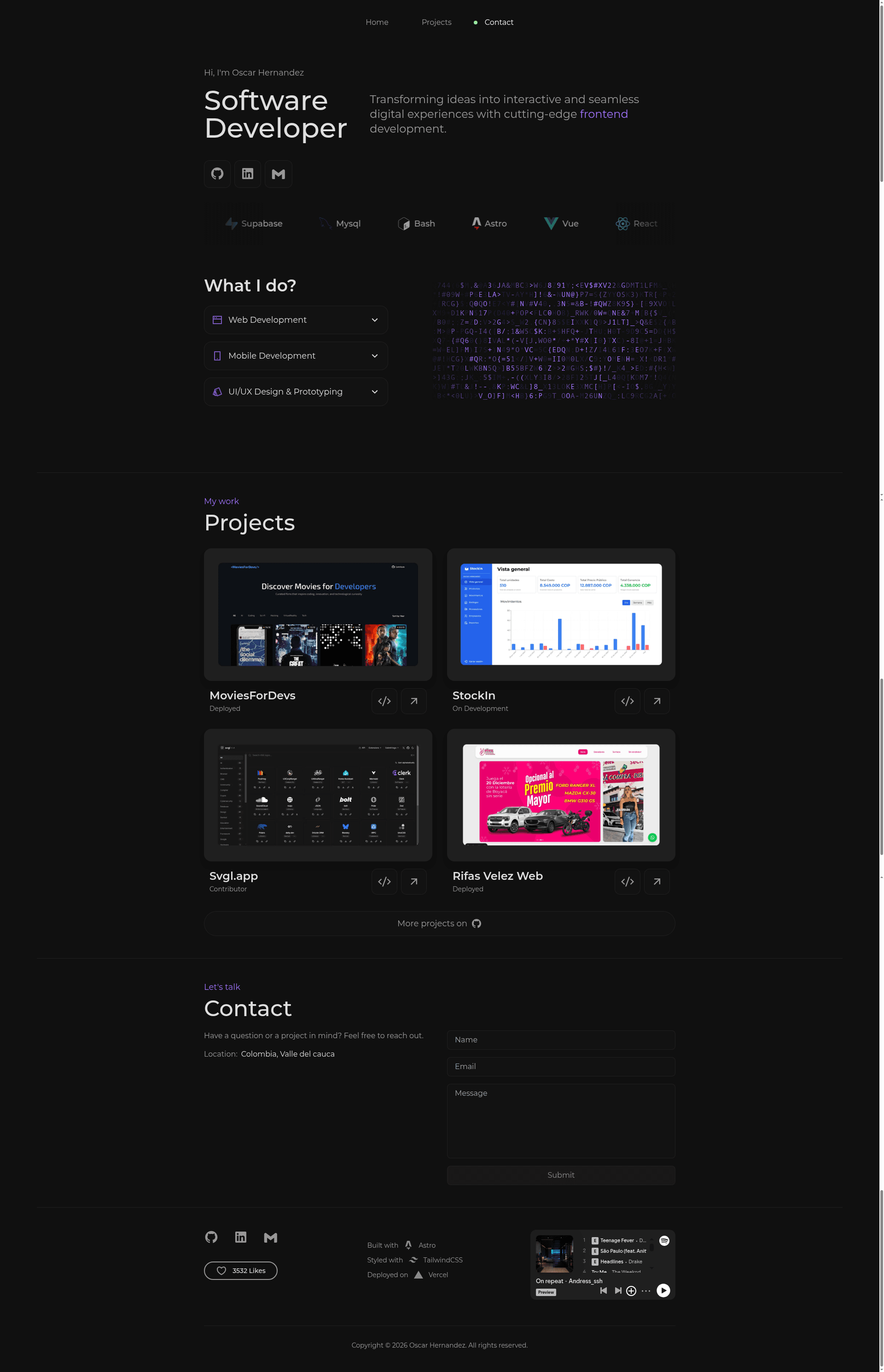
Minimal personal portfolio template built with Astro, React, TypeScript and Tailwind CSS, with Spotify and Formspree integrations.
About this template
Astro-portfolio is a minimal, custom personal portfolio template built on Astro, React, TypeScript, and Tailwind CSS, designed to produce a fast static site with interactive UI components. It is MIT-licensed and published by Oscar Hernandez, with a demo hosted at oscarhernandez.vercel.app.
What is Astro-portfolio?
Astro-portfolio is a single-page portfolio template that runs on Astro's static site generator and ships zero JavaScript by default, only loading React islands where needed. It takes content edited directly in .astro and .tsx component files and produces a fully static site ready for deployment. The template includes a working contact form wired to Formspree, a Spotify album embed in the footer, and a set of interactive React components from ReactBits.dev.
Key Features
- Astro static generation — The site is built with Astro, which compiles components to static HTML for fast loading.
- Tailwind CSS styling — The design is styled with Tailwind CSS; theme tokens live in
tailwind.config.mjs. - TypeScript components — Interactive pieces like
LetterGlitch.tsx,LikeButton.tsx, andSkillsList.tsxare written in TypeScript. - Spotify integration — Embed any Spotify album by pasting Spotify's iframe code into
src/Components/footer.astro. - Formspree contact form — The form in
src/Components/contact.astroposts to a Formspree endpoint; replace theactionattribute with your own endpoint URL. - Simple component structure — The site is organized into
home.astro,projects.astro,contact.astro,nav.astro,footer.astro, andlogoWall.astroundersrc/Components. - Customizable layout metadata — Site title and meta tags are edited in
src/layouts/Layout.astro. - Easy deployment targets — The README documents deployment to Vercel, Netlify, or GitHub Pages.
Who is it for?
Astro-portfolio is aimed at developers and designers who want a minimal but polished personal site without building from scratch. A front-end developer can clone the repo, install dependencies with npm, and start editing components immediately. A designer who knows Tailwind can restyle the theme by editing tailwind.config.mjs. A musician or artist can showcase a favorite album through the Spotify embed without writing custom code.
What can you do with it?
- Developers — Set up a personal portfolio with a projects section, about section, and working contact form in less than an hour.
- Designers — Rapidly customize the visual theme using Tailwind utility classes and the global config.
- Musicians — Display a Spotify album embed in the footer to highlight recent work or musical taste.
How does it work?
Running the template locally requires Node.js v18 or higher and npm or pnpm. The workflow is: clone the repository, run npm install, start the dev server with npm run dev, then edit the component files to replace placeholder content. After customization, the site can be built and deployed to any static host such as Vercel or Netlify.
FAQ
Is Astro-portfolio free to use?
Yes, the template is released under the MIT License. You must retain the original copyright notice and license text if you redistribute compiled or modified versions, per the license terms.
What Node.js version do I need?
The README recommends Node.js v18 or higher, with npm or pnpm as the package manager.
How do I set up the contact form?
Create a free account at Formspree, create a form, and copy the endpoint URL. Then open src/Components/contact.astro and replace the form's action attribute with your endpoint URL.
Can I deploy this template to Vercel?
Yes, the project imports directly into Vercel or Netlify from a GitHub repository; the README also mentions GitHub Pages as an option.
What interactive components are included?
The template ships three React components from ReactBits.dev: LetterGlitch, LikeButton, and SkillsList, all written in TypeScript.