Template details
gatsby-starter-scientist
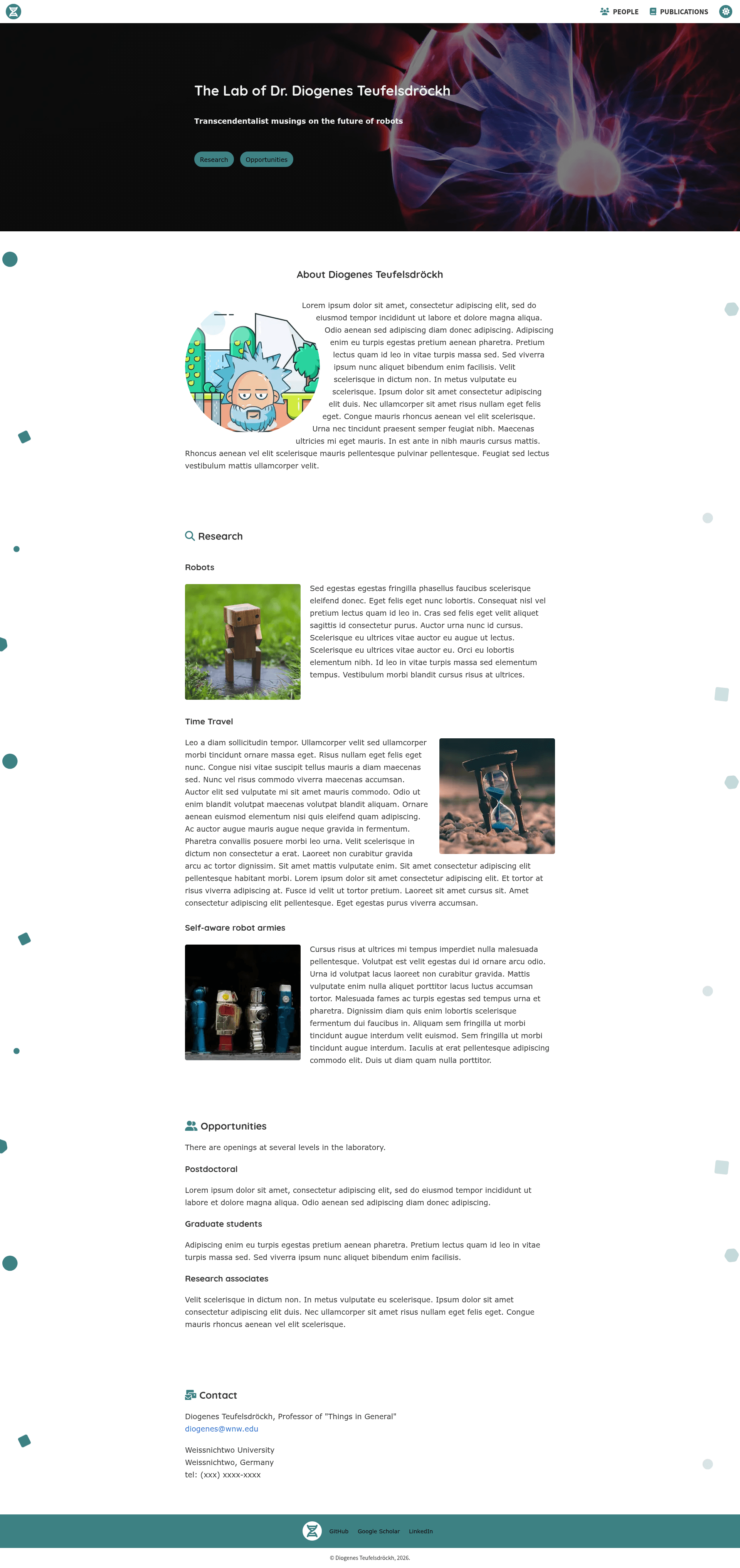
Gatsby starter template for building a scientist or laboratory profile site with publications, people, and research sections.
About this template
gatsby-starter-scientist is a free, open-source Gatsby starter template that builds a static profile website for a scientist, researcher, or laboratory group, with sections for about, research, people, publications, opportunities, and contact.
What is gatsby-starter-scientist?
gatsby-starter-scientist is a Gatsby-based starter template that produces a fully static, deployable website for scientists or lab teams. The source content is written in markdown files under src/markdown and configuration lives in gatsby-config.js; the build output is a collection of HTML, CSS, and JS files ready for any static host. The project is maintained by knightjdr on GitHub, and the live demo is available at knightjdr.github.io/gatsby-starter-scientist.
Key Features
- Gatsby static site generation — Built on the Gatsby framework, the template pre-renders pages for fast performance and can be deployed to any static host, with a default
npm run deployworkflow for GitHub Pages. - Markdown-driven content — All main sections, including About, Research subsections, Opportunities, Contact, and People, are edited as markdown files, so non-developers can update text without touching HTML.
- Automatic PubMed publications — Enter PubMed IDs in the
publicationsfield ofsiteMetadataingatsby-config.js, and the site fetches and displays the publication list automatically, ordered by publication date. - People and research profiles — Each lab member gets a markdown file with optional email, image, and title; research subsections are declared per file with optional images and a required display order.
- Light and dark color themes — The design uses CSS variables in
src/components/layout/layout.csswith separate values forlight-modeanddark-mode, letting you tune brand colors while preserving contrast. - Customizable images and branding — Replace the hero PNG (starter ships a 5184 × 3456 image), the favicon (512 × 512 PNG), and the inline SVG logo by swapping files in
src/images; square images are auto-cropped to circles. - Optional sections and pages — Delete a markdown file or empty a config array to remove a section entirely; removing People or Publications also removes the corresponding navigation link.
Who is it for?
gatsby-starter-scientist is aimed at individual researchers, lab principal investigators, and academic research groups that need a professional web presence but don't want to design a site from scratch. It requires only basic familiarity with Git and editing text files, making it accessible to scientists without web development experience.
- Individual scientists — Publish a personal homepage with an about photo, research interests, and a PubMed-synced publication list.
- Lab PIs — Maintain a lab site with team member profiles, research area subsections, and an opportunities page for open positions.
- Research groups and institutions — Share contact information and footer links for collaborators, and keep publications current without manual HTML updates.
What can you do with it?
- Launch a lab website quickly — Fork the repository, clone it, run
npm install, then edit the markdown files; a local development server athttp://localhost:8000gives instant preview with hot reloading. - Keep publications up to date — Add new PMIDs to the config and rebuild; the template pulls the latest metadata from PubMed automatically.
- Host for free on GitHub Pages — Run
npm run deployto publish the site athttps://your-username.github.io/gatsby-starter-scientistwith no hosting costs. - Adapt the design to your institution — Change theme colors via the CSS variables, upload a dark hero image, and swap in your own SVG logo.
How does gatsby-starter-scientist work?
- Fork and clone the repository, then install dependencies with
npm install. - Start the development server with
npm run develop; edits to markdown or config are reflected in the browser immediately. - Customize
gatsby-config.jsfor site metadata, path prefix, and PubMed IDs, and edit the markdown files for content. - Build a production version with
npm run build, then deploy to GitHub Pages withnpm run deploy(GitHub credentials are requested).
Pricing
The starter is open source and free to use. The README notes that the default hosting destination, GitHub Pages, is free, and there are no paid themes, plugins, or dependencies required to run the site.
FAQ
How do I add my publications?
Edit gatsby-config.js and add the PubMed IDs to the publications array inside the siteMetadata object. Rebuild the site and the Publications page will automatically retrieve and display those papers in descending date order.
Can I remove sections I don't need?
Yes. Delete or rename the relevant markdown file in src/markdown — for example about.md, opportunities.md, or contact.md — or empty the people folder and the publications array. Removing the People or Publications sections also removes their links from the navigation bar.
Why are my images not showing up during development?
Run npm run clean and restart the development server. This clears Gatsby's cache, which can sometimes hold stale references to image files that were replaced or removed.
Can I use a custom domain?
Yes. The README links to GitHub's official instructions for configuring a custom domain for GitHub Pages. You'd also update the siteUrl and pathPrefix fields in gatsby-config.js if your site is served from a subpath.
What image files do I need to replace?
The hero background should be a dark PNG (the default is 5184 × 3456), About images need to be square PNG/JPG at least 1050 × 1050 pixels, People and Research images at least 900 × 900 pixels, the favicon a 512 × 512 PNG, and the logo an SVG so it can adapt to light/dark themes.