Template details
Astro Terminal
Retro-terminal blog template for Astro — an amber/green CRT-styled blog with scanlines, boot sequence, hacking 404, and content collections.
About this template
Astro Terminal is a retro-terminal blog template built on Astro that turns a static blog into an amber-phosphor CRT experience with scanlines, a boot sequence, and a hacking-themed 404.
What is Astro Terminal?
Astro Terminal is a blog template for the Astro static site generator, styled after 1980s CRT terminals. It takes Markdown files with frontmatter as input and produces a static blog with an amber or green phosphor screen, scanlines, glow, and the IBM VGA 8x16 font (with Cyrillic support) as output. The template runs on Astro's content collections and includes archive, tags, RSS, about, and 404 pages.
What makes Astro Terminal stand out?
- Two CRT themes — Amber by default, green 'phosphor' alternative; toggle with the THEME button or the T key, and the choice is remembered.
- CRT effects — scanlines, vignette, rolling scan bar, and subtle flicker; all disabled under prefers-reduced-motion.
- Power-on boot sequence — first visit per session plays a mainframe-style POST log that can be dismissed with any key or click; the fictional vendor name is configurable in src/consts.ts.
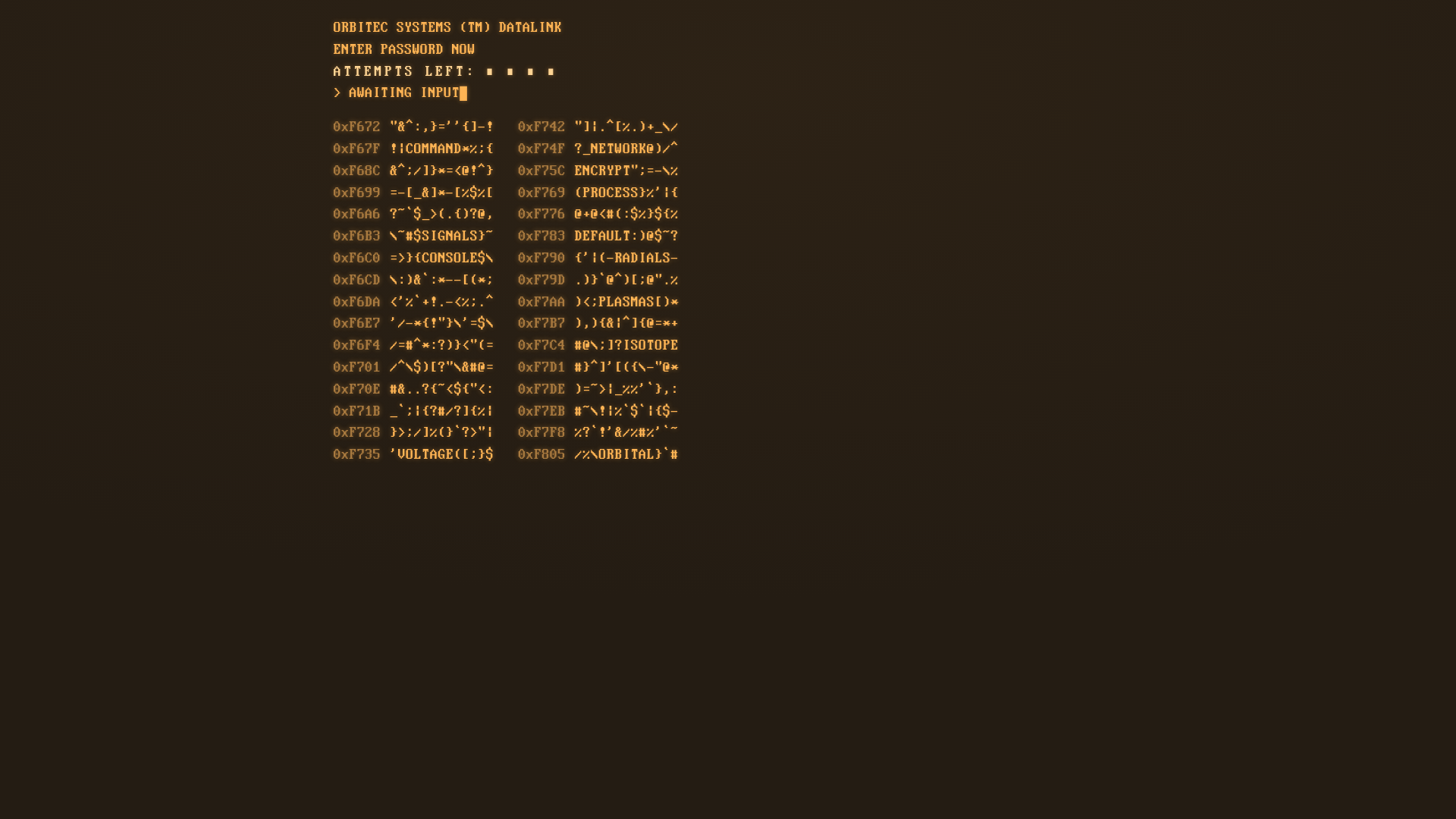
- Hacking 404 — the file-not-found page is a password-guessing minigame with hex addresses, hidden words, attempts, and likeness; real links remain available so it's an easter egg, not a dead end.
- Optional private mode — set a flag in src/consts.ts to cover the entire site with the same minigame at the start of each session; the lock is a cosmetic client-side gate, not real protection.
- Terminal sound — menu rows, links, and the minigame grid play synthesized blips via the Web Audio API; the 'access denied' buzz is a CC0 sample from Kenney's Interface Sounds pack; sounds toggle with the SND button.
- Content-collections blog — posts are plain Markdown files with optional hero images; Astro optimizes and tints images to match the current theme; includes archive by year, tags, and RSS.
- Mobile-tuned — under 640px the terminal drops scanlines, vignette, flicker, text glow, boot screen, and frame border to keep scrolling smooth; buttons move to the footer; minigame switches from a grid of about 344 targets to tappable 48px rows; wide tables scroll internally.
Tech stack — Built on Astro with TypeScript scripts for the hack game and sound, plain CSS in src/styles/terminal.css, and no external UI framework or CSS library. The font is WebPlus IBM VGA 8x16 from The Ultimate Oldschool PC Font Pack, licensed under CC BY-SA 4.0. Pages include home, archive, blog posts, tags, about, 404, and an RSS feed.
Who should use Astro Terminal?
- Retro-tech and terminal enthusiasts who want a personal blog that looks like an old phosphor CRT, complete with scanlines and a boot sequence.
- Astro developers who want a ready-made blog with content collections, RSS, and a theming system, plus playful interactive elements like the hacking 404.
- Indie web hobbyists who enjoy easter eggs and a quirky vibe — the private mode even makes the whole site a password-gate game, though static content is still visible in HTML.
What can you do with Astro Terminal?
- Blog writers: publish Markdown posts with frontmatter (title, description, pubDate, tags, optional heroImage, draft flag) and get an optimized, theme-tinted blog with archive, tags, and RSS.
- Customizers: change the site title, tagline, description, version, and PRIVATE_MODE flag in src/consts.ts, set the site URL in astro.config.mjs for RSS, and fill in your 'personal file' on the about page.
- Sound tweakers: replace any synthesized sound by dropping a file into public/sounds/ and adding it to SFX_SAMPLES in src/consts.ts, or remove the entry to let the Web Audio synth take over.
How does Astro Terminal work?
Create a Markdown file in src/content/blog/ with frontmatter fields (title, description, pubDate, tags, optional heroImage, draft) and put images in src/content/blog/images/. Run npm install, then npm run dev for local development, npm run build to output the site to ./dist/, and npm run preview to test the build. Static output means no server-side rendering; the private mode uses sessionStorage to keep the gate open for the session.
Pros and cons
- Pros: No external styling dependencies; keyboard shortcuts H (home), A (archive), T (theme) work even on Russian layouts; phones get simplified effects for readability; all CRT animations respect prefers-reduced-motion.
- Cons: The private mode is explicitly cosmetic — the content is still present in the HTML and visible with curl, view-source, or JS disabled; real privacy would require Astro SSR with middleware and a session.
FAQ
How do I add a new post?
Create a Markdown file in src/content/blog/ with frontmatter containing title, description, pubDate, tags, an optional heroImage path, and a draft boolean. Images go in src/content/blog/images/. The content collection schema in src/content.config.ts defines the expected fields.
Is the private mode real protection?
No. The template states the site is static, so the lock is a cosmetic client-side gate 'for the vibe', not real security. A visitor can view the content with curl, view-source, or by disabling JavaScript. Real protection would need server-side rendering or authentication.
Can I use the terminal sound effects commercially?
The synthesized sounds are generated with the Web Audio API and don't require external licensing. The one exception is the 'access denied' buzz, a CC0 sample from Kenney's Interface Sounds pack — CC0 is public domain, but you should still swap in your own audio if you need to be certain. The template reminds you to use audio you have the rights to.
Does the site work on phones?
Yes. Below 640px the template removes scanlines, vignette, flicker, text glow, the boot screen, and frame border to avoid moire and improve scrolling. The minigame switches from a character grid to a list of tappable 48px rows, buttons move to the footer, and touch targets are enlarged. Sound defaults to off on phones because there's no hovering.
What font does the template use?
It uses WebPlus IBM VGA 8x16 from The Ultimate Oldschool PC Font Pack by VileR, int10h.org, released under CC BY-SA 4.0. The font includes Cyrillic support and the license text is included at public/fonts/FONT-LICENSE.txt.