Template details
AtomGraph Web-Client
Generic Linked Data browser and UX component framework that renders RDF/XML data into interactive, responsive HTML using XSLT 3.0.
About this template
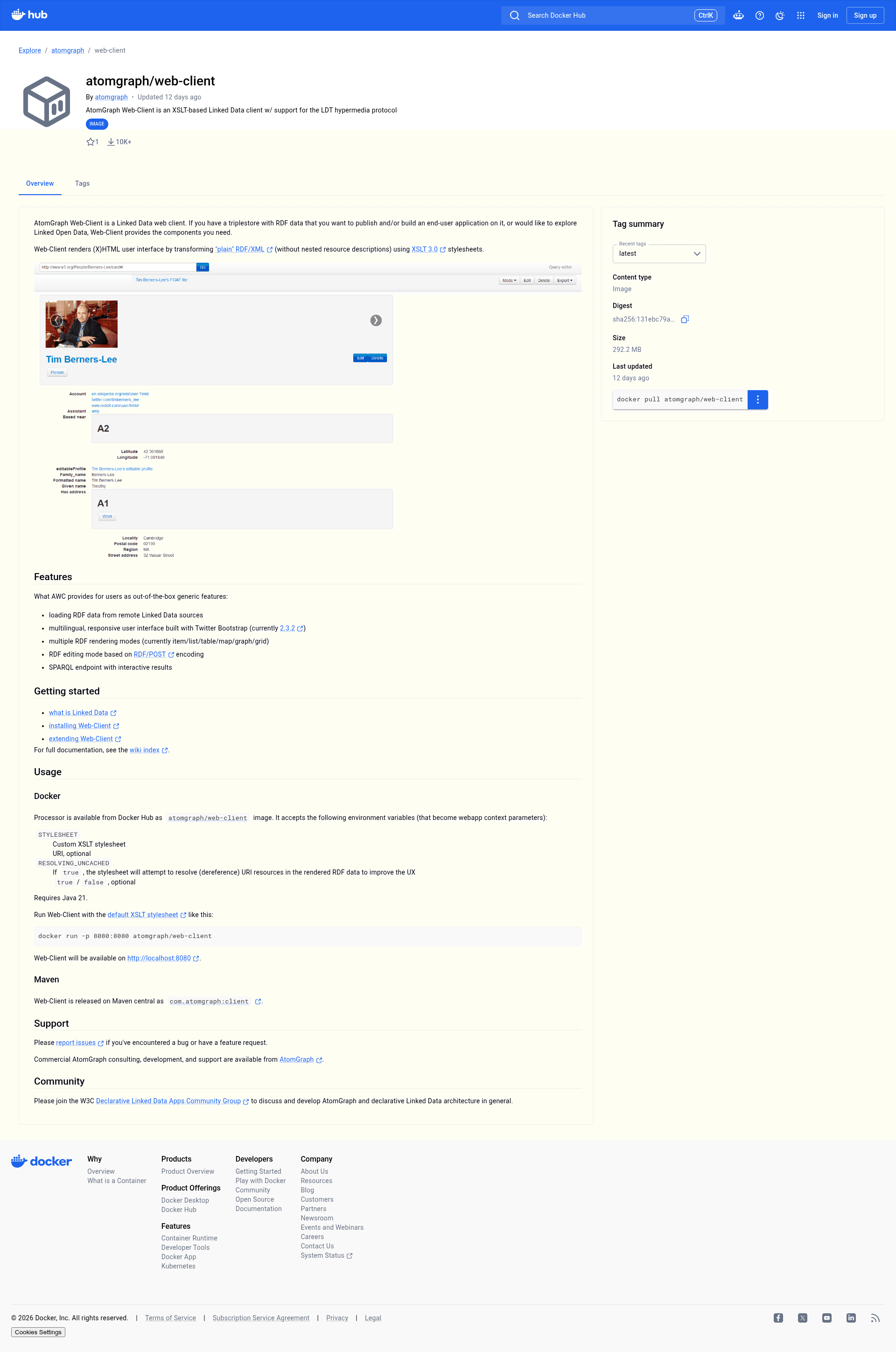
AtomGraph Web-Client is an open-source, generic Linked Data browser and UX component framework that converts RDF/XML data into interactive, responsive (X)HTML pages using XSLT 3.0 stylesheets.
What is AtomGraph Web-Client?
AtomGraph Web-Client (AWC) is a Java-based web application that renders RDF/XML from a triplestore or remote URL into a human-readable HTML interface. It accepts plain RDF/XML as input and produces an (X)HTML document through XSLT 3.0 transformation, with no nested resource descriptions required. The project is developed by AtomGraph and distributed under the Apache License 2.0, with the source hosted on GitHub.
Key Features
- Remote RDF loading — Loads RDF data from remote Linked Data sources automatically.
- Multilingual, responsive UI — The interface is built with Twitter Bootstrap 2.3.2 and adapts to different screen sizes.
- Multiple rendering modes — Renders resources as item, list, table, map, graph, or grid views.
- RDF editing — Supports editing RDF data through the RDF/POST encoding protocol.
- SPARQL endpoint — Includes an interactive SPARQL endpoint for querying the underlying data.
- Custom XSLT stylesheets — You can replace the default layout.xsl with your own stylesheet via the STYLESHEET environment variable.
- Docker deployment — The atomgraph/web-client image on Docker Hub runs with a single command and requires Java 21.
- Maven artifact — Available on Maven Central as com.atomgraph:client for Java integration.
Who is it for?
- Linked Data developers — who need a ready-made UI for RDF datasets without building front-ends from scratch.
- Knowledge graph engineers — who want to expose a triplestore to end users with browsing and editing capabilities.
- Researchers working with Linked Open Data — who want to explore remote RDF resources in a browser instead of raw XML.
What can you do with AtomGraph Web-Client?
- Publish an RDF dataset: Deploy the Docker image, point it at your triplestore, and get an explorable web UI with multiple view modes.
- Prototype a read/write Linked Data app: Use the RDF/POST editing mode to mutate triples from the browser.
- Explore external datasets: Load remote Linked Data resources and navigate them through hyperlinks.
- Run SPARQL queries: Use the built-in interactive SPARQL endpoint to query the data directly.
How does it work?
The web client first obtains RDF/XML from a triplestore or a remote URL. An XSLT 3.0 stylesheet then transforms the plain RDF/XML into an (X)HTML document, which is served to the browser with the Bootstrap-based responsive layout. If the RESOLVING_UNCACHED parameter is set to true, URI resources inside the data are dereferenced to enrich the rendering.
Pros and cons
- Pros: Free and open source; one-command Docker deployment; fully generic across RDF/XML datasets; rendering is customizable through XSLT.
- Cons: Only handles plain RDF/XML without nested resource descriptions; the bundled UI uses the older Bootstrap 2.3.2; requires Java 21.
Pricing
AtomGraph Web-Client is free to use under the Apache License 2.0. AtomGraph also offers paid consulting, development, and support services.
FAQ
Is AtomGraph Web-Client free?
Yes, it is open-source software released under the Apache License 2.0. You can use it without licensing fees, and paid support is available from AtomGraph.
What are the system requirements?
It requires Java 21. The Docker image atomgraph/web-client includes the necessary runtime, so Docker is the quickest way to start.
How do I run it with Docker?
Run docker run -p 8080:8080 atomgraph/web-client and open http://localhost:8080. You can also set the STYLESHEET and RESOLVING_UNCACHED environment variables to customize behavior.
Can I customize the rendering?
Yes. The entire HTML output is generated by XSLT stylesheets. Provide your own stylesheet by setting the STYLESHEET environment variable to the URI of your .xsl file.
Does it support N-Triples or Turtle?
The documentation specifies that it processes plain RDF/XML. Other RDF serializations are not mentioned, so you would need to convert your data to RDF/XML first.