Template details
Aviator Jekyll Template
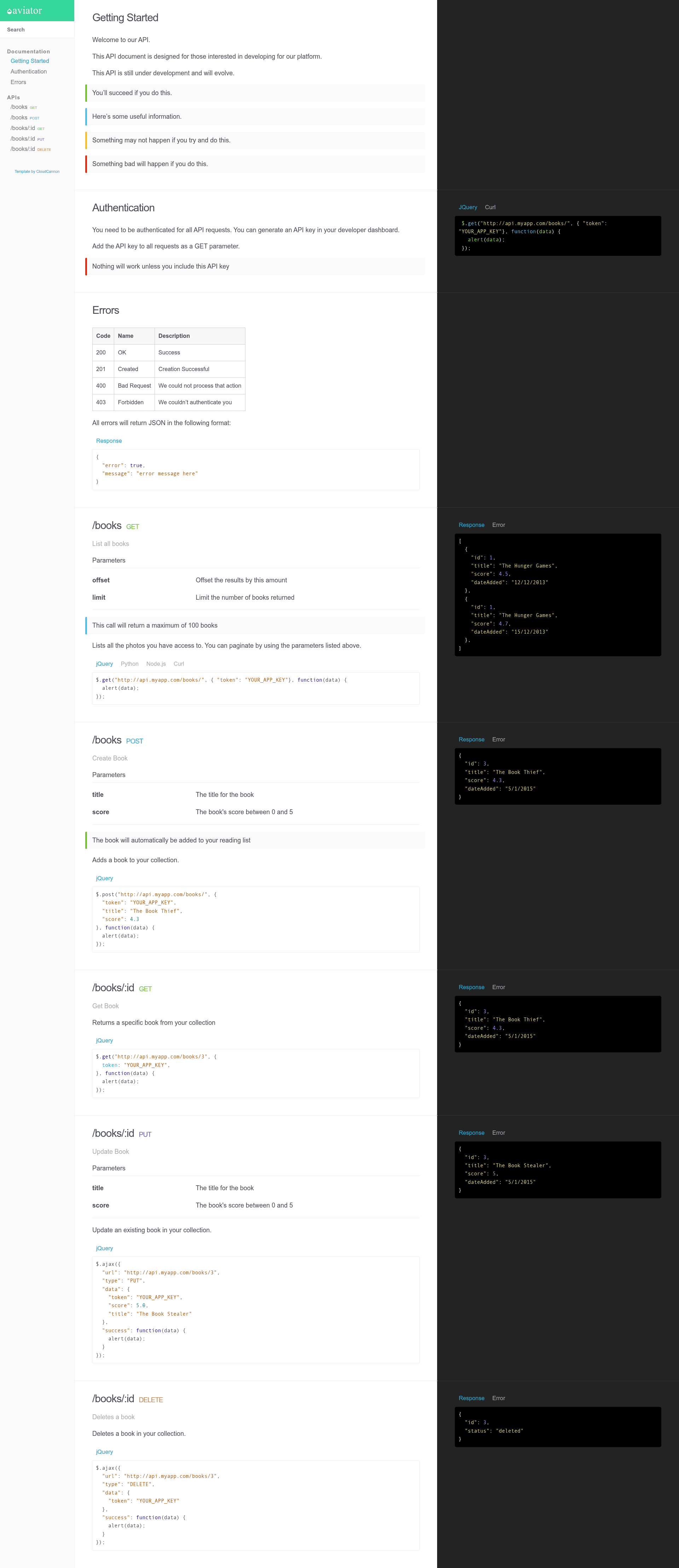
Legacy API documentation template for Jekyll with three-column layout, full-text search, and CloudCannon-optimized editing.
About this template
Aviator is a legacy API documentation template for Jekyll, created by CloudCannon, that generates a responsive three-column documentation site with full-text search and auto-generated navigation.
What is Aviator Jekyll Template?
Aviator is an API documentation template built on Jekyll 3.7.2 by CloudCannon, the company behind the CloudCannon Academy Jekyll tutorials. It takes documentation pages organized into Jekyll collections and outputs a static website with a three-column layout, full-text search, and navigation automatically generated from collection categories. The repository explicitly labels the template as legacy and no longer maintained, but it remains functional and deployable either locally or through CloudCannon.
Key Features
- Three-column layout — the documentation site uses a three-column design that is fully responsive on mobile devices.
- Full-text search — a built-in search index covers all documentation pages; individual pages can opt out by adding
excluded_in_search: trueto front matter. - Auto-generated navigation — navigation is built automatically from collection categories, so you do not hand-craft menus.
- Pre-styled components — the theme includes ready-made styles for common documentation elements.
- CloudCannon-optimized — the template is designed for editing in CloudCannon, with collections and the
position_numberfield controlling content order. - SEO tags — metadata for search engines is included out of the box.
- Google Analytics — integration is built in for tracking site traffic.
- Jekyll 3.7.2 base — built with Jekyll 3.7.2 and intended to work with newer Jekyll versions via Bundler.
Who should use Aviator?
- API documentation teams — publish reference docs as a static site without building the layout from scratch.
- CloudCannon users — edit documentation in a visual CMS that natively understands this template's collection structure.
- Jekyll developers — use the template as a starting point for a searchable docs site and customize it with local
bundle exec jekyll serveworkflows.
What can you do with Aviator?
- Organize API sections: create one Jekyll collection per API section and order them with
position_numberin the collection configuration inside_config.yml. - Control page order: set
position_numberin each document's front matter to determine the order pages appear within a collection. - Hide internal pages from search: add
excluded_in_search: trueto a page's front matter to keep it out of search results.
How does Aviator work?
Aviator runs as a standard Jekyll site. After adding site and author details to _config.yml, you start the site locally with bundle exec jekyll serve or connect the repository to CloudCannon for a hosted workflow. The template reads Jekyll collections, applies the position_number ordering, and outputs a static site with the pre-styled three-column layout.
FAQ
Is Aviator still maintained?
No. The repository description marks Aviator as a legacy template that is no longer maintained. It can still be used as a starting point, but there will be no official updates or support.
How do I exclude a page from search results?
Add excluded_in_search: true to the page's front matter. This per-page flag removes the document from the site's full-text search index.
How do I order documents within a collection?
Set the position_number field in the front matter of each document. The order of collections themselves is controlled by a position_number field set in the collection configuration in _config.yml.