Template details
BootstrapVue Argon Dashboard
Free BootstrapVue admin dashboard with over 100 components, SASS theming, and example pages from Creative Tim.
About this template
BootstrapVue Argon Dashboard is a free open-source admin dashboard template by Creative Tim that pairs Vue.js with BootstrapVue components to deliver a complete set of coded UI elements, example pages, and SASS-driven customization for admin panels and back-office interfaces.
What is BootstrapVue Argon Dashboard?
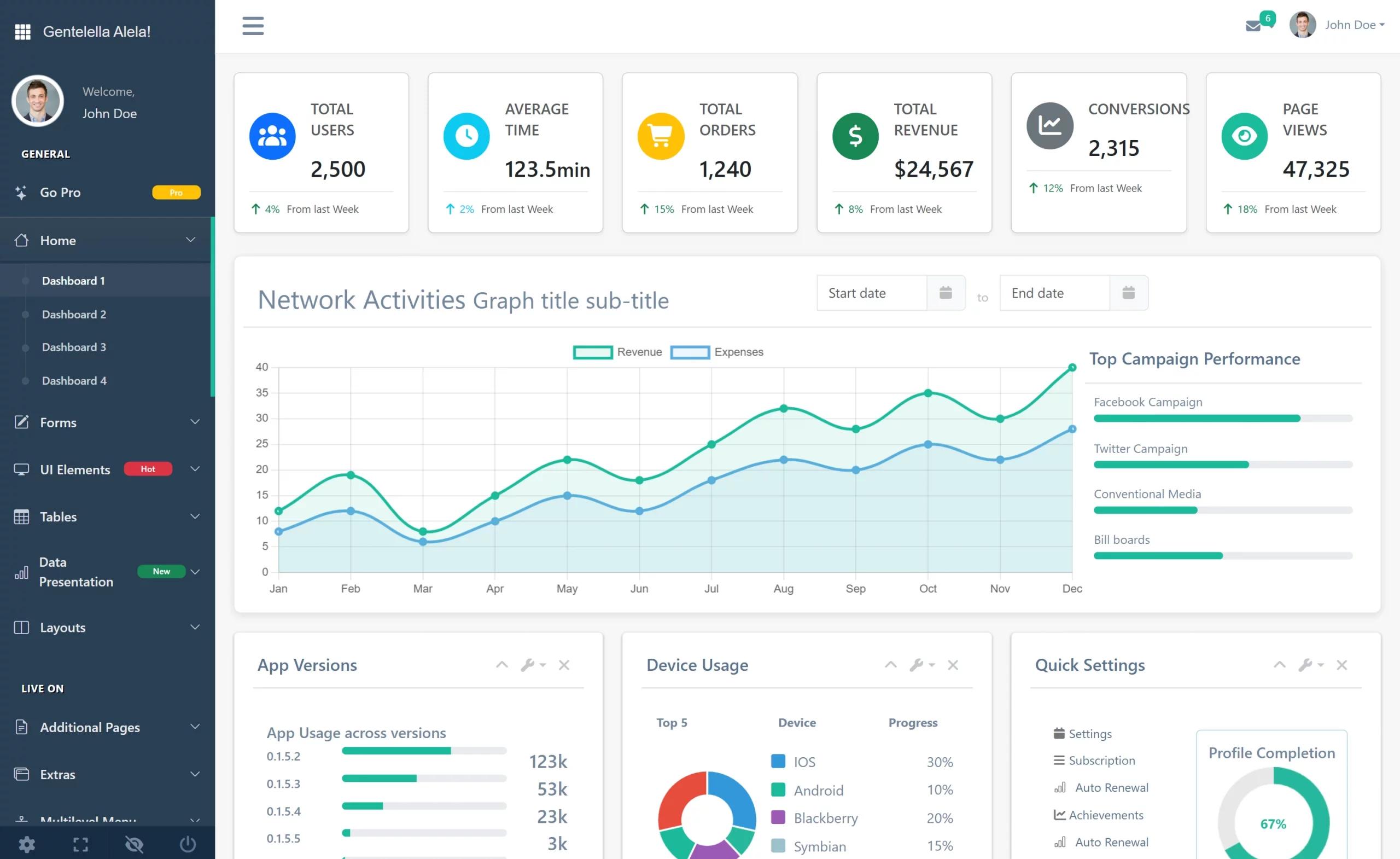
BootstrapVue Argon Dashboard is a Vue.js single-page application built on BootstrapVue and generated with vue-cli, released under the MIT license at version 1.0.0. It takes design assets from the Argon Design System and converts them into reusable Vue components — cards, tables, alerts, dropdowns, modals, tabs, sliders, progress bars, notifications, and charts — which developers can wire into a working dashboard. The output is a responsive admin interface that ships with pre-built example pages, a starter layout, and a router configuration, so a developer can clone the repository and begin building immediately. It was made by Creative Tim, the UI library and design system company that also publishes matching Argon Dashboard versions for HTML, React, Angular, NodeJS, and Laravel.
Key Features
- 100+ coded components — the template includes over 100 individual BootstrapVue components, including Badge, BaseButton, BaseDropdown, BasePagination, BaseProgress, BaseSlider, BaseTable, Modal, Tabs, Collapse, and more, located in the src/components directory.
- SASS theming — all components can take color variations and state styling such as hover, focus, and active by editing src/assets/scss files, including the argon.scss entry point and the core and custom folders.
- Example pages — pre-built Dashboard, Icons, User Profile, Regular Tables, Login, Register, Maps, and Starter Sample pages with layouts, driven by the routes defined in src/routes/routes.js.
- Charts included — src/components/Charts contains LineChart.js and BarChart.js wrappers over Chart.js with a shared configuration, global options mixin, and rounded-corners extension.
- Auth and layout views — views/Pages includes AuthLayout, Login, Register, and UserProfile, while views/Layout provides DashboardLayout, DashboardNavbar, Content, and ContentFooter.
- Sidebar plugin and notification plugin — src/plugins includes global components, global directives, the SidebarPlugin for navigation, and NotificationPlugin with Notification and Notifications components.
- Router ready — src/routes provides router.js, routes.js, and starterRouter.js, and the sidebar navigation is built from these route definitions.
- Browser support — officially supports the last two versions of Chrome, Firefox, Edge, Safari, and Opera.
Who is it for?
- Vue.js developers who need a ready-made admin dashboard structure with componentized UI so they can skip design work and focus on wiring up data and business logic.
- Startups and agencies that build internal tools, CRM panels, or analytics dashboards and want a free MIT-licensed starting point they can customize in SASS.
- UI designers working in code who can use the example pages — profile, tables, login, register — to present functional mockups to clients before adding backend functionality.
- Creative Tim users who already use the Argon Design System and want the Vue and BootstrapVue implementation to stay consistent with other Argon-based projects.
What can you do with it?
- Admin panel builders: replace the dummy data in views/Dashboard/PageVisitsTable.vue and SocialTrafficTable.vue to show real page-visit and social-traffic metrics.
- Authentication screens: reuse the Login and Register pages under views/Pages to add user sign-in and sign-up flows to a new or existing product.
- Team dashboards: customize the StatsCard components on the Dashboard page to surface KPIs such as users, sales, or active sessions.
- Starter apps: use the Starter directory containing SamplePage, SampleLayout, SampleNavbar, and SampleFooter as a clean base layout when the example pages are more than needed.
How does the template work?
The quick start is a standard Vue CLI workflow: download the ZIP from GitHub or Creative Tim, or clone the repository with git. After that, install dependencies and run the project using the Vue CLI scripts in package.json. The built project compiles the SASS in src/assets/scss, registers global components through src/plugins/globalComponents.js, and maps sidebar routes through src/routes/routes.js. For server deployment, the README provides a one-click Genezio deploy option.
Pricing
The template is free and released under the MIT license, so it can be used in personal and commercial projects without paying a license fee. Creative Tim sells premium products separately, but the BootstrapVue Argon Dashboard itself carries no price tag and no watermark.
FAQ
Is BootstrapVue Argon Dashboard free?
Yes. It is free and licensed under the MIT license, as shown in the repository's LICENSE.md and the version 1.0.0 badge. You can use it for personal projects, client work, and commercial products.
How do I install the template?
You can download the ZIP from the GitHub repository or the Creative Tim product page, or run git clone of the repository URL. After cloning, follow standard Vue CLI steps: install the dependencies listed in package.json and start the development server with the project's npm scripts.
What browsers are supported?
At present, the template officially supports the last two versions of Chrome, Firefox, Edge, Safari, and Opera. Older browser versions are not part of the official support matrix.
What is included in the download?
The download contains the full Vue CLI project: public assets, src with assets/scss, vendor files for Nucleo icons, components, directives, plugins, routes, and views. It also includes CHANGELOG.md, LICENSE.md, and a README with documentation links.
Is there documentation available?
Yes. Detailed documentation is hosted on the Creative Tim learning lab for BootstrapVue Argon Dashboard, covering colors, avatars, components, and the foundation. Links to the demo, download page, and license agreement are in the Resources section of the README.