Template details
Cause
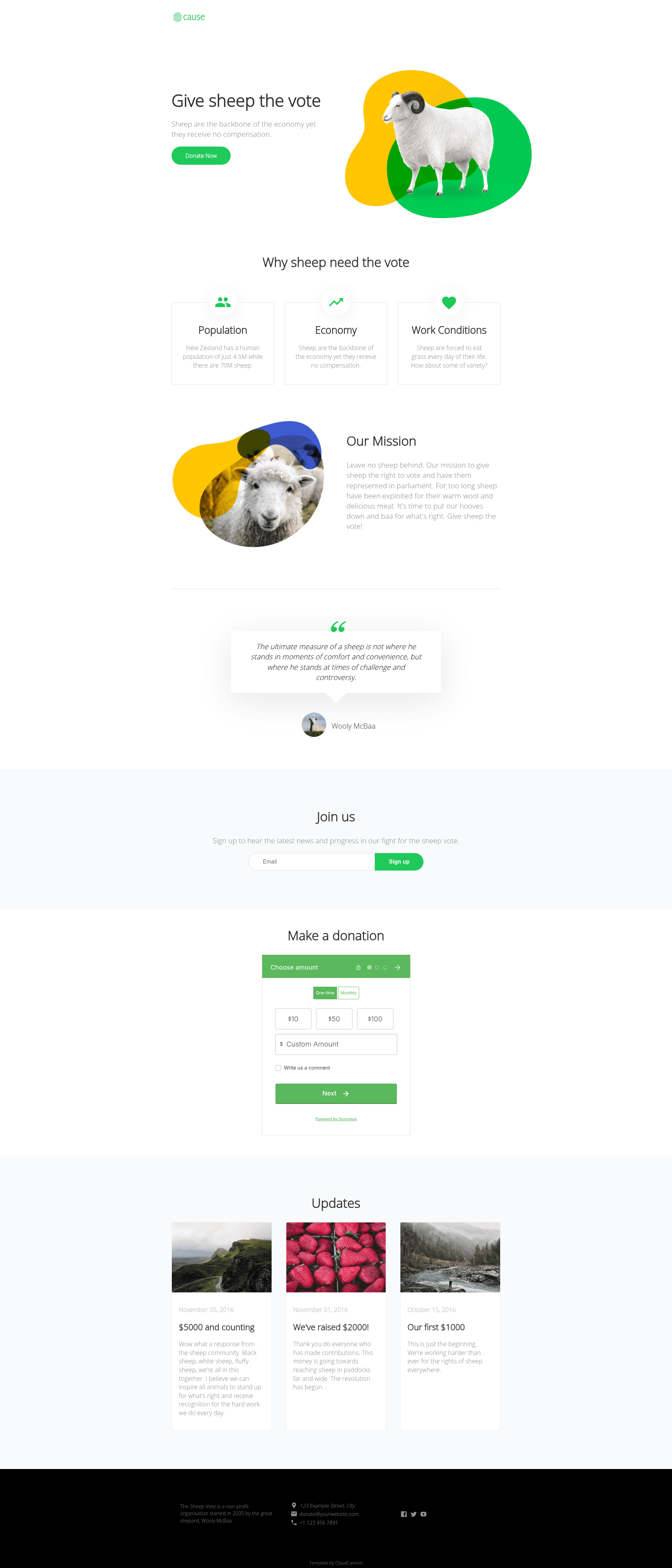
Not for profit themed Jekyll template with Donorbox donations, MailChimp newsletters, SEO tags, and CloudCannon editing.
About this template
Cause is a not-for-profit Jekyll website template from CloudCannon that bundles donation forms, newsletter signups, SEO tags, and Google Analytics into a configurable static site.
What is Cause?
Cause is a Jekyll-based website template designed for not-for-profit and cause-focused organizations, created by CloudCannon. It takes your organization's details — set in _config.yml and a company data file — and generates a static website with pre-built pages and pre-styled components. The template runs on Jekyll 3.3.1 and newer, and is optimized for editing inside CloudCannon's visual CMS, though it can also be built locally with Bundler.
Key Features
- Pre-built pages — The template ships with ready-made page layouts so you don't have to design from scratch.
- Pre-styled components — A set of styled UI components is included, covering common nonprofit site elements like headers, footers, and donation callouts.
- Configurable footer — Footer content and company details are set in a central data file and reused across the site.
- CloudCannon editing — The template is structured for point-and-click editing in CloudCannon's CMS, making content updates accessible without touching code.
- SEO tags — Uses the
jekyll-seo-tagplugin; at minimum you set a title in each page's front matter, with more options on the plugin's project page. - Google Analytics — Add your analytics key to
_config.ymland run withJEKYLL_ENV=productionto collect site traffic data. - Donorbox integration — Paste a Donorbox campaign embed code into the
donation_embedconfig field to add a donation form. - MailChimp integration — Set the newsletter form's action URL in
newsletter_actionto embed a MailChimp signup form.
Who is it for?
- Nonprofit organizations that need a professional web presence with a built-in donation form via Donorbox.
- Community campaigns that want to grow an email list with MailChimp and publish SEO-friendly news or updates.
- Small charities that lack a dedicated developer and need a template they can edit visually in CloudCannon, with company details updated in one place.
What can you do with Cause?
- Nonprofit staff: Replace the placeholder content with your mission, programs, and impact stories using CloudCannon's editor.
- Fundraisers: Paste your Donorbox embed code to accept donations directly on the site.
- Communications leads: Connect a MailChimp form to collect newsletter subscribers and send updates.
- Administrators: Add your Google Analytics key in
_config.ymland track visitor behavior in production.
How does Cause work?
Cause follows a standard Jekyll workflow:
- Add your site details to
_config.yml. - Add your Google Analytics key to
_config.yml(optional). - Configure third-party integrations like Donorbox and MailChimp by pasting their codes into the appropriate config fields.
- Build the site locally with
bundle exec jekyll serve, or connect the GitHub repository to CloudCannon for automated deploys.
FAQ
How do I install Cause locally?
Install the dependencies with Bundler, then run bundle exec jekyll serve from the template directory. The template was built with Jekyll 3.3.1 but should support newer versions, so you can use bundle exec to ensure you're running the right versions.
How do I add Donorbox to my Cause site?
Set up a campaign on Donorbox, copy the embed code from the Dashboard, and paste it into the donation_embed field in _config.yml. The form will then appear on your donation page.
How do I connect MailChimp to Cause?
Create a campaign on MailChimp, find the signup form's action URL, and place it in the newsletter_action field in _config.yml. This embeds a newsletter signup form on your site.
What is the jekyll-seo-tag plugin?
It's a Jekyll plugin that adds SEO metadata to your pages. Cause uses it, so you should at least set a title in the front matter of each page; more options are documented in the plugin's GitHub project.