Template details
Dark Poole
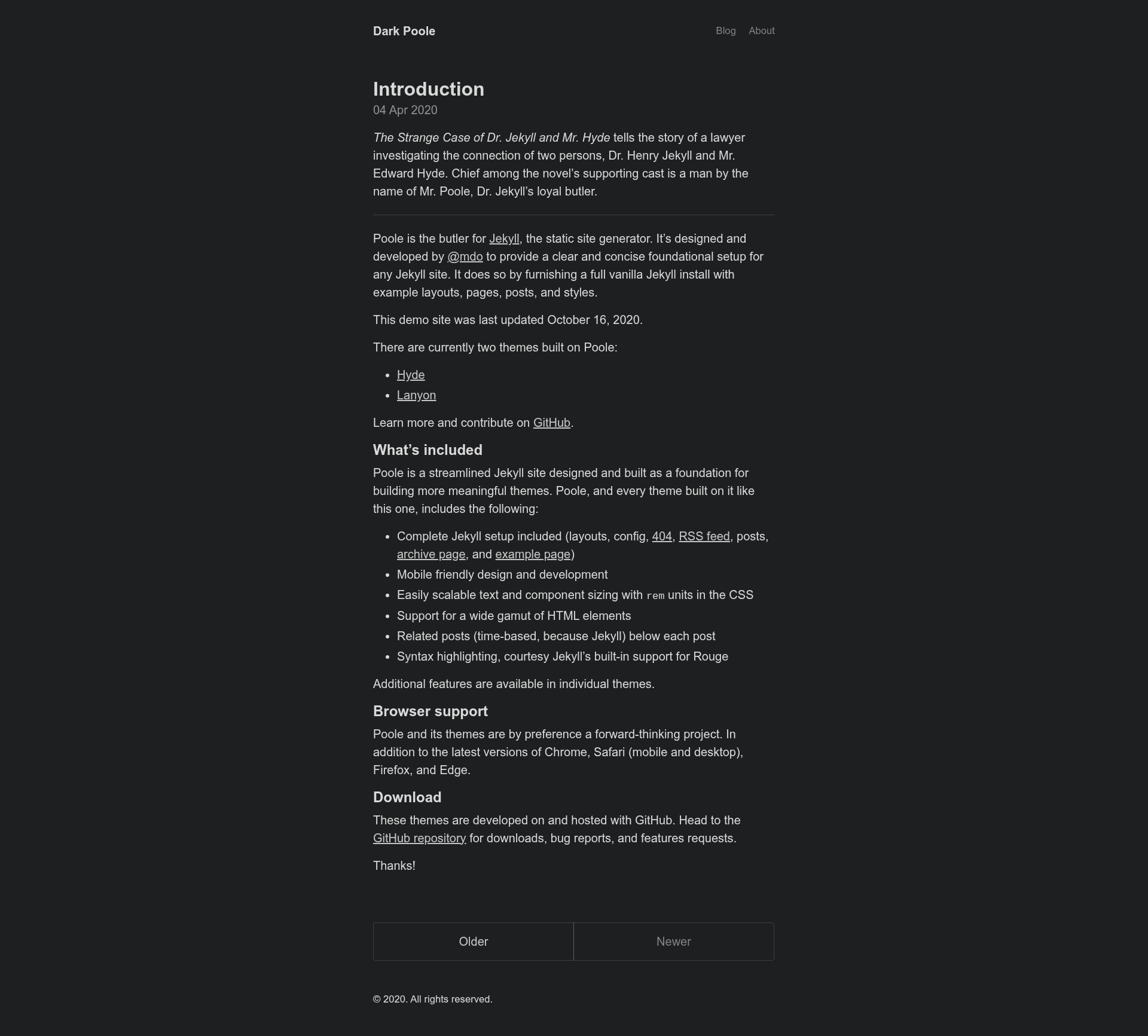
Permanent dark theme for Poole, a Jekyll blog theme, with customizable navbar and 20px base font size.
About this template
Dark Poole is a permanent dark theme for the Poole Jekyll blog theme by Mark Otto, created to keep a site dark regardless of the visitor's system preference. Built on Jekyll's built-in SCSS compiler, the theme takes a standard Poole installation and applies a darker color scheme, a customizable navbar, a 20px base font size, and removed tagline. It is open-sourced under the MIT license and distributed as a GitHub repository with a master branch for development and a gh-pages branch for the hosted demo.
What is Dark Poole?
Dark Poole is a drop-in replacement theme for Poole, the Jekyll-based blog theme created by Mark Otto. It changes Poole's styling to a permanent dark palette, meaning the site always displays dark colors and never switches based on a user's OS or browser preference. The theme works with Jekyll's built-in Sass pipeline: source files are stored in _sass/, included in styles.scss, and compiled into styles.css when the site builds. The project is maintained by Mark Otto and is distributed under the MIT license.
Key Features
- Permanent dark mode — Unlike stock Poole, which uses CSS media queries to toggle between light and dark, Dark Poole stays dark in all situations, giving a consistent look to every visitor.
- Customizable navbar — The navbar is defined in
_config.ymlwith anavlist oftitleandurlpairs; the order in the list is preserved on the rendered site. - Larger base font size — The default font size is increased to 20px from Poole's original size, making body text more readable.
- No tagline in the navbar — The tagline that appears in Poole's navbar was removed for a cleaner header.
- Jekyll-native SCSS compilation — Sass files live in
_sass/, get pulled intostyles.scss, and are compiled by Jekyll, so no extra build tools are required. - GitHub Pages deployment path — The README documents forking the repo, switching to
gh-pages, setting a custom domain inCNAME, and configuringurlandbaseurlin_config.yml. - Pagination instructions for subpath sites — The documentation explains how to set
paginate_pathand adjust links inarchive.mdandindex.htmlwhen the site is hosted under a base URL. - Minimal deviation from Poole — The theme intentionally stays as close as possible to the original Poole codebase, which eases migration and maintenance.
Who is it for?
Jekyll bloggers who want a dark-themed site without writing custom CSS can use Dark Poole as a direct replacement for the default Poole layout. Developers who already run a Poole-based blog can follow the documented upgrade and deployment steps to switch to a permanent dark appearance. GitHub Pages users benefit from the included gh-pages branch and configuration notes for custom domains and project subpaths.
What can you do with Dark Poole?
- Bloggers: Launch a personal or technical blog with a dark theme and publish posts through Jekyll's standard Markdown workflow.
- Developers: Customize the navbar by editing
_config.ymland serve the site locally withbundle exec jekyll servefor instant preview atlocalhost:4000. - Open-source authors: Host project documentation or a changelog on GitHub Pages using the documented
baseurland pagination setup to keep links working under a subpath.
How does Dark Poole work?
To use the theme, you install Jekyll and its dependencies (jekyll, jekyll-gist, jekyll-sitemap, jekyll-seo-tag), install bundler, and run bundle exec jekyll serve to preview the site locally. For production, the README recommends forking the repository, switching to the gh-pages branch, and setting url and baseurl in _config.yml (and a CNAME file if a custom domain is used). Pagination on subpath sites requires adding a paginate_path to the config and small link adjustments in archive.md and index.html.
FAQ
Is Dark Poole free?
Yes, Dark Poole is open-sourced under the MIT license, so you can use, modify, and redistribute it freely.
Does Dark Poole respect the user's dark mode preference?
No. Dark Poole is a permanent dark theme. Unlike the default Poole theme, which uses CSS media queries to follow the user's system preference, Dark Poole always renders dark colors.
How do I customize the navbar?
Edit the nav list in _config.yml. Each item needs a title and a url, and the order of the list controls the order of the navbar links on the page.
How do I deploy Dark Poole to GitHub Pages?
Fork the repo and switch to the gh-pages branch. If you have a custom domain, edit CNAME. If not, set the url in _config.yml to your GitHub Pages URL, and set baseurl to your repository name if you are hosting under a project path.
What changed from the original Poole theme?
Dark Poole made three main changes: it made the theme permanently dark, added a customizable navbar in _config.yml, and set the default font size to 20px. It also removed the tagline from the navbar to keep the header cleaner.