Template details
FreshCart
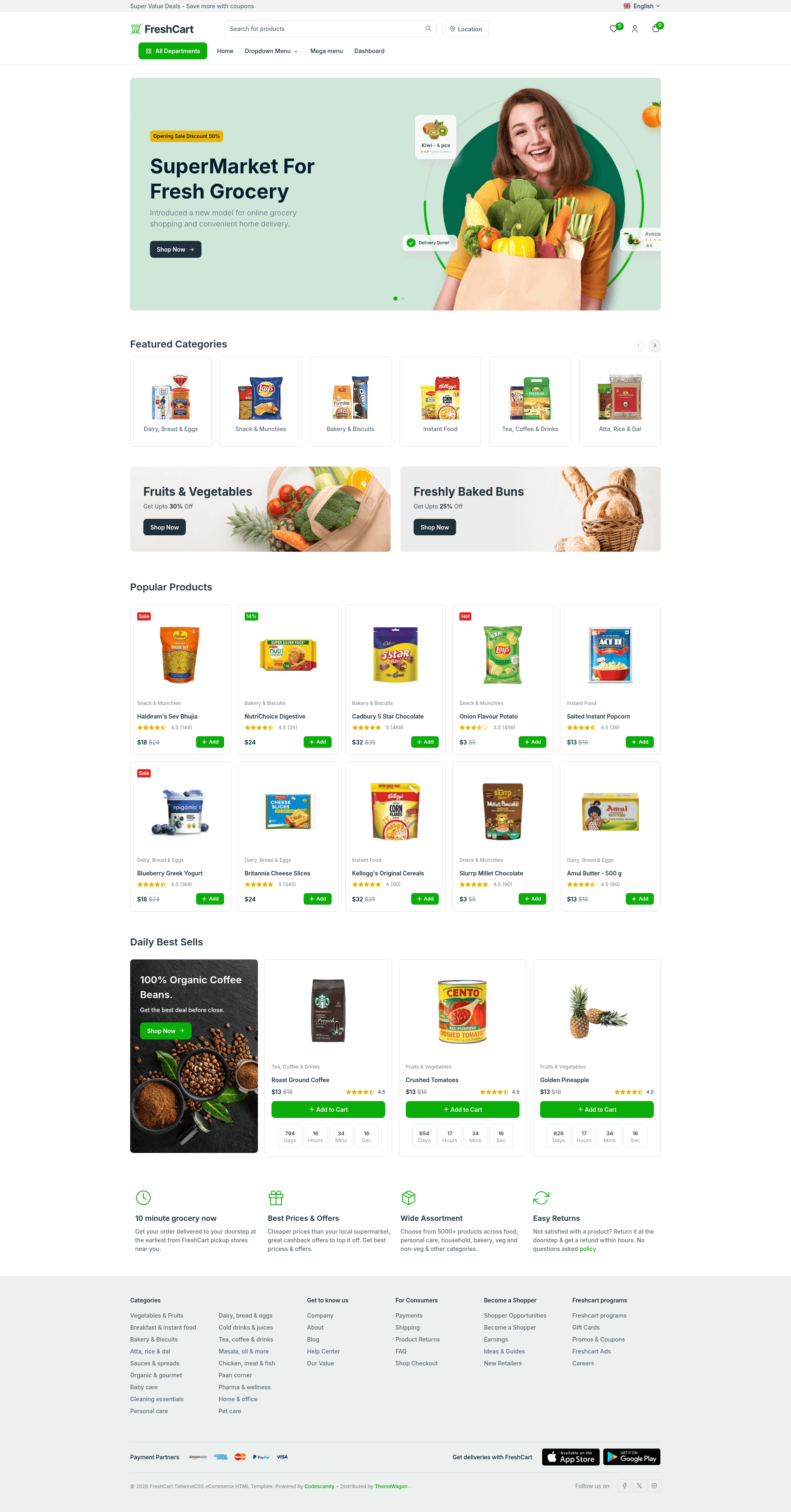
Free responsive Tailwind CSS eCommerce website template with product cards, sliders, and a sign-up modal, created by CodesCandy.
About this template
FreshCart is a free, single-page eCommerce website template built with Tailwind CSS and Swiper, created by CodesCandy and distributed by ThemeWagon.
What is FreshCart?
FreshCart is a free responsive eCommerce website template that provides one pre-built HTML page for showcasing products. It uses Tailwind CSS for utility-first styling and the Swiper library for sliders and carousels. Developers download the static source files, customize the markup, and host the page anywhere without a backend. The template is created by CodesCandy and currently has version 1.0.0 with over 3,900 downloads.
The page includes a top navigation bar, a hero header with a carousel, dropdown menus, a sign-up modal, product cards with on-hover effects, and a detailed footer. It is designed to be fully responsive and works across Chrome, Edge, Firefox, Opera, Safari, Android, iPad, iPhone, and other mobile devices.
Key Features
- Tailwind CSS framework — The entire layout is styled with Tailwind utility classes, so no extra CSS framework is bundled; customization happens by editing class names and the config file.
- Swiper slider integration — The header carousel and product sliders run on the Swiper library, included as a plugin in the download.
- Single pre-built page — The template ships with exactly one HTML page containing hero, product grid, search filter, and footer sections; additional pages must be built on top of this structure.
- Sign-up modal — A modal form for email capture or account registration is included and triggered from the navigation bar.
- Search filter — A built-in search input filters product cards on the page without a page reload.
- Collapsible burger menu — Navigation collapses into a burger icon on small screens, supporting the mobile-first approach.
- Cross-browser compatible — The clean codebase and Tailwind styling are tested for fewer browser bugs across all major desktop and mobile browsers.
- SEO and speed basics — The markup is structured for search engine optimization and page-speed optimization, as stated by the author.
Who is it for?
- Freelance web developers — Use FreshCart as a starting point for client eCommerce projects; the clean Tailwind codebase is easy to rebrand and extend with a custom backend.
- Small online store owners — Deploy a fast, static product showcase page that works on phones and desktops without paying licensing fees.
- UI/UX designers — Use the template’s product cards, modal, and carousel components as reference building blocks for eCommerce mockups.
- Tailwind CSS learners — Study a production-ready single-page layout that demonstrates utility classes, responsive design, and Swiper integration.
Use cases
- Product showcase landing page — Replace demo images and copy in the product cards to create a catalog page that highlights featured items and drives sales.
- Lead generation — Activate the sign-up modal and call-to-action buttons to collect customer emails before a full store launch.
- Portfolio storefront — Adapt the flexible grid and hover effects to display a small collection of physical or digital products.
FAQ
Is FreshCart free?
Yes. FreshCart is a free download from ThemeWagon, released under an open-source license that allows use in commercial projects and includes lifetime free updates.
What is included in the download?
The download contains one pre-built HTML page, all demo images, and the required libraries and plugins — specifically Tailwind CSS and Swiper. You get the static source files, but no backend, cart, or checkout functionality is bundled.
Can I use FreshCart in commercial projects?
Yes, the template license permits commercial use. ThemeWagon lists the template as open source, free to use in commercial projects, and covered by lifetime free updates.
Which browsers and devices are supported?
FreshCart is compatible with Chrome, Edge, Firefox, Opera, Safari, Android, iPad, iPhone, and other mobile devices, thanks to its responsive and mobile-first design.
How do I customize the template?
Since the template uses Tailwind CSS, you customize it by editing the HTML markup and Tailwind class names. You can also adjust the Swiper slider settings and replace the placeholder content and images directly in the source files.