Template details
Fyrre
Astro 6 starter for magazines and blogs with Sanity CMS, i18n (EN/UA), PWA, and 99+/100 Lighthouse scores.
About this template
Fyrre is an open-source Astro starter template for building magazines, blogs, and brand websites, bundling Astro 6, Tailwind CSS 4, Daisy UI, and Sanity CMS into a single performance-focused project. It was created by GitHub user anastasiiaxfr and draws design inspiration from the free Fyrre Figma theme.
What is Fyrre?
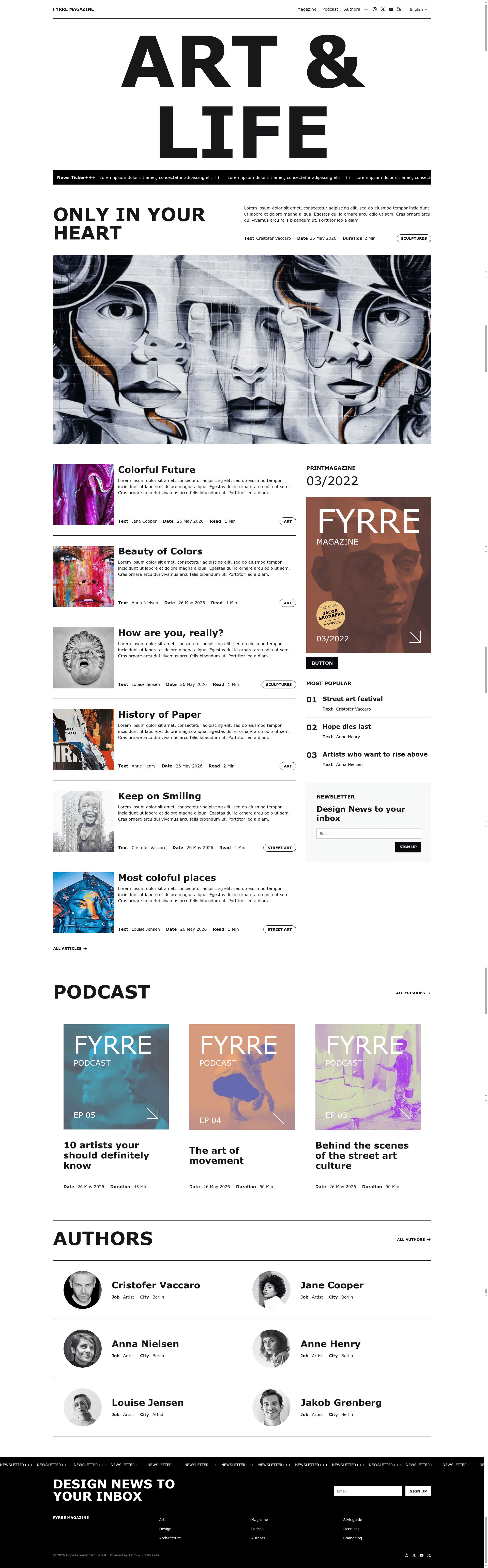
Fyrre is a magazine and blog website template built on the Astro 6 framework. It takes content managed in Sanity CMS and outputs a static site with pages for home, blog, blog detail, podcast, podcast detail, authors, author detail, and 404/500 errors. The template ships with English and Ukrainian locales out of the box and includes a preconfigured CMS folder for Sanity Studio, letting editors manage posts, podcasts, authors, and categories in separate language trees.
What makes Fyrre stand out?
Fyrre distinguishes itself by combining a modern static-site framework with a headless CMS and localization, all while scoring 99+/100 on Lighthouse performance. The key features visible in the repository are:
- Astro 6 with Tailwind CSS 4 and Daisy UI — the styling stack provides a minimal, customizable design system with utility classes and UI components.
- Sanity CMS integration — a ready-to-run Sanity Studio lives in the cms/ folder with collections for Posts, Podcasts, Authors, and Post Category, each split into EN and UA locales.
- Localization & translations (i18n) — built-in support for English and Ukrainian, with a Translation metadata workflow that links posts across locales.
- SEO and metadata controls — canonical URLs, meta tags, Open Graph data, JSON-LD schema, sitemap.xml, and robots.txt are included for search visibility.
- PWA support — the template is set up as a progressive web app for offline and installable experiences.
- Markdown and MDX support — content can be authored in Markdown or MDX in addition to Sanity CMS, giving developers flexibility.
- Performance focus — screenshots in the README show 99+/100 Lighthouse scores on both mobile and desktop.
- Easy deployment — the project can be deployed to Vercel, Netlify, or Cloudflare Pages with minimal configuration.
Who should use Fyrre?
- Magazine and blog editors — manage articles, podcasts, and author profiles through the Sanity CMS studio, with separate content trees for English and Ukrainian.
- Developers — get a pre-configured Astro 6 project with Tailwind, Daisy UI, and Sanity boilerplate, then customize styles and components for client sites.
- Media and brand teams — launch a bilingual news or brand site that needs podcast sections, author pages, and strong SEO metadata without building from scratch.
- Freelancers — use Fyrre as a starting point for editorial projects and deploy static sites to common hosting platforms quickly.
What can you do with Fyrre?
- Publish bilingual articles — create posts in the English or Ukrainian locale inside Sanity, then link translations via the Translation metadata section so a single post appears in multiple languages.
- Add a podcast feed — use the included podcast list and detail page templates to publish audio episodes alongside written content.
- Customize the visual design — rely on Tailwind CSS 4 and Daisy UI utility classes to restyle the minimal default look without touching Astro internals.
- Deploy a high-performance site — build a statically rendered site that targets 99+ Lighthouse scores and host it on Vercel, Netlify, or Cloudflare Pages.
How does Fyrre work?
To start, clone the repo, run npm install, and start the dev server with npm run dev. For content, install the Sanity CLI globally, enter the cms/ folder, adjust the sanity.config.ts environment values, and run npm run dev to open Sanity Studio. When an editor creates a post in a locale, they use the Translation metadata button to select the target locale and link the matching content, which the Astro front end then renders.
FAQ
What pages does Fyrre include?
Fyrre includes templates for home, blog list, blog detail, podcast list, podcast detail, authors list, author detail, and 404/500 error pages. This page set covers the core needs of a magazine or blog website.
Does Fyrre support multiple languages?
Yes, the template has built-in localization support for English (EN) and Ukrainian (UA). The Sanity CMS content structure separates posts, podcasts, and authors into EN and UA collections, and a translation metadata workflow links content across locales.
What CMS does Fyrre use?
Fyrre uses Sanity CMS as its content backend. The repository includes a cms/ folder with a preconfigured Sanity Studio and collections for posts, podcasts, authors, and categories, with EN and UA locale splits.
Is Fyrre a free template?
Yes, Fyrre is an open-source starter template published on GitHub. You can download, modify, and use it for personal or commercial projects, subject to the terms of the repository. No license file is shown in the README, so check the repository if you need license details.
Can I deploy Fyrre to my own hosting?
The template supports deployment to Vercel, Netlify, or Cloudflare Pages. The README lists these platforms and the standard Astro build commands produce a static dist/ folder that can be served anywhere.